
agladdbkaldhackfjfbollifdnbalmom
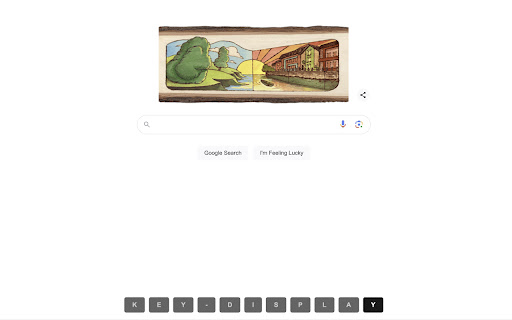
Display key press on web page This extension is open source. See: https://github.com/eyebrowkang/key-display Elevate your presentations, tutorials, and live coding sessions with the Key Display Chrome Extension. This innovative tool is designed to enhance online communication and learning by displaying real-time keystrokes directly on your web page. Whether you're a professional educator, a developer, or just someone looking to share your skills online, this extension makes it easier than ever to follow along with any keyboard-based activity. Real-Time Display: Every key press is shown on the web page in real time, allowing viewers to see exactly what keys are being pressed without delay. This includes letters, numbers, function keys, and special characters, ensuring comprehensive coverage of all keyboard activities. Easy Toggle On/Off: A simple toggle feature allows you to turn the keystroke display on or off as needed, providing flexibility during presentations or when switching between tasks that require different levels of visibility. Educational Tutorials: Enhance your online tutorials by showing viewers exactly what keys you press during software demonstrations or when teaching coding lessons. Live Coding Streams: Share your coding process more transparently with live audiences, making it easier for viewers to follow along and understand your keystroke choices. Presentations: Add a professional touch to your online presentations by seamlessly integrating real-time keystroke visibility, aiding in the explanation of workflows or software usage. Installation is quick and easy, directly from the Chrome Web Store. Once installed, simply activate the extension from your browser toolbar to start displaying keystrokes on any web page. Dive into the settings to customize the appearance and behavior of the keystroke display to suit your specific needs and preferences. Enhance your online interactions and educational content with the Key Display Chrome Extension, the ultimate tool for bringing clarity and engagement to your keyboard-based activities.

Presenter Cursor
Make your cursor impossible to miss and your shortcuts easy to follow. Tired of people losing your cursor during screen shares or recordings? Presenter Cursor gives your mouse a clear on-screen highlight and displays keystrokes in real time so your audience can follow every click and shortcut without guessing. Features • Highlight your cursor with a clear, visible focus ring • Show key presses like Esc, Ctrl, Cmd, Shift, and common shortcuts • Ideal for tutorials, webinars, trainings, demos, and tech support • Adjustable highlight colors • Simple on-off toggle so it appears only when needed Turn confusing walkthroughs into clean, professional presentations with Presenter Cursor.

Cursor Highlighter
Add a visual indicator to your mouse cursor for better visibility Add a customizable visual indicator to your mouse cursor on any website. Whether to assist those who are visually impaired or for presentation/education purposes, this will make your cursor stand out! Select one of the default colors, or use the built-in color picker to choose your own unique color to fit your personality!

Keyboard Event Viewer
Visualize on-screen what keys are pressed in real time to enhance your presentations Shows the currently pressed keyboard keys on the screen. Very useful when doing trainings and presentations to display the keyboard shortcuts used on the screen. Can be disabled/enabled with a single click.

Keystroke Biometrics Logger
Keystroke Biometrics Logger is a Chrome extension designed to assist researchers collect keystoke data. Keystroke Biometrics Logger is a Chrome extension designed to assist researchers collect keystoke data. It simplifies the process of collecting keystroke data during web browsing, allowing researchers to focus on data analysis and interpretation. Start a new session with a single click, and the extension will silently record keystroke data as users browse the web. The collected data is stored securely and can be easily downloaded in CSV format using the provided download button. Please note that the Keystroke Biometrics Logger strictly adheres to user privacy and research ethics. It does not collect sensitive information or share data with third parties. This extension is intended solely for research purposes and aims to provide a convenient tool for gathering keystroke data without compromising user privacy. The captured data includes the following information:
