
hljljfcdpdhjnclioogdnekngnnfhnnk
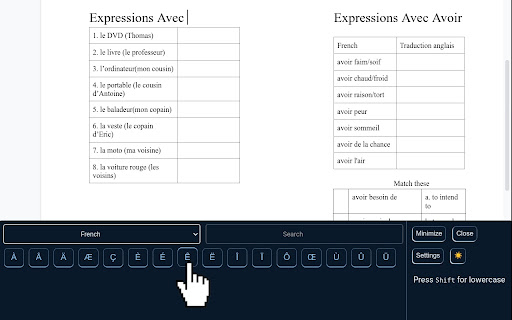
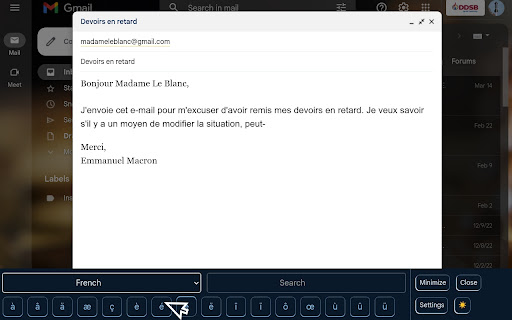
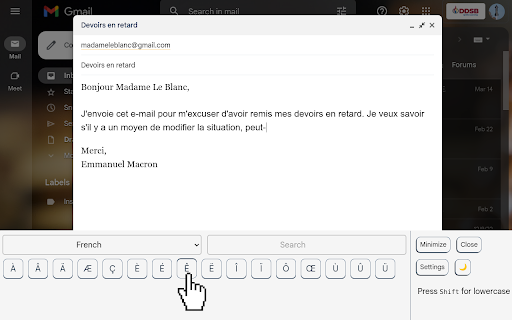
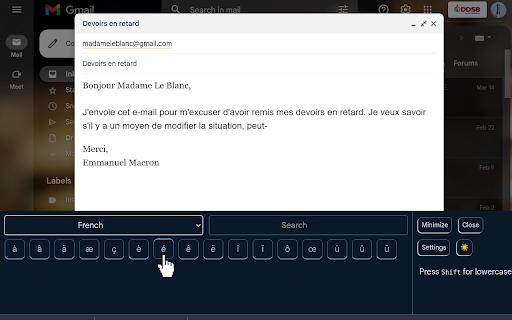
Quickly find, copy, and paste symbols, accents, arrows, and special characters from a clean toolbar on any webpage. Easily access Math, Greek and French symbols from a small toolbar. Add your own custom buttons, use recent buttons and do it on any website!

Page Marker - Draw on Web
Draw or highlight on any website in real time. Add text, lines, and shapes. Move, undo, or redo anything you draw. Draw on any website, add text, add lines, and highlight! With Page Marker, you can use your mouse or touchscreen to draw on the web or on PDFs and save it to your computer. Paint, draw, and mark on any webpage or website. Instructions: 1. Click the puzzle piece-shaped extensions icon in the top right corner of your browser. Pin the Page Marker red marker icon for ease of access. 2. Begin drawing on any webpage with your mouse or touchscreen. 3. To change the color of the marker, click on the color selecting box. 4. To change thickness, use the size slider. 5. Use the highlighter tool to highlight lines of text. 6. Use the eraser tool to erase parts of your drawing. 7. Use the text tool to add text to the website. 8. Use the line tool to draw straight lines. 9. To undo or redo, click the corresponding undo/redo buttons. 10. Change the default color or thickness in the options menu when you right click the Page Marker icon.

Simplescraper — a fast and free web scraper
A web scraper that's fast, free and simple to use. Scrape website data and table data in seconds 💡 In a hurry? Watch the short video above to see how to scrape in seconds. 💡 Simplescraper 2.0 is web scraping as it should be: automatic list detection, multi-page scraping, scheduling, saved recipes, and built-in AI that names your columns and enriches your data. Available everywhere - browser, cloud, and API - for every scale of scraping task. Try it for yourself: 1. Open Simplescraper on any website and press "Detect Lists". 2. The extension will find the data you want automatically. 3. Confirm your selection, and watch the data appear instantly, right beside the page you're browsing. 4. Click "AI Enhance" to transform, clean, or extract structured information from your data. Any type of data - product lists, search results, contact lists, social media feeds - can be scraped and enhanced in seconds. Start for free with unlimited single-page scraping in your browser, plus free credits for multiple page and cloud scraping. For powerful automation and scheduling, scale up with our Cloud scraping and API offerings. Simplescraper is your all-in-one data extraction platform. ⚡ NEW AI Property Naming: Instantly transform columns like "sc-1x2y3z" into meaningful names like "product_title" and "price". ⚡ NEW Transform scraped data with AI. Extract structured information from unstructured text, summarize content, translate languages, or clean messy data. Works with any data you've collected. ⚡ NEW Automatic List Detection: One click is all it takes. Our smart algorithm instantly scans the page and identifies all scrapable data. No more tedious setup—get the data you need in seconds. ⚡ NEW Sidepanel Interface: Scrape data without interruption. See your results in real-time while you continue to browse. ⚡ Unlimited Free Browser Scraping: Scrape any single page, as many times as you want, for free. ⚡ Scrape Anything: Automatically capture data from tables, text, images, and links. ⚡ Flexible Export: Download your data as a clean CSV or JSON file with a single click. ⚡ Save & Re-run Scrape tasks: Save scraping recipes to run again with a single click, either in the Browser or the Cloud. ⚡ One-Click Integrations: Send data directly to Google Sheets, Airtable, Zapier, Make (formerly Integromat), and more. Power-Up with Cloud Features: ⚡ Pagination & Crawling: Automatically navigate through multiple pages and links. ⚡ Historical Data Snapshots: Access all previous versions of your scraped data. - E-commerce: Scrape product listings and let AI extract prices, ratings, and specifications into clean fields - Lead Generation: Scrape contact information and have AI extract emails, phone numbers, and job titles - Content Creation: Gather data from websites and use AI to translate or reformat for your needs - Market Analysis: Collect competitor data and let AI structure it for easy comparison - AI Property Naming: Turn default column names like "sc-1x-ProductCard" into useful names like "product_title" and "price" in one click! - AI Enhance: Transform your scraped data with AI. Extract structured data, summarize content, translate text, or clean messy information - all with a single click. - All-new sidepanel experience: The extension has been completely redesigned. Scrape any website without leaving the page for a faster, more intuitive workflow. - Automatic List Detection: Click one button to automatically find all the scrapable data on a page. - Unlimited Browser Scraping: You can now scrape across multiple pages, right in your browser. - Flexible Recipes: Saved recipes can now be run either locally in your browser or in the cloud, giving you more control over how you scrape. - Selecting which data to extract is now faster, more reliable and requires fewer clicks - AI Enhance allows you to ask your data anything using AI. See the new AI Enhance tab on your saved recipe for more info - Easier cookies - add cookies to your recipe directly from the extension for data behind a login (note: using this feature will request optional permissions in order to save the cookies) - Bulk editor: edit the schedule or cookie settings for all your recipes with one click - URL generator: easily create a list of URLs to extract data from based on a single URL - Scrape speed: choose your preferred rate of data extraction - Starred recipes: star a recipe to keep it at the top of your recipe list - Improved property selector - it's now even easier to select the data you need! - Crawler can now scrape up to 5000 URLs at a time - Updated Airtable integration to optionally save metadata - Added Airtable integration - scrape any data directly into Airtable! - Added a new recipe overview section to make managing multiple recipes easier - Improved credits - unused credits now carry over to the next month - Improved selection process: easily select a single element using the new 'only this' menu option - Improved next page selection process - Design and layout improvements - CSS editor - you can now edit the CSS selector when selecting elements

Ultimate Web Scraper
Extract data instantly: Grab text, images, emails & links from any website with a single click. Fast, simple & powerful web scraper Your all-in-one tool for effortless web scraping, lead generation, and data extraction. No code, no setup — just instant results. + AI Assisted extraction for better results 😲 👇 One-Click Scraping Point the web scraper at any page with lists, tables, or directories and extract structured data instantly. Pagination and infinite scroll are handled automatically. 📄 Bulk Page Scraping Feed the data scraper a list of URLs and pull emails, business details, contact info, or custom fields from every page at once. 🖼️ Image Downloader Grab every image from a page in one click. 📬 Email Extractor Run the email scraper on one page or thousands — it finds and collects every address. 📊 Data Export Send your scraped data to CSV, Excel, or Google Sheets. 📧 Email Scraper — Pull email addresses for outreach and lead gen 📞 Phone Scraper — Collect phone numbers for sales follow-up 🏢 Business Scraper — Grab company names, addresses, and details 👤 People Scraper — Extract names, job titles, and work history 🌐 Social Scraper — Collect website URLs and social media profiles 💼 B2B Scraper — Get company size, industry, and revenue data 💬 Review Scraper — Scrape reviews and comments from any site 📄 Page Text Scraper - Scrape pages for clean text 📈 Sales & Marketing — Build lead lists with verified contact data 🎯 Recruiters — Scrape candidate info from job boards and LinkedIn 🛒 E-commerce — Monitor competitor pricing, products, and stock 🔬 Researchers & Data Scientists — Collect datasets for analysis and ML ✍️ Content & SEO — Gather data from blogs, news sites, and forums 📉 Brand & BI Teams — Track reviews, sentiment, and competitor moves ✅ AI‑powered extraction improves accuracy on messy, unstructured pages. ✅ No coding required, so anyone can start in seconds. ✅ Runs entirely in your browser, keeping your data private. ✅ Works on login‑protected pages and complex layouts. ✅ Handles pagination and infinite scroll for complete results. ✅ Fast exports to CSV, Excel, or Google Sheets. ☁️ Cloud Web Scraping — Run this web scraper in the cloud with cloud browsers for large‑scale data scraping. ⏱️ Scheduling — Automate web scraping and data extraction on a schedule. 🔗 Integrations — Connect your data scraper to n8n, Google Sheets, and Make.com. 1️⃣ Install the web scraper from the Chrome Web Store 2️⃣ Go to your target site 3️⃣ Click to scrape 4️⃣ Export your data

InkShot — Webpage Screenshot & Draw Tool
Capture any webpage as a screenshot, then draw arrows, boxes & text on it. The fastest screenshot & annotate tool for Chrome Take a screenshot of any webpage in one click, draw on it and share instantly. InkShot is a free Chrome screenshot extension — no account, no login, your data stays on your device. InkShot is a free screenshot and annotation tool for Chrome. Capture any webpage, draw arrows, add text and shapes on top, then share with one click — no extra apps needed, everything works right inside your browser. 🔲 Select Area & Capture Drag to select any part of the page and take a screenshot instantly. 🖥️ Capture Visible Area Screenshot exactly what you see in your browser with one click. 📄 Full Page Screenshot Automatically scrolls and stitches the entire page into one image. Perfect for capturing long webpages. ⌨️ Keyboard Shortcuts → Ctrl+Shift+S — Select area screenshot → Ctrl+Shift+V — Visible area screenshot → Ctrl+Shift+F — Full page screenshot Draw directly on your captured image: → ➡️ Arrow — point to specific elements → ▭ Rectangle — highlight and frame areas → ◯ Circle — mark important spots → ✏️ Freehand pen — draw and sketch freely → T️ Text — add captions and notes → 🔵 Blur — hide passwords and sensitive info → 🟡 Highlight — emphasize key areas → 🔢 Number labels — for step-by-step guides 🎨 8 preset colors, custom color picker, adjustable line thickness and opacity. 📥 Download as PNG — save high-quality screenshot to your device 📋 Copy to clipboard — paste directly into any app or chat 🔗 Share as link — generate a shareable link, recipients can open it without installing anything 💬 Send to Slack, WhatsApp, email or social media instantly ✅ Everything runs locally on your device ✅ No screenshots are sent to any server ✅ No account or login required ✅ Works offline ✅ No personal data collected 🎓 Students — capture and annotate study materials 💼 Professionals — screenshot webpages for reports and presentations 🎨 Designers — visual feedback and markup 💻 Developers — bug reporting and issue documentation 📢 Content creators — prepare visuals for social media 🛒 Shoppers — compare prices and save product screenshots 📊 Marketers — capture competitor pages and save web content Q: How do I take a full page screenshot in Chrome? A: Click the InkShot icon, select "Capture Full Page." The extension automatically scrolls and captures the entire webpage as one image. Q: How do I annotate a screenshot? A: After capturing, the editor opens automatically. Use arrows, shapes, text and blur tools to draw directly on your screenshot. Q: Do I need an account? A: No. Install and use immediately. No signup, no login, no email required. Q: Can I hide sensitive information in my screenshot? A: Yes. Use the blur tool to cover passwords, card numbers or any private content before sharing. ① Install InkShot ② Click the icon in your Chrome toolbar ③ Choose your capture mode ④ Draw, annotate and edit ⑤ Download, copy or share as a link
