
hlfdanlfnbbibonkckiimholgcflgjch


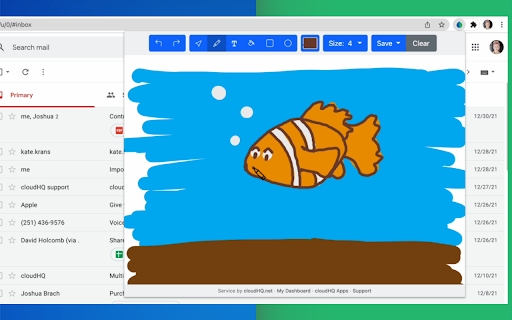
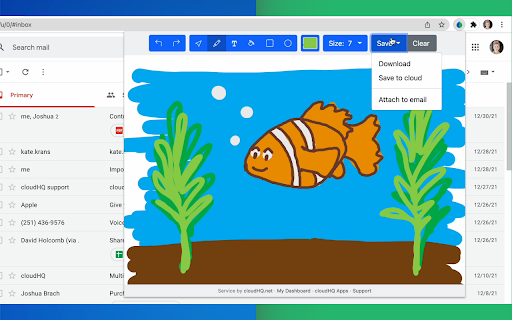
Create, collaborate, and share your tiny sketchbook doodle art projects Tiny Sketchbook is a simple to use free extension that allows you to create and save quick and fun drawings. ~~~5 Benefits of Doodle Art Drawing~~~ ✅ Visually show what you need in a sketch (great for remote teams) ✅ Create and collaborate on digital sketching art projects ✅Team bonding activity ✅ Classroom assignments for teachers ✅ De-stress therapy with doodling ~~~Features~~~ ✅ Touch screen support ✅ Include rectangular boxes or lines ✅ Include circles ✅ Fill ✅ Write text ✅ Pen with different sizes ✅ Save as PDF, PNG, etc. ✅ One click attach to Gmail message ✅ Save screenshots to Google Drive, Dropbox, Box ✅ Share and collaborate on your drawing cloudHQ. Helping your productivity, 1 click at a time. cloudHQ website: https://www.cloudhq.net/ Website: https://www.tinysketchbook.com/ Pricing: FREE Support page: https://support.cloudhq.net/category/browser-extensions/tinysketchbook Blog: https://blog.cloudhq.net

Email Signature Generator by cloudHQ
Email signature generator and signature templates Are you looking for an amazing email signature tool that'll take seconds to create? Presenting: Email Signature Generator by cloudHQ, where you'll be able to easily create an email business card at the end of your emails as your email signature in Gmail™. You'll be able to include: ✅ Your company information ✅ Multiple aliases support ✅ An image like a logo, or your headshot ✅ A meeting calendar link ✅ A "big sale" link to your sales website ✅ A link to a YouTube video where you can put extra information about what your product does, or create a customized one created right inside the email signature generator ✅ A banner to wish your email recipients happy holidays ✅ A confidentiality clause ✅ A "save the planet" green quote so please don't print your email and hurt the environment ✅ An area for HTML if you want to include something of your very own Key features: * Customizable Signature Templates * Ready-to-Use Banner Designs * Integration with Google Workspace™ Admin Console * Multi-User Management Capability Your email signature template is highly customizable where you can choose your font size, colors, and anything else you want to include. How use this extension: 1) Install the extension 2) Compose a new email 3) Click on Email Signature Generator icon (next to your Send button) 4) Design your signature and save it Our platform also offers integration with Google Workspace™ admin console, enabling administrators to effortlessly manage and maintain consistent email signatures for all company employees. This feature allows for centralized control and uniformity in signatures across the organization. cloudHQ. Helping your productivity, 1 click at a time. cloudHQ website: https://www.cloudhq.net/ App website: https://www.email-signature-generator.com Pricing: https://www.email-signature-generator.com/pricing Support page: https://support.cloudhq.net/category/browser-extensions/email-signature-generator/ Blog: https://blog.cloudhq.net Gmail and Google Workspace are trademarks of Google LLC. Use of these trademarks is subject to Google Permissions.

Copilot for Gmail™ by cloudHQ
Mini CRM for your Gmail Copilot for Gmail™ is a mini CRM that lets you see a snapshot view of your email contact's profile information, and any past emails conversations you've had. This is crucial to have so that you can respond intelligently, and help you dramatically cut down your search time when you're looking for a past email conversation you had with your email contact. Right within Gmail, you can: ✔️View profile information of the person you're emailing, or who emailed you ✔️Create private notes about this contact (For example: This client has needed support for over 4 hours last week) ✔️Set up a reminder alarm for this contact (For example: Follow up with client on a specific date/time) ✔️A list of all the email conversation history you have with that email contact ✔️A list of all documents and attachments related to that email contact This is great for anyone who wants to appear more professional, and have everything neatly organized in their email. Key features: ⭐️ person and company profile info ⭐️ easy access to all email messages ⭐️ easy access to all attachments ⭐️ notes (private or shared with the team) ⭐️ reminders cloudHQ. Helping your productivity, 1 click at a time. cloudHQ website: https://www.cloudhq.net/ App website: https://www.gmail-copilot.com/ Pricing: https://www.gmail-copilot.com/pricing Support page: https://support.cloudhq.net/category/browser/gmail-copilot Blog: https://blog.cloudhq.net Demo: https://www.cloudhq.net/demo Google Workspace, Google Sheets, Google Drive, Google Alerts and Gmail are trademarks of Google LLC. Use of this trademark is subject to Google Permissions.

ChatGPT for Gmail by cloudHQ
Automatically write emails using ChatGPT for Gmail 🚀 Supercharge Your Email Game with ChatGPT for Gmail! 🚀 Introducing the ultimate Chrome extension for Gmail that revolutionizes the way you write emails! Unleash the power of cutting-edge AI technology to elevate your communication skills and make every email count. 🌟 What's in store for you? 🌟 🔥 AI-Powered Email Composer: Generate entire emails and messages using the groundbreaking OpenAI AI, meticulously crafted to work seamlessly with Gmail. 🎯 Key Functions Tailored for You: ✅ Instant Grammar Guru: Say goodbye to embarrassing typos! ChatGPT intelligently checks and edits your grammar on the fly. ✅ Context-Smart Replies: Create contextually appropriate responses for any email you receive, boosting your efficiency and professionalism. ✅ Effortless Outreach: Generate persuasive and engaging outreach emails from scratch, making connections easier than ever. 🌠 Exclusive Features: ✅ Privacy-First AI: ChatGPT for Gmail respects your privacy, ensuring your data stays safe and secure. ✅ Unparalleled Quality: Experience the finest responses, outshining all other natural language processing AIs in the market. ✅ Gmail-Optimized: Enjoy a seamless integration with Gmail, designed for your convenience. ✅ Multilingual Magic: Break language barriers with support for all languages, empowering global communication. 🎉 Download ChatGPT for Gmail now and experience email mastery like never before! 🎉 ~~~How to use it~~~ 1. Go to https://chat.openai.com/chat and create an account. 2. Install this extension. 3. Open Gmail and compose a new email. 4. Click on the "ChatGPT for Gmail" icon and enter your ChatGPT prompt to complete your email message. You can also type @chatgpt 5. If you are satisfied with the message, simply click on send. Text Enhancement: Simply select any text in your email, right-click to access the context menu, and choose options like "Fix Grammar" or "Summarize" for instant improvements. Smart Reply Assistance: Click on our extension's icon adjacent to the 'Reply' button to access a variety of response prompts. For instance, select "Answer to the Best of Your Knowledge" for AI-assisted responses tailored to the email's content. Custom Prompts: Personalize your experience by adding your own prompts. To do this, click on our extension icon located in the top-right corner of your browser. ~~~FAQ~~~ Q: What is ChatGPT for Gmail? A: It's an extension that integrates OpenAI with Gmail to assist in drafting and replying on emails. Q: What are the requirements to use it? A: A valid OpenAI account is necessary. Go to https://chat.openai.com/chat and create an account. Q: What functions does it offer? A: Creating or replying to emails, correcting grammar and spelling, enhancing or rewriting text, and sending instructions to ChatGPT directly. It also includes prompt library. Q: How does it help draft emails? A: Through writing suggestions, automated responses, and grammar and spell checking. Q: Can I use my own API key with it? A: Yes, you can use your own OpenAI API key. Q: Can I use my own fine-tuned model? A: Yes, you can use your fine-tuned model. Please contact us to help you setup a system to create a fine-tuned model. Q: How can I create a library of prompts? A: Yes. You can use Gmail Snippets by cloudHQ extension to create shortcuts for prompts. You can also customize context prompts and auto-reply prompts. cloudHQ website: https://www.cloudhq.net/ App website: https://www.chatgpt-for-gmail.com/ Pricing: https://www.chatgpt-for-gmail.com/pricing Support page: https://support.cloudhq.net/category/browser-extensions/chatgpt-for-gmail/ FAQ page: https://support.cloudhq.net/google-chatgpt-faq-frequently-asked-questions/ Blog: https://blog.cloudhq.net Gmail, Google Calendar, and Google Workspace are trademarks of Google LLC. Use of these trademarks is subject to Google Permissions.

Sketchpad for Google Chrome
Free! Easily draw and save simple drawings right in the browser. Want to draw and doodle while you are in the browser? Simply install this software today and you can start drawing no matter where you are. To begin, simply choose the color of your pencil and start using the mouse to draw. If you make a mistake, just press the "undo" button. Start drawing today using this simple sketchpad software. - 10+ colors to choose from for paintbrushes - thickness of paint brush - Undo feature Disclaimer: Please note this extension is NOT made by Google and is made by an independent development team. All copyrights belong to their respective owners. Google doesn’t endorse or sponsor this extension. Sketchpad for Google Chrome is not owned by, is not licensed by and is not a subsidiary of Google Inc.
