
hkheabjfgcabjmgbdajcmkaokaeimhnc
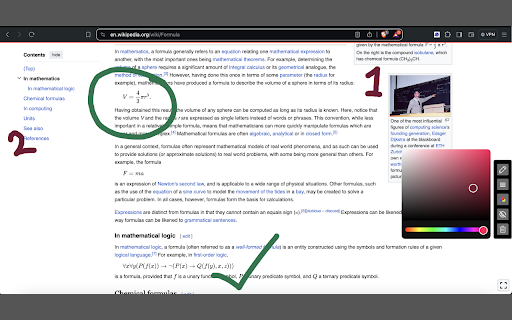


Draw on any web page, highlight text blocks, and annotate them with notes and colours, all for FREE. With Screen Canvas, you can draw on any web page, or annotate them. You can highlight texts and add notes to them, so you remember why you highlighted them. You can drag your drawings from one area on the page to the other. Finally, you can take a screenshot of the page when you're done or create a share link that you can easily copy and paste. ⭐ You can draw on any web page with any colour ⭐ You can highlight texts and add notes to them for easy recollection ⭐ You can drag around your drawings ⭐ You can save your work and re-store it when a website reloads (Paid feature) ⭐ You can take full page screenshots that actually work 📸 ⭐ You can hide and show drawings at any point ⭐ You can easily delete each drawing with your keyboard ⭐ You can easily share your annotations by converting it into a link that you can copy-page to your friends and colleagues

LiteCompose - Write Light, Easy on Your Tab
Write without distractions right in your browser. Stay focused with offline, private, and ad-free writing. With LiteCompose, your notes are kept private and secure, securely stored directly in your browser's storage and not in the cloud. It's incredibly easy to use, enabling you to open a new tab and start writing in an instant — no accounts or permissions required. You can either click on the extension icon or use the keyboard shortcuts below to open it quickly: - For Windows, press Ctrl+Shift+L - On a Mac, use Command+Shift+L - For Chrome OS, it's Ctrl+Shift+L - And if you're using Linux, go for Ctrl+Shift+L Effortlessly jot down notes, save them, rename, and delete them — all securely stored directly in your browser's Local Storage. LiteCompose does NOT collect ANY personal data or information from its users. We do NOT track your activity, store your browsing history, or gather ANY identifiable information. - Auto-save: Your work is automatically saved as you write. - Saved Documents: Access and manage saved documents with ease. - Rename and Delete: Customize document names and remove unwanted documents. - Privacy Assurance: Your data remains securely stored on your computer. - Rich Text Editor: Enjoy text color, highlights, backgrounds, and more — like a word processor. - Offline Mode: Access your notes anytime, even without an internet connection. And much more awaits you! Try it out. You won't be disappointed. Feel free to reach out to us at info@sfer.dev with any concerns, feedback, or suggestions you might have.

Web Paint Tool - Page Marker & Editor to Draw on web
Draw, annotate, and mark up any web page with a versatile set of drawing tools. Add text, shapes, and highlights to web content. Web Paint Tool – Page Marker & Editor is the ultimate free Chrome extension that lets you draw on web pages, annotate any website, and paint online directly in your browser — no downloads, no fuss. Whether you’re a student, teacher, designer, or presenter, this tool turns any webpage into an interactive whiteboard with full drawing, highlighting, and screenshot features. ✅ Key Features – Everything You Need to Draw on Web Pages: ✏️ Pencil Tool – Draw freely and annotate directly on web content 🔲 Shape Tools – Draw rectangles, circles, lines, arrows, and polygons 🅰️ Text Tool – Add comments, labels, or instructions with customizable fonts 🎨 Color Picker & Eyedropper – Pick and apply colors from the page or palette 🪄 Emoji Tool – Add emojis for fun or emphasis 🧼 Eraser Tool – Edit or remove parts of your drawings easily 🖼️ Full Page or Selected Area Screenshot – Capture and save your artwork 🖨️ Print or Save your drawings instantly as PNG, JPG, or PDF 💾 Auto Save – Your annotations are preserved even if you reload the page 🎯 Why Web Paint Tool is the #1 Page Marker Extension for Chrome: 💻 Draw on any webpage in real time — perfect for tutorials, reports, and educational content 📷 Take screenshots of your annotations with one click 🧠 No learning curve — MS Paint-style tools with a clean and simple interface 🚀 Lightweight, fast, and doesn’t slow down your browser 🧑🏫 Loved by educators, marketers, UX designers, and anyone needing to draw on websites 🌐 Use Cases: Annotate content for remote teaching Highlight bugs or features for UX/UI reviews Mark up web pages during screen shares 🔎 Optimized for Top Keywords: Web Paint, Web Paint Tool, Page Marker, Draw on Web, Draw on Web Pages, Paint Online, Annotate Web, Screenshot Tool, Browser Drawing Tool, and more. Install Web Paint Tool – Page Marker & Editor today and transform the way you interact with websites! 🖼️ Draw. Annotate. Screenshot. Share. All within your Chrome browser.

Draw on Screen
Draw, highlight, and annotate on any webpage with Draw on Screen — the simplest way to comment as you browse! ✏️ Draw on Screen – Draw, Annotate, Screenshot & Share. Transform your web browsing by easily drawing, highlighting, annotating, capturing screenshots, and scrolling pages without losing your annotations—directly on any webpage! 🎨 Multiple Colors & Brush Sizes: Adjust colors and thickness to clearly emphasize ideas. 🔷 Shape Tools: Draw rectangles, circles, lines, and arrows to effectively illustrate your thoughts. ↩️ Undo/Redo: Effortlessly correct annotations with intuitive undo and redo buttons. ⏸️ Pause Mode: Temporarily disable drawing tools to interact normally with pages. 📸 Instant Screenshot Capture: Save and share annotated pages with a single click. Who benefits from Draw on Screen? Students & Educators: Highlight key points, annotate study materials, or capture notes. Designers & Developers: Provide clear visual feedback or collaborate on design projects. Business Professionals: Mark up reports, presentations, and proposals effectively. Creative Individuals: Sketch ideas and visually communicate concepts quickly. Draw on Screen seamlessly integrates multiple annotation and screenshot tools into one user-friendly extension, boosting your productivity as you browse. Install Draw on Screen today and transform the way you interact with web content!

Web Marker - Draw on Websites
Draw on any webpage in real time! Draw, highlight, add shapes & more. Easy to use, perfect for studying & teaching. Hey there! Meet Web Marker – your new companion that lets you draw directly on websites! With Web Marker, you can draw and write on any webpage like it's a piece of paper. It's super easy and fun! To make things even easier, we've included some handy keyboard shortcuts for you: · P : Toggle pencil mode. · H : Toggle highlighter mode. · R : Toggle rectangle mode. · C : Toggle circle mode. · T : Toggle text mode. · L : Toggle line mode. · E : Toggle eraser mode. · S : Toggle selection mode. · X : Toggle pointer mode. · I : Add an image. · M : Hide/Show the menu. · D : Download annotations as image. Here's why users are falling in love with it: ✔ Simple Drawing and Highlighting: Whether you're studying, teaching, or just love getting creative online, you can easily draw and highlight on pages without any complicated tools. Our keyboard shortcuts make things even easier. You can draw using just your keyboard, whether the menu is collapsed or uncollapsed. ✔ Draw Anything: You have all the drawing tools you need, from circles to rectangles, a highlighter, pencil, eraser, lines, and text. Easily undo, redo, clear, zoom in, zoom out, select, delete, move, resize, change colors, and adjust the marker size. Choose from a variety of colors or select one of the 33+ default colors. You have plenty of options! ✔ Easy to Use: Simply click on the extension icon or use a keyboard shortcut to get started (the default shortcut is Ctrl + Shift + L ) ✔ Scrollable: It's the ONLY extension that seamlessly keeps what you've written after scrolling up and down the page, ensuring that as you scroll, the drawn content moves along with the page. ✔ Works with Your Stylus: Got a stylus? Great! Web Marker plays nice with it. ✔ Collapsible and Movable Menu: You know that menu where you find all the tools? You can collapse it to get more space. Plus, you can move it around wherever you like. ✔ Fix Mistakes with Ease: Messed up? No worries! Use the eraser or hit delete – it's like magic. ✔ Add Pictures: You can even add images and draw on them. How cool is that? ✔ Zoom In, Zoom Out: Zoom in to see details or zoom out to see the big picture. It's all up to you. ✔ Undo and Redo: Oops, made a mistake? No problem! Just hit undo and redo until it's perfect! ✔ Copy or Download Your Drawing: When you're finished, you can copy your drawing or download it as a high-quality image to use it anywhere else. And here are two more cool things: ✔ ✔ No Data Collection: Your data stays YOURS. We do NOT collect ANY of your personal info – doodle in peace! ✔ ✔ No Special Permissions Needed: Just install and go! Web Marker doesn't need special browser permissions. And guess what? It's completely FREE! But hold on, you're probably thinking, how do we keep this awesome tool free for everyone?!! Well, here's the deal: we believe in keeping things simple and user-friendly. Instead of bombarding you with ads or charging for premium features, we've chosen to operate on a donation basis. Yep, that's right! We rely on the generosity of users like you who appreciate what we do and want to support us in keeping Web Marker awesome. So, If you love using Web Marker and find it valuable, we'd be incredibly grateful if you could consider contributing a donation of any amount you can. Every donation goes a long way in helping us maintain and make Web Marker even better for you. Also feel free to reach out to us with any concerns, feedback, or suggestions you might have. Happy drawing with Web Marker!
