
hjhkodkpmiekcnnjkppeinmienganein
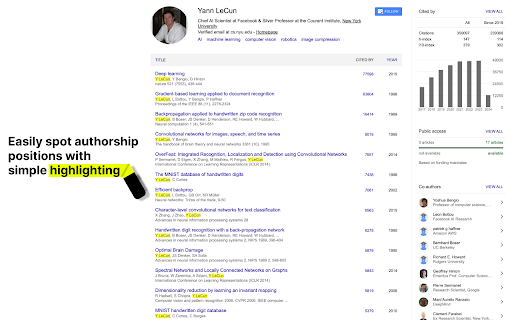
Highlights the name of the Google Scholar profile in all publications. This extension highlights the name of the author in all publications to make it easier to spot contributions. Works for scholar.google.com .fr. .ch .de .at .ca .co.uk

Google Scholar Citation Tracker
Fetches Google Scholar total citations and displays it on the extension badge. Google Scholar Citation Updater A lightweight extension that keeps your Google Scholar citation count visible in the toolbar, tracks history locally, and lets you manage it when you need. How to use 1) Pin it to the toolbar - Click the puzzle icon (Extensions) → Pin “Google Scholar Citation Updater”. 2) Set up once - Click the icon → Settings → enter your Google Scholar user ID. - Choose your theme and chart range (10d / 30d / 180d / All). 3) Check anytime - The badge shows your current total citations. - Click the icon to open the popup: press Refresh for an instant update and view trends. 4) View & manage history - Click the icon → Settings → Manage Citation History. - See recorded snapshots, edit entries, add or delete rows, and export/import CSV. Highlights - Live citation badge in the toolbar - Clean trend charts (10d / 30d / 180d / All) - Automatic history tracking (stored locally; fully editable) - One‑click refresh and quick link to your Scholar profile Privacy - Uses only your public Scholar page. Your ID and history are stored locally on your device—nothing is sent to any server. Tip - After installing, Pin the extension so you always see your up‑to‑date citation count.

Rapid Journal Quality Check
Displays rankings and h-index for academic journals next to Google Scholar search results. Rapid Quality Check for Academic Journals in Google Scholar Search Results This Chrome extension displays an academic journal's (and some conference's) rankings next to search results from Google Scholar. This also works for scholar profile pages on Google Scholar and other subpages (e.g. cited by, etc.). A variety of rankings are available for the user to choose from (SJR, ABDC, ABS, VHB, FT50, CORE, ...). These are interdisciplinary (e.g., SJR, BFI), focused on economics/social sciences (e.g., ABDC, VHB, ...), or focused on computer science journals/conferences (CORE, CCF). Hovering your cursor over the ranking gives you additional information such as the name of the journal and its h-index. Clicking on the "+" (if available) gives you additional rankings; those that you have not pre-selected. Via the extension's icon (which you can pin) you can also access a search bar to enter a journal name and get the ranking. This extension uses/builds upon: - CCFrank by WenyanLiu: https://github.com/WenyanLiu/CCFrank4dblp - the public Crossref API: https://api.crossref.org/swagger-ui/index.html - the public dblp API: https://dblp.org/ - Australian Business Deans Council (ABDC) list: https://abdc.edu.au/research/abdc-journal-quality-list/ - Academic Journal Guide (AJG) by the Chartered Association of Business Schools (C_ABS): https://charteredabs.org/academic-journal-guide-2021/ - Bibliometriske Forskningsindikator (BFI) of the Danish Ministry of Higher Education and Science ranking: ufm.dk - Ranking of the Chinese Computer Foundation (CCF): https://www.ccf.org.cn/en/Bulletin/2019-05-13/663884.shtml - CNRS ranking: https://www.gate.cnrs.fr/spip.php?rubrique31&lang=en - Foundation National pour l’Enseignement de la Gestion des Enterprises (FNEGE) ranking: https://www.fnege.org/classement-des-revues-scientifiques-en-sciences-de-gestion/ - Financial Times (FT) research rank: - High Council for Evaluation of Research & Higher Education (HCERES) ranking: https://www.hceres.fr/sites/default/files/media/downloads/2020-liste-hceres-domaine-shs1-economie-et-gestion_0.pdf - SCImago Journal & Country Rank (retrieved July 20th, 2022): http://www.scimagojr.com - CORE journal and conference ranking: http://portal.core.edu.au/jnl-ranks/ - Financial Time's FT50 ranking: https://www.ft.com/content/3405a512-5cbb-11e1-8f1f-00144feabdc0 - Icons from Flaticon.com: https://www.flaticon.com/free-icons/research

Mark Google Scholar Papers as Read
This extension allows you to mark Google Scholar papers as "read." It also provides the capability to export all read articles into a text file with a single click on the extension's icon.

Google Scholar OJC Checker
This extension connects ResearchIC.com to Google Scholar, which will allow users to check if there is existing Online Journal Club events on ResearchIC.com related to found academic publications on Google Scholar. It also allows the user to create a new Online Journal Club event on ResearchIC, if there isn't a record.
