
mfkbhgdamgfcifnhcdebfahkgnbkagmo
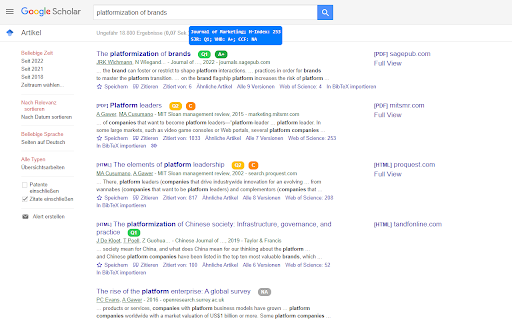

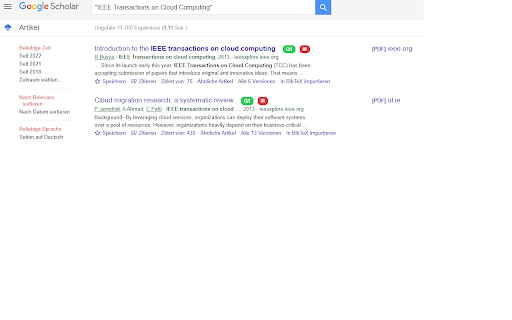
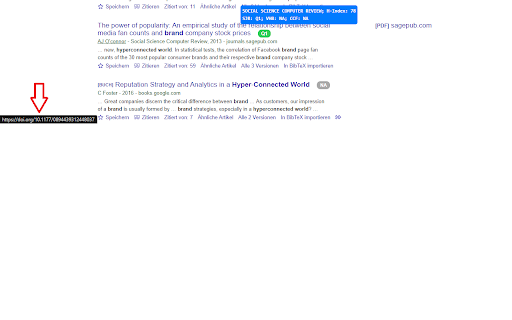
Displays rankings and h-index for academic journals next to Google Scholar search results. Rapid Quality Check for Academic Journals in Google Scholar Search Results This Chrome extension displays an academic journal's (and some conference's) rankings next to search results from Google Scholar. This also works for scholar profile pages on Google Scholar and other subpages (e.g. cited by, etc.). A variety of rankings are available for the user to choose from (SJR, ABDC, ABS, VHB, FT50, CORE, ...). These are interdisciplinary (e.g., SJR, BFI), focused on economics/social sciences (e.g., ABDC, VHB, ...), or focused on computer science journals/conferences (CORE, CCF). Hovering your cursor over the ranking gives you additional information such as the name of the journal and its h-index. Clicking on the "+" (if available) gives you additional rankings; those that you have not pre-selected. Via the extension's icon (which you can pin) you can also access a search bar to enter a journal name and get the ranking. This extension uses/builds upon: - CCFrank by WenyanLiu: https://github.com/WenyanLiu/CCFrank4dblp - the public Crossref API: https://api.crossref.org/swagger-ui/index.html - the public dblp API: https://dblp.org/ - Australian Business Deans Council (ABDC) list: https://abdc.edu.au/research/abdc-journal-quality-list/ - Academic Journal Guide (AJG) by the Chartered Association of Business Schools (C_ABS): https://charteredabs.org/academic-journal-guide-2021/ - Bibliometriske Forskningsindikator (BFI) of the Danish Ministry of Higher Education and Science ranking: ufm.dk - Ranking of the Chinese Computer Foundation (CCF): https://www.ccf.org.cn/en/Bulletin/2019-05-13/663884.shtml - CNRS ranking: https://www.gate.cnrs.fr/spip.php?rubrique31&lang=en - Foundation National pour l’Enseignement de la Gestion des Enterprises (FNEGE) ranking: https://www.fnege.org/classement-des-revues-scientifiques-en-sciences-de-gestion/ - Financial Times (FT) research rank: - High Council for Evaluation of Research & Higher Education (HCERES) ranking: https://www.hceres.fr/sites/default/files/media/downloads/2020-liste-hceres-domaine-shs1-economie-et-gestion_0.pdf - SCImago Journal & Country Rank (retrieved July 20th, 2022): http://www.scimagojr.com - CORE journal and conference ranking: http://portal.core.edu.au/jnl-ranks/ - Financial Time's FT50 ranking: https://www.ft.com/content/3405a512-5cbb-11e1-8f1f-00144feabdc0 - Icons from Flaticon.com: https://www.flaticon.com/free-icons/research

Perplexiti AI Goocle Scholar Search
Searches Google Scholar automatically with Perplexiti AI queries Unlock the full potential of academic research with our Chrome extension, which seamlessly integrates Perplexity AI with Google Scholar. This tool automates and enhances your search experience by generating precise AI-driven queries on Google Scholar, saving you time and improving the relevance of your results. Automated AI Searches: Leverage Perplexity AI to generate and refine Google Scholar queries automatically. Enhanced Precision: Get more accurate and tailored search results, quickly identifying the most relevant papers and research. Effortless Workflow: Streamline your academic research process with a single click. Whether you're a researcher, student, or academic enthusiast, this extension provides an efficient, AI-powered approach to scholarly discovery. Install today and revolutionize your research workflow!

Altmetric for Pubmed and Google Scholar
Get Altmetric score for research papers in Google Scholar and Pubmed search results Using this extension, researchers can get Altmetric score for research papers in Google Scholar and PubMed search results. Altmetric score is an indicator of how impactful and influential, a particular paper is. It is complementary to traditional, citation-based metrics. Altmetric score can help researchers understand where and why a piece of research is being discussed and shared, both among other scholars and in the public sphere. For e.g., they can see how a particular paper is being covered in the news, blogs and Twitter.

Journal Metrics
Automatically Discover Quartile Information to Google Scholar page. You can search more data in detail manually. Effortlessly improve your Google Scholar experience with automatic journal quartile information! This extension seamlessly integrates quartile data into any Google Scholar page, allowing you to quickly view the ranking and impact of journals without the need for extra searches. For more comprehensive insights into academic journals, the extension also provides access to additional metrics. Ideal for researchers, academics, and students looking to make informed decisions about their publications and references. V1.0.1: Bug fix for Google Scholar page. When visiting a Google Scholar profile, you’ll now see a floating pie chart summarizing publication types. The chart displays the number of journals by quartile (Q1–Q4), as well as the count of conference papers and unmatched (not found) journals. The dashboard floats on the page and updates dynamically as content loads or changes. V1.0.3 – Chart located after Cited-by section in Google Scholar profile page

SINTA & SCOPUS Scholar Checker
Tampilkan akreditasi SINTA, kuartil Scopus, status DOAJ Open Access, dan deteksi jurnal predator di Google Scholar 🎓 SINTA & Scopus Scholar Checker adalah ekstensi Chrome yang otomatis menampilkan akreditasi jurnal langsung di halaman Google Scholar. Tidak perlu login, tidak perlu buka tab baru, dan tidak perlu cek satu per satu. Saat kamu membuka profil Google Scholar, baik punya sendiri maupun orang lain atau halaman pencarian Scholar, atau bahkan saat membuka website jurnal langsung, ekstensi ini langsung bekerja. 🏷️ Badge Akreditasi SINTA (S1 sampai S6) Setiap judul paper diberi badge berwarna sesuai level SINTA. Database mencakup lebih dari 13.000 jurnal nasional terakreditasi. 🔵 Kuartil Scopus (Q1 sampai Q4) Selain SINTA, ekstensi ini menampilkan kuartil Scopus berdasarkan data SciMago JR 2025. Total lebih dari 31.000 jurnal internasional. 🟢 Status Jurnal Scopus Setiap jurnal Scopus yang terdeteksi dilengkapi keterangan status resmi dari Scopus Source List Maret 2026: ● Active — jurnal aktif terindeks Scopus ● Inactive — jurnal tidak aktif ✕ Discontinued by Scopus — dihentikan oleh Scopus ⚠ Journal Change Policy — kebijakan indeksasi berubah 🟡 DOAJ Open Access (BARU!) Jurnal yang terindeks DOAJ (Directory of Open Access Journals) mendapat badge khusus, termasuk label Diamond Open Access (tanpa biaya APC) untuk jurnal yang sepenuhnya gratis. ⚠️ Deteksi Jurnal Predator (BARU!) Ekstensi otomatis menandai jurnal atau penerbit yang termasuk dalam daftar predatory journals menggunakan database stop-predatory-journals. Badge peringatan merah muncul jika jurnal terdeteksi mencurigakan. 📂 Pelabelan Konten Non-Jurnal (BARU!) Paper yang bukan artikel jurnal — seperti prosiding konferensi, buku, book chapter, atau webinar — diberi label khusus agar tidak salah terhitung sebagai publikasi jurnal. Tidak ada badge SINTA/Scopus yang salah muncul untuk konten non-jurnal. 📊 Panel Statistik Otomatis Langsung muncul di halaman profil, berisi: ● Total paper yang terdeteksi dan persentasenya ● Distribusi paper berdasarkan level SINTA (S1–S6) ● Distribusi berdasarkan kuartil Scopus (Q1–Q4) ● Grafik donat untuk visualisasi level akreditasi ● Grafik sitasi per tahun (untuk pengguna yang login Google Scholar) 🔍 Mode Halaman Pencarian Saat membuka hasil pencarian Google Scholar (scholar?q=...), badge SINTA dan Scopus muncul langsung di tiap hasil pencarian, lengkap dengan status jurnal dan keterangan DOAJ. 🏅 Ranking Author SINTA Jika author masuk daftar Top 100 SINTA Nasional, kartu ranking otomatis muncul di halaman profil mereka dengan informasi instansi dan skornya. 🔍 Cari Jurnal di Popup Klik ikon ekstensi → tab "Cari Jurnal" → ketik nama jurnal → langsung tampil: ● Level SINTA (S1–S6) ● Kuartil Scopus (Q1–Q4) dan SJR rank ● Status jurnal (Active / Inactive / Discontinued) ● Status DOAJ Open Access 🌐 Deteksi dari URL Website Jurnal (BARU!) Saat kamu membuka website jurnal langsung (bukan Google Scholar), ekstensi otomatis mendeteksi jurnal dari meta-tag ISSN halaman dan menampilkan informasi peringkat di popup, tanpa perlu cari manual. 📥 Export CSV Export seluruh daftar paper beserta level SINTA, kuartil Scopus, tahun, dan jumlah sitasi ke file CSV dengan satu klik. 📌 Sumber Data: ● Data SINTA: sinta.kemdiktisaintek.go.id ● Data Scopus Quartile: scimagojr.com (SciMago JR 2025) ● Status Jurnal: Scopus Source List March 2026 (Elsevier) ● Open Access: DOAJ — Directory of Open Access Journals ● Predatory Detection: stop-predatory-journals dataset 🔒 Privasi: Tidak ada data pengguna yang dikumpulkan. Semua proses terjadi lokal di browser. Tidak diperlukan login. Ekstensi tidak mengirim data ke server manapun. Database diperbarui secara berkala mengikuti data SINTA dan SciMago terbaru. 👨💻 Pengembang Fabriyan Fandi Dwi Imaniawan Dosen Universitas Bina Sarana Informatika imaniawan.id 🎓 Kuliah? BSI aja! Pendaftaran Mahasiswa Baru UBSI ➡️ pmbubsi.id
