
hjglipkneddkikocdjfhmnachfjoccjn
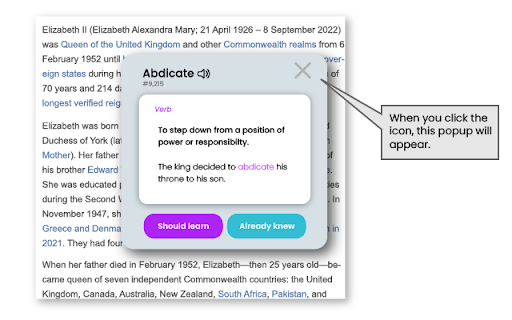


It helps you to complete your WordUp knowledge map by automatically highlighting the words you don't know and showing their meaning. WordUp is a revolutionary app for learning new English words and improving your vocabulary. It maps out where the gaps in your knowledge are, and creates a personalised learning plan that focuses on one word at a time. This Chrome Extension allows you to complete your WordUp knowledge map as you browse the web. It will scan the page you're looking at, and check every word on the page against your WordUp knowledge map. - If you have declared that you know the word, it will do nothing. - If you have declared that you don't, then it will show a red underline, helping you to quickly look up the word's definitions with a single click. - If you have not declared it either way, it will show a green line below the word, which you can then click to see the definitions and also declare if you knew it or not. This helps you in 2 ways. Firstly, it will help you to complete your WordUp knowledge map. Secondly, and once, your knowledge map is more complete, it will cleverly highlight any word that you don't know on any web page, and help you look it up with no effort! This helps you to build WordUp into your everyday life and make the most out of your WordUp knowledge map in your day-to-day life. With WordUp, you are in control of your knowledge.

Anki Quick Adder
This extension provides the ability to create anki cards directly from Google Chrome on your Anki Desktop. Welcome to Anki Quick Adder. This extension provides Ability to create anki cards directly from Google Chrome on your Anki Desktop. It includes an inline WYSIWYG editor and keyboard shortcuts for editing your notes before adding them to anki. Requirements You will require the following sofware to use the extension. This extension is currently in beta. so, bear the bugs with me :-) Changelog: 2.0.6 January 25 2020 -------------------- Fixed ankiConnect Cors problem. -------------------- 2.0.4 February 12, 2019 -------------------------------- Added sticky field for tags Added ability to add links in editor(Settings->in-line editor-> add Link button) -------------------------------- 2.0.3 August 5, 2018 Fixed duplicate tags in autoCompleteTags Array Fixed sending multiple tags on mainCard and dialogCard Fixed indexOf error for numbers only in deckName Added auto-complete of tags for EditCards and sanitization for tags Fixed Error when extension doesnot load data on first start. 2.0.2 july 21,2018 Fixed refresh decks button -------------------------------- 2.0.1 july 20, 2018 Fixed chromeMenu creation on extension update Fixed incorrect saveNote fields. -------------------------------- 2.0.0 added settings to show fav decks and models in chrome context menu. -------------------------------- 1.0.9 Fixed minor bugs -------------------------------- 1.0.8 Fixed notes not saving from shortcuts -------------------------------- 1.0.7 Fixed typebug error -------------------------------- 1.0.6 Fixed minor bugs -------------------------------- 1.0.5 added localNotes mode to save note without checking for anki. Version 1.0.4 - Tuesday, June 19th, 2018 - Ability to export and import your saved notes in extension. - fixed typeError bug on saving notes. - Quick icon to turn off global sticky fields. -------------------------------- Version 1.0.3 - Tuesday, June 19th, 2018 - Moved to local storage to save currentFields instead of sync -------------------------------- Version 1.0.2 - Tuesday, June 19th, 2018 Fixed Type Error --------------------- Version 1.0.1 - Monday, June 18th, 2018 Fixed bug for user who updated extension. -------------------------------------- Version 1.0.0 - Monday, June 18th, 2018 - Ability to save notes in Local Storage and sync later. (settings-> saveNotes) - Added ability to customize in-line editor buttons (settings-> In-Line editor Buttons) - Added sticky Fields. Click [S] icon and field data will persist after adding a note until you clear. - Mode to change field background theme to dark mode temporarily. - Fixed field deletion on noteType change. --------------------------------------- Version 0.0.9 - Sunday, June 10th, 2018 - Fixed bugs Version 0.0.8 - Sunday, June 10th, 2018 - Toggle between favourite decks or models (select more than one deck or model) [Open demo](https://imgur.com/a/o54jyFw) - Fixed cloze caret position while adding from shortcut. - Customizable shortcuts for decks, models, cloze and quickSubmit. ---------------------------------- Version 0.0.7 - Wednesday, June 7th, 2018 - card submission directly on shortcut instead of submission through pop-up. --------------------------------------- Version 0.0.6 - Wednesday, June 7th, 2018 -fixed settings bug for users who updated instead of installing it. Version 0.0.5 - Wednesday, June 6th, 2018 --------------------------------------- - shortcuts for: deck, model and Cloze - shortcuts for: adding selection to fields - Cache for: decks, models and tags - settings for: cleaning text - Settings for: submit timeout from chrome menu Version 0.0.2 - Saturday, June 2nd, 2018 ------------------------------------------------ - Fixed note adding error on windows and mac ------------------------------------------------- Version 0.0.1 - Friday, June 1, 2018 ------------------------------------------------- - Released beta version -fixed deck selection for single decklist -fixed deck selection for modelList - parsed tags for autocomplete

LingQ Importer
Automatically import foreign language content from the web & study it with LingQ's web & mobile language learning apps. The LingQ Importer extension allows you to automatically import web pages, articles, and video captions from sites like YouTube and Netflix into LingQ for studying using LingQ's web and mobile language learning tools. The Importer will automatically grab the title, text, image, captions and original url and display them in the LingQ Reader so you can look up and track all word data using LingQ's lookup, review and tracking functionality. The LingQ Importer will: * Import the text, captions and title of whatever page you are on * Import the article image and original url * Allow you to specify your LingQ account and language for import * Allow you to specify the course to import to and create a course if necessary * Allow you to add tags to help categorize the lesson in your account The LingQ Importer lets you learn languages from any content you find on the web. Get LingQing today!

Dictozo - Save and Learn new words by auto-highlighting
Dictozo helps you memorize words by highlighting them along with their definitions or translations in webpages It is tough to recall the meaning of an English word you searched a few days ago. When you see it again you have to search the meaning again and the cycle goes on. Dictozo lets you save definitions and translations of those words and highlights them on every next occurrence on any webpages. It improves your reading ability and builds a strong vocabulary. Say goodbye to the frustration of forgotten words and embrace a more enriching reading journey with Dictozo. - Added URL and website blocker - Improved settings page - Improved dashboard - More storage for savings words - Bugs Fixes

Readlang Web Reader
Read websites in the language you're learning, translate words you don't know, and we'll create flashcards to help you remember. Learn a language while surfing the web! Visit articles in the language you're learning. Use Readlang to translate the words and phrases you don't understand. And we'll create flashcards and vocab lists for you. - Visit a webpage in the language you are learning. - Click the "R" button to open Readlang. Supercharge your language learning! Alternatively, right click on any webpage and select "Import to Readlang" to import a plain text version to read on readlang.com Featured on Lifehacker and Tim Ferriss' Five-Bullet Friday.
