
odpdkefpnfejbfnmdilmfhephfffmfoh

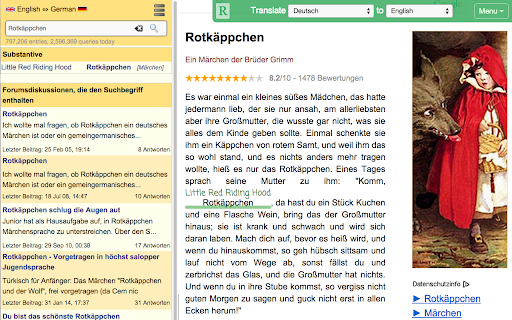


Read websites in the language you're learning, translate words you don't know, and we'll create flashcards to help you remember. Learn a language while surfing the web! Visit articles in the language you're learning. Use Readlang to translate the words and phrases you don't understand. And we'll create flashcards and vocab lists for you. - Visit a webpage in the language you are learning. - Click the "R" button to open Readlang. Supercharge your language learning! Alternatively, right click on any webpage and select "Import to Readlang" to import a plain text version to read on readlang.com Featured on Lifehacker and Tim Ferriss' Five-Bullet Friday.

Dictozo - Save and Learn new words by auto-highlighting
Dictozo helps you memorize words by highlighting them along with their definitions or translations in webpages It is tough to recall the meaning of an English word you searched a few days ago. When you see it again you have to search the meaning again and the cycle goes on. Dictozo lets you save definitions and translations of those words and highlights them on every next occurrence on any webpages. It improves your reading ability and builds a strong vocabulary. Say goodbye to the frustration of forgotten words and embrace a more enriching reading journey with Dictozo. - Added URL and website blocker - Improved settings page - Improved dashboard - More storage for savings words - Bugs Fixes

Burning Vocabulary - Learn words from reading
Master vocabulary effortlessly with the full cycle process. Mark and save the words you don't understand while surfing the web. The Burning Vocabulary will help you learn their meanings and memorize them effortlessly by associating them with paragraph snapshots, word audio, and translations in various contexts such as events, news, social media, tech posts, and articles. ★ Mark and highlight words on any website - Highlight words on any web pages. - Highlight words of Subtitles on Youtube/TED. - Highlight words on PDF File (online and local PDF file). - The saved words will be marked automatically while on other pages. ★ Very user-friendly Use Right-clicking, shortcuts, or double-clicking to mark words then shows a professional definition pop-up instantly. Save-automatically. Just focus on your reading. ★ Manage words with Vocabulary Calendar The Vocabulary Calendar shows words you marked day by day. You can feel the improvement in your vocabulary every day. You can delete a word if you are familiar. Export and import vocabulary. ★ Sync on your multiple devices Login on your multiple devices with license key. The marked word will be sync-auto in your multiple devices. The web App shows the marked words and sentence context. ★ Flashcards and Spaced Repetition Use the Flashcards and Spaced Repetition to practice your marked words. Use the Web App Flashcards to learn the marked words in anywhere. ★ Paragraph Sentence Snapshot Auto-generating paragraph snapshot so that you can recall words more easily through sentence snapshot. Mark a word by clicking, then save a word to the Vocabulary Calendar, practice a word with Flashcard, then apply a word to your daily reading with auto-highlighted. The process becomes more and more familiar with new words and memorize it forever. Privacy Policy - We respect your privacy. https://burningvocabulary.com/privacy-policy.html

LingQ Importer
Automatically import foreign language content from the web & study it with LingQ's web & mobile language learning apps. The LingQ Importer extension allows you to automatically import web pages, articles, and video captions from sites like YouTube and Netflix into LingQ for studying using LingQ's web and mobile language learning tools. The Importer will automatically grab the title, text, image, captions and original url and display them in the LingQ Reader so you can look up and track all word data using LingQ's lookup, review and tracking functionality. The LingQ Importer will: * Import the text, captions and title of whatever page you are on * Import the article image and original url * Allow you to specify your LingQ account and language for import * Allow you to specify the course to import to and create a course if necessary * Allow you to add tags to help categorize the lesson in your account The LingQ Importer lets you learn languages from any content you find on the web. Get LingQing today!

Reverso – Translation, dictionary
Translate and learn languages while browsing and watching movies, it’s free. Translate and learn languages while browsing and watching movies. It’s free, and registration is optional. Just select a text, let the magic happen and get accurate translations illustrated by examples of real usage. ENJOY THE ULTIMATE AI-POWERED TRANSLATION • Powerful big data algorithms and machine learning. • The most accurate and relevant results, based on millions of real-life multilingual texts. LEARN WHILE WATCHING YOUR FAVORITE MOVIES • Translate subtitles while you enjoy a movie on Netflix, Amazon Prime, YouTube, and more. • Save your favorite words and expressions to review and memorize them later. LEARN WHILE BROWSING AND READING • Discover translations and pronunciations of words and expressions in foreign languages: Spanish, French, Russian…, in the context of your article or document. • Read, write and speak with more accuracy and confidence. • Save your favorite words and expressions to review it later and memorize them. SYNCHRONIZE YOUR FAVORITES ACROSS DEVICES • Synchronize your translation history and favorites with your Reverso account. • On Reverso Context mobile app, practice the vocabulary you’ve discovered via the extension with flashcards, quizzes and games. SUMMARY OF KEY FEATURES • Instant translation of selected text when reading content on your browser • Subtitles translation on Netflix, Amazon Prime Video, YouTube, TED Talks and more. • AI-powered translation available in 26 languages and more are coming in the future! • Seamless synchronization across all Reverso products for registered users. • Advanced features include pronunciation, history, phrasebook of your favorites and more. • Suggestions: words and expressions will be suggested to you as you type. • One-click to get more details on Reverso Context. Download Reverso extension now and enjoy our AI-based translation for free!
