
eaanhanppiifopiabnfmhjbikjmeeale
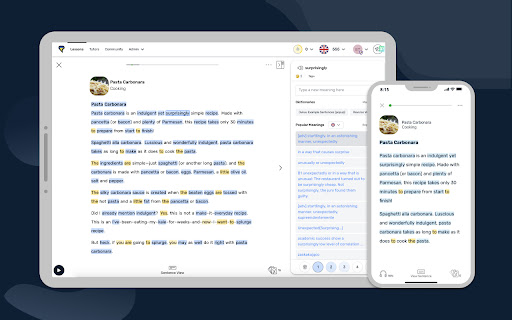


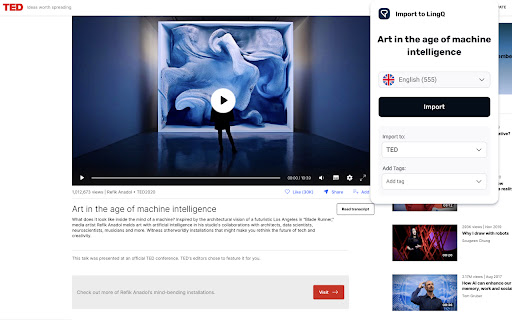
Automatically import foreign language content from the web & study it with LingQ's web & mobile language learning apps. The LingQ Importer extension allows you to automatically import web pages, articles, and video captions from sites like YouTube and Netflix into LingQ for studying using LingQ's web and mobile language learning tools. The Importer will automatically grab the title, text, image, captions and original url and display them in the LingQ Reader so you can look up and track all word data using LingQ's lookup, review and tracking functionality. The LingQ Importer will: * Import the text, captions and title of whatever page you are on * Import the article image and original url * Allow you to specify your LingQ account and language for import * Allow you to specify the course to import to and create a course if necessary * Allow you to add tags to help categorize the lesson in your account The LingQ Importer lets you learn languages from any content you find on the web. Get LingQing today!

Lingopie: Learn Languages With TV Shows & Movies
The smartest way to learn a language: watch TV shows and movies with dual subtitles, translations, and vocab tools in every episode. Lingopie's Chrome extension turns your next binge into a language lesson. No pausing, no tab-switching, no breaking immersion. Watch TV shows and movies with dual subtitles, click any word for an instant translation, and save vocabulary directly from scenes you'll actually remember. 💡 Why Lingopie? Unlike other language learning extensions, Lingopie combines dual subtitles, real-time translations, and structured vocabulary learning in a single experience. Shows are organized by difficulty level, and subtitles are interactive and designed for active learning. 🔑 Features Dual Subtitles Learn while watching with subtitles in both your native language and the language you’re learning. Click any word or phrase to see instant translations, definitions, and context-based grammar help. Interactive Vocabulary Builder Save words and phrases as you watch to build personalized, video-based flashcards. Learn vocabulary naturally through real content instead of memorization. AI Grammar Help Get instant explanations for difficult sentences while watching. Understand grammar in context, not just rules. Progress Tracking Track your vocabulary growth, comprehension, and learning consistency with simple, clear insights based on your activity. 🌍 Supported Languages Learn Spanish, French, Portuguese, Italian, German, Korean, Japanese, Chinese, Russian, Turkish, Dutch, Hebrew, Greek, and Polish – with more languages added regularly. 🎓 Perfect for All Skill Levels Lingopie supports your learning journey at every stage, helping you improve naturally through real content. ✔ Beginners: Strengthen comprehension with simple interactive quizzes while watching. ✔ Intermediate: Build vocabulary faster by reviewing and reinforcing new words from real videos. ✔ Advanced: Improve fluency by understanding sentence structure, nuance, and context in authentic content. 🔓 Your Lingopie Subscription The Chrome extension is part of your full Lingopie learning experience, giving you access to immersive language content across different formats. Watch exclusive Lingopie Originals made for learners Improve listening with interactive podcasts Learn through music with clickable lyrics Practice reading with short, translated stories 🚀 Start Learning Today! Install the Lingopie Chrome extension and start learning with your next episode. ℹ️ Note The Lingopie extension runs on Chrome only – Safari is no longer supported. Lingopie does not include streaming subscriptions. If you need help setting up the extension, visit the help center or contact support at support@lingopie.com.

Migaku: Really Learn Languages
Transform anything into the ultimate learning resource. Learn from videos, streaming, websites, social media, and much more. Transform anything into a language-learning opportunity. Learn from videos, streaming services, websites, social media, and much more. ⭐️ Beginners → Our data-driven courses will get you from zero to stumbling through Netflix in about six months ⭐️ Intermediate and beyond → Our tools enable you to begin consuming content intended for natives much sooner than would normally be possible Sign up for a free 10 day trial (no credit card required) at migaku.com! 🌐 Languages offered → Japanese, Korean, Mandarin, Spanish, Portuguese, French, German, Cantonese, Vietnamese, English 🎬 Supported streaming sites → YouTube, Netflix, Disney+, Rakuten Viki, Animelon 📱iOS and Android apps → Watch Migaku-ified YouTube, create flashcards, do your daily reviews, and access all courses on-the-go At Migaku, we believe that learning languages is actually pretty simple: if you consume content you enjoy, and you understand the sentences and messages within that content, you will make progress. With us, your journey will look like this: 1. Course → If you're a total beginner, start with one of our courses—they will take about 6 months to finish, assuming a pace of 10 flashcards per day (currently available for Japanese, Mandarin, and Korean) 2. Media → Boot up content you personally find interesting with Migaku 3. Explore → Click on words in that media and Migaku will show you what they mean 4. Flashcards → If you decide a word is useful, one more click will build a media-rich flashcard around it 5. Review → Migaku will periodically nudge you to review flashcards you make, ensuring that you eventually remember them And then repeat! As you spend more time interacting with content you love, you will gradually build the unique skills to better understand the things that you personally find interesting. [1] In-depth Courses • Fundamentals courses → Master your language's writing and sound systems. Takes about a month to complete at 10 flashcards per day. Currently available for Japanese, Mandarin, Korean, and English. Upon completion, you'll be ready to start our Academy courses. • Academy courses → Data-driven courses that teach you the specific ~1,500 words and ~300 grammar points you need to follow 80% of shows on Netflix. Takes about 6 months to complete at 10 flashcards per day. Currently available for Japanese, Mandarin, Korean, and English. Upon completion, you'll be ready to leave ""learner"" materials behind and start exploring real media intended for native speakers. • Vocabulary courses → Teaches you over 1,000 common words across 15 categories such as Food & Drink, Places, Body Parts, and more. Currently available for French, German, Korean, Mandarin, Portuguese, and Spanish. Perfect for travelers who need to brush up on specific types of vocabulary! [2] Text Analysis • Interactive text → Migaku analyzes text or subtitles in your selected media and makes it interactive (see Feature 3 below) • Learning Statuses → We remember one of five statuses for every word you encounter: Unknown, Learning, Known, Ignored, and Tracked • Learning recommendations → Get recommendations of which words and sentences to learn next based on the words you know now • Difficulty analysis → Compare the vocabulary in a selected piece of content against your currently known vocabulary to see how difficult it will be for you • More → Optional color-coding lets you see a word's gender, tone, or pitch accent at a glance [3] Powerful Dictionary • One-click lookups → Click on words in texts/subtitles to open up a dictionary with information about what they mean • Various dictionaries → Use our bilingual and monolingual dictionaries or upload your own • AI Explanations → Migaku's AI explains what a particular word means in context, breaks down how a sentence works, and translates sentences • Frequency data → See a star-based or numerical ranking of how common a word is in a variety of mediums (Netflix, novels, Wikipedia, etc.) • More → See images of your word, hear natives pronounce it, and more! [4] Flashcard App • One-click flashcards → Turn any subtitle or text into a flashcard with a single click • Media-rich → Flashcards contain your word, native audio, the sentence it appears in, text-to-speech audio, and (if from a video) a screenshot of your show + audio snippet • Dual-platform → Review your flashcards via our mobile apps or at study.migaku.com • Spaced Repetition System → Migaku periodically nudges you to review your flashcards, ensuring you remember them • Anki support → You can export flashcards out of our ecosystem, if you prefer [5] Video Features • Interactive subtitles → Click on words in subtitles to see what they mean in Migaku's dictionary (see feature #3) • Various playback modes → Always display subtitles, only show subtitles if dialogue contains an unknown word, hide subtitles but pause after each line of dialogue and show subtitles, and more! • Subtitle browser → View all subtitles in the sidebar, click to jump to any sentence, display only dialogue with unknown words, and bookmark subtitles for study later • Hotkeys for everything → Jump to or repeat lines of dialogue, create cards at the push of a button, tweak display options, and more • Play local files → Have an actual video file? You can watch it with Migaku! [6] Clipboard • Import text → Copy text from books or webpages and save it in Migaku's clipboard to be read offline • Create flashcards → Create high-quality flashcards with one click • Auto-paste → Migaku can automatically detect when your system's clipboard and fetch that text (convenient for manga and video games) [7] Text Recognition/OCR (iOS and Android only) • Use your camera → Take a photo and import it into Migaku; we'll detect any text it contains and make that text interactive • Real-world learning → Use Migaku with books, e-readers, other apps, menus from a restaurant, signs on the road... or anything you see! ✨✨ Sign up for a free 10 day trial (no credit card required) at migaku.com ✨✨

DuoCards
Translate and save words from browser using DuoCards Translate and save words from the browser using DuoCards! Select any text in your browser or right-click on an unknown word, translate the word and save it into your DuoCards deck. Alternatively, you can click on the Mammoth icon of this extension in the top right corner, translate and save any phrase you need. Later on, you will be able to use it for learning in the app on your phone. *Requirements Make sure you have DuoCards installed on your phone and have completed the registration before you start using this extension.

Reverso – Translation, dictionary
Translate and learn languages while browsing and watching movies, it’s free. Translate and learn languages while browsing and watching movies. It’s free, and registration is optional. Just select a text, let the magic happen and get accurate translations illustrated by examples of real usage. ENJOY THE ULTIMATE AI-POWERED TRANSLATION • Powerful big data algorithms and machine learning. • The most accurate and relevant results, based on millions of real-life multilingual texts. LEARN WHILE WATCHING YOUR FAVORITE MOVIES • Translate subtitles while you enjoy a movie on Netflix, Amazon Prime, YouTube, and more. • Save your favorite words and expressions to review and memorize them later. LEARN WHILE BROWSING AND READING • Discover translations and pronunciations of words and expressions in foreign languages: Spanish, French, Russian…, in the context of your article or document. • Read, write and speak with more accuracy and confidence. • Save your favorite words and expressions to review it later and memorize them. SYNCHRONIZE YOUR FAVORITES ACROSS DEVICES • Synchronize your translation history and favorites with your Reverso account. • On Reverso Context mobile app, practice the vocabulary you’ve discovered via the extension with flashcards, quizzes and games. SUMMARY OF KEY FEATURES • Instant translation of selected text when reading content on your browser • Subtitles translation on Netflix, Amazon Prime Video, YouTube, TED Talks and more. • AI-powered translation available in 26 languages and more are coming in the future! • Seamless synchronization across all Reverso products for registered users. • Advanced features include pronunciation, history, phrasebook of your favorites and more. • Suggestions: words and expressions will be suggested to you as you type. • One-click to get more details on Reverso Context. Download Reverso extension now and enjoy our AI-based translation for free!
