
hijfnlgdhfpmnckieikhinolopcolofe


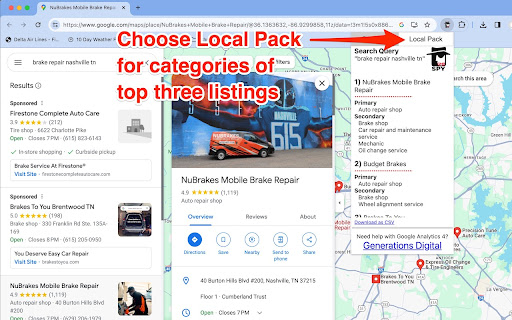
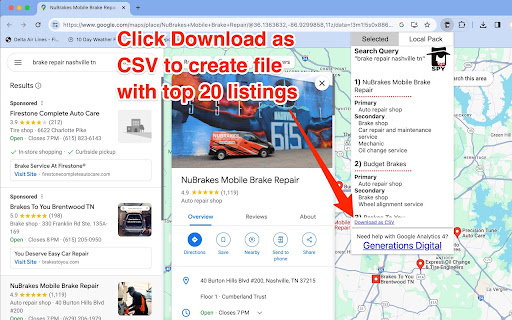
Allows viewing of Google Business Profile, Google My Business "Categories" for single listings or top 20 Google search results. *NEW VERSION 3.5.3 updated August 2025 to fix known bugs, supporting Google search and map updates. Do you love keeping an 👀eye on your competitors? Just wait until you try GMBspy🕵🏼 With one simple click, we show you the current categories for any Google Business Profile, or GBP (formerly known as Google My Business, or GMB, hence the name GMBspy!). You can also find common GBP categories for any top 20 search results, in either Google Maps or Google Local Finder. Audit your GBP page along with competitors and see certain listings are winning in local search! Why are GBP Categories so important? Categories are one of Google's number one local search engine optimization (local SEO) ranking element. Categories are important content elements that help feed Google's knowledge graph, and can help improve your rankings in local Google Search. Choosing the right GBP categories is an important first step in optimizing the listing for SEO. While the GBP category information is public, it can be difficult for the average user to locate this information manually in the HTML. The GMBspy tool saves you tons of manual work, automating this "spying" process! You can even download a comma-quote-separated file with the business names and categories for the top 20 search results for any Google Maps or Google Local Finder search query. From car dealers to pizza parlors, small retailers to big box national brands, we show you all of the individual GBP categories, or the categories of matching businesses in search results, so you can see why one business may be outranking another in local Google search. 📕INSTRUCTIONS: Now that you have located the GMBspy extension in the Chrome Store, click on the “Add to Chrome” button on the top right. Once you install the GMBspy Chrome Extension you should then click on the thumbtack icon in the upper right Chrome toolbar to “pin” the GMBspy extension onto your Chrome toolbar. This will allow the extension to always appear in the toolbar, ready for action! Next you are ready to use the extension. First you must select a GBP listing from Google Search or Google Maps, you then fire the GMBspy extension to view current categories for this individual selected listing. The default tab is “Selected”, this shows the categories for the single, selected GBP page. If you want to see the GBP Categories for listings in the “local map pack” of 3 results, simply select the Local Pack tab. If you would like to download a comma-separated-value (.csv) file containing the names, primary categories, and secondary categories of the top-20 ranked GBP listings, simply click “Download as CSV” at the bottom of the window. Once the CSV file is downloaded, it can be opened and viewed by applications such as Microsoft Excel or Apple Numbers. 👩🏻💻For technical support on GMBspy, 🐦Tweet to @generationsdig Here are the top troubleshooting tips: 1. Make sure you have first selected a Google Business Profile before firing the GMBspy extension. 2. The Local Pack tab will only work when searching for a business category, vs. a specific business name. An example search would be 'coffee near me'. 2. If the extension doesn't deliver the correct business categories, or gives an error, simply refresh the Chrome browser window. 3. When all troubleshooting fails, you should remove the GMBspy extension and re-install it from the Chrome Store. ❓🕵🏼❓If you have additional questions, visit our GMBspy web page at: https://www.generationsdigital.com/gmbspy ⭐️⭐️⭐️⭐️⭐️Thank you for your support! 🕵🏼

GMB PLUG: Google Maps & Local SEO Tool for Google Business Profile
Local SEO Tool for Google Business Profile GMB Plug is a practical Chrome extension designed for people who work seriously with Google Business Profile (GBP) and Google Maps SEO. If you manage local businesses, handle client SEO campaigns, or want to understand how competitors rank on Google Maps, this tool helps you extract useful insights directly from Google search results — without complicated dashboards or manual research. Built for marketers, agencies, freelancers, and business owners who want faster and smarter local SEO decisions. 1. Category Finder for Google Business Profile: — Instantly detect primary and secondary GMB categories — See how competitors are positioning their business categories — Identify missing category opportunities for better Google Maps visibility Choosing the right category is one of the most important local ranking factors — GMB Plug makes it easy. 2. Google Maps Profile Analysis: — View ratings and total reviews at a glance — Analyze profile structure directly from Google Maps — Understand how top-ranking businesses organize their profiles No need to manually inspect each listing. Everything is simplified and structured for you. 3. Competitor Research for Local SEO: — Study competitors ranking in your target location — Compare profile categories and positioning — Spot patterns that may influence local search rankings This helps you improve your own Google Business optimization strategy based on real data — not guesswork. 4. Time-Saving Local SEO Workflow — Works directly inside Google search & Google Maps — Simple and clean interface — Ideal for fast audits and client research Perfect for agencies handling multiple GMB accounts. — Improve your Google Maps ranking strategy — Optimize your Google Business Profile categories — Conduct faster local competitor analysis — Save time during audits and research — Make smarter local SEO decisions If your goal is better visibility in local search results, this extension simplifies the process. Who Is It For? — Local SEO professionals — Digital marketing agencies — Freelance SEO experts — Local business owners — Google Business Profile managers Whether you're optimizing one location or managing dozens, GMB Plug helps streamline your workflow. Local SEO is competitive. Small improvements in Google Business Profile optimization can make a big difference in visibility and leads. GMB Plug is built to give you the insights you actually need — quickly, clearly, and directly inside Google. If you work with Google Maps SEO or GMB optimization, this extension will become a useful part of your toolkit.

Detailed SEO Extension
Get SEO insights at the click of a button to any website you're currently on. Built by full-time SEO's for daily analysis. Get SEO-related insights at the click of a button to any website you're currently on. Pull back their title tag, meta description, meta robots tag and much more. Save hours of time looking through the source code of this page with our SEO analysis extension.

SEO Minion
SEO Minion helps you in your daily SEO tasks such as On-Page SEO analysis, Broken Link Checking, SERP Preview and more The tool helps you with the following tasks - (1) Analyze On-Page SEO - analyze the HTML of any webpage and view useful information that will help you optimize the On-Page SEO as well as alert you to any issues. (2) Highlight All Links - quickly see all the links (internal & external) for any webpage (3) Check Broken Links - check every link on a webpage and get a report of any links with issues (5) SERP Preview - preview your website on a real Google search result and update this in real time (6) Google search location simulator - view non-personalized google search results for one keyword on two different location/language combination. (8) HTML v/s DOM - analyze the differences between the HTML source code and the rendered DOM to check if your JS library is causing any SEO related issue (9) Analyze Structured Data - analyze the structured data on the webpage We add features based on user feedback. If you'd like us to add any new features, please email us at akash@seominion.com. You can view the change-log for every version update at https://seominion.com/news

PlePer Local SEO Tools
Useful shortcuts and quick analyzes for Local SEO`s The extension offers collection of tools and shortcuts for Local SEO's. With this extension you get detailed information for every google my business listing in Maps, Local Finder, Knowledge panel and making four different analysis based on maps search results. Listing details returned by the extension: Name / Address / Phone / All Categories / Verification status / Attributes / Coordinates / All important Google ID’s (CID, Place ID, Knowledge Graph ID) / Export function / Pin function / Links to popular business directories, search engines, different website analysis tools (Speed Test / Mobile Friendly Test / Whois information / Domain backlink analysis etc ). For US listing direct link to corespondig Secretary of state business lookup website. Four different analyzes when searching in Maps: - Categories - top categories used, average categories per listing, max categories per listing; - Reviews - average rating and reviews, maximum/minimum rating and reviews, listings without reviews; - Attributes - all the attributes used; - Business Hours - when business are open and the average business hours; Pin function - the listing information on any website with keyboard combination (CTRL + ALT + E). Easiest way to compare / enter data anywhere. The chrome extension is plug and play - no settings or configuration needed! Instructions: 1. Install the extension 2. Open in new tab google maps 3. Make a search and you will see the analyses. 4. Select any listing from the results and you will see the details.
