
hhhflijfhlnddhneehnhojkpbjengbfh
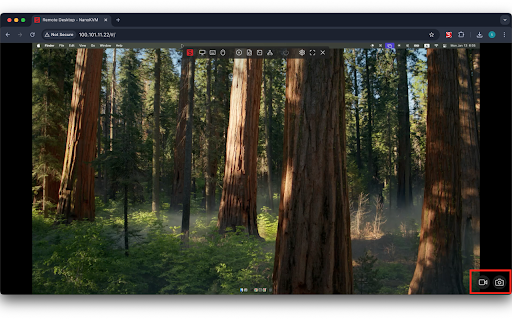
A Chrome extension that adds screenshot and video recording capabilities to NanoKVM. A Chrome extension that adds screenshot and video recording capabilities to NanoKVM. - Screenshot Capture of NanoKVM Interface - High-quality PNG image capture - One-click saving - Automatic timestamped filenames - Video Recording of NanoKVM Interface - High-quality WebM recording with VP9 codec - Start/stop recording at any time - Real-time recording duration display - Visual recording indicator - Local Storage of Captured Media - Automatic saving with timestamped filenames - PNG format for screenshots - WebM format for videos - Easy-to-use Interface Integrated with Chrome Browser - Simple and intuitive floating controls - Visual feedback for recording status - Video Format: WebM with VP9 codec - Image Format: PNG - Browser Support: Chrome with VP9 codec support - Interface Detection: Automatic detection of NanoKVM interface - Performance: Optimized for minimal resource usage

Screen Recorder for Google Chrome™
Screen Recorder is a software that allows you to capture and record your computer screen right in the browser! Use this free screen recorder software to make video recordings / screen recordings directly from the Chrome browser and share these video recordings with your friends/colleagues. To begin using the software Screen Recorder for Google Chrome™, simply click on "Start Capture" to begin recording your computer screen. Once you have finished recording your video, click on "Stop capture" to stop the video. You can save the video you made onto your computer/Google Drive. Its simple and easy to use Screen recorder to make video tutorials/software help videos etc and much more. Disclaimer: Please note this extension is NOT made by Google and is made by an independent development team. All copyrights belong to their respective owners. Google doesn’t endorse or sponsor this Chrome extension. Screen Recorder for Google Chrome™ is not owned by, is not licensed by and is not a subsidiary of Google Inc.

Screen Recorder & Screenshot App for Chrome | Scrnli
Screen recorder for Chrome, take screenshots, record screen and video, capture, edit and share instantly Scrnli is a powerful screen recorder and screenshot tool for Chrome that lets you capture your screen, record video, take screenshots, and share content instantly. Use Scrnli to record your screen, capture full pages, edit screenshots, and create video recordings for work, study, or communication. Why Choose Scrnli screen recorder and screenshot app Screenshot Tool for Chrome - Capture full page, selected area, or visible screen Screen Recorder for Chrome - Record screen, browser tab, or desktop video Edit Screenshots - Annotate, draw, add text, arrows, and highlights Instant Capture - Take screenshots and record screen with one click Easy Sharing - Share screenshots and videos instantly via link Save and Download - Save screenshots and screen recordings locally Lightweight Extension - Works smoothly without slowing down Chrome Secure and Private - Your data stays safe and under your control What You Can Do with Scrnli Take Screenshots - Capture full page screenshots or selected areas Record Screen Video - Record tutorials, meetings, and presentations Create Tutorials - Record screen and explain processes visually Improve Communication - Share screenshots and videos instead of text Save Important Content - Capture and store useful information How to Use Screen Recorder & Screenshot Tool 1. Install Scrnli from the Chrome Web Store 2. Click the extension icon 3. Choose screenshot or screen recording mode 4. Capture your screen or record video 5. Edit, save, or share instantly Capture and record your screen in seconds with this easy-to-use screen recorder for Chrome. Full Page Screenshot - Capture entire web pages Visible Screen Capture - Capture what you see Area Screenshot - Select and capture specific areas Instant Editing - Add text, arrows, and highlights Screen Recorder Features Record Screen - Capture desktop, browser tab, or window Video Recording - Record video with smooth performance Quick Sharing - Share recordings instantly Save Video - Download recordings for offline use Why Users Install Scrnli Screen Recorder • Easy screenshot and screen recording tool • Fast capture and editing features • Share screenshots and videos instantly • Lightweight and simple to use • Perfect for work, study, and daily tasks Privacy and Security Scrnli Screen Recorder does not collect or store personal data. Your screenshots and recordings remain private.

BombBomb Video - Webcam & Screen Recorder
Create, share, and track webcam and screen capture videos with the BombBomb Browser Extension. Get better results with video. Quickly and easily create, share, and track webcam and screen capture videos from any page in Chrome with the BombBomb Chrome Extension. 🎥 RECORD OR UPLOAD VIDEOS ‣ Record your webcam, your screen, or both ‣ Create and add in-video Calls-to-Action ✉️ SHARE YOUR VIDEOS ‣ Embed video on a page or in an email, or share video URL ‣ 3-second Animated Preview in emails ‣ Add logo to your video player pages ‣ Recipients can like and comment on videos ‣ Recipients can reply with their own video 📊 TRACK ENGAGEMENT WITH YOUR VIDEOS ‣ Track emails opened, videos played, links clicked ‣ Real-time activity feed ‣ Know how much of your videos were watched ‣ Browser and smartphone push notifications ★★ Using Gmail? Enjoy all of the above features added directly to your Gmail inbox, PLUS: 🗒 SNIPPETS (GMAIL ONLY) ‣ Create and save canned responses to be reused ‣ Include text, images, links, and videos We believe that every message you send can (and should!) be as effective as an in-person meeting. Join 40,000+ Sales and Customer Success professionals by humanizing your digital messages with BombBomb Video. WHY BOMBBOMB? BombBomb has been pioneering video communication since 2006. With over a decade of experience, an engaged community, and the definitive guide (we literally wrote the book on it!), you'll have the education, training, and support you need to be successful with video. Try free for 14 days (no credit card required).

Div Capture: Screenshot Chrome Extension
Introducing Div Capture, the ultimate screenshot tool for Chrome users! Simplify your screen capturing experience with this user-friendly Chrome extension, designed to seamlessly integrate into your browsing workflow. Precision Selection: Easily select and capture specific webpage elements or entire pages. Our intuitive interface allows for precise control, ensuring you capture exactly what you need. One-Click Capture: Say goodbye to cumbersome snipping tools. With Div Capture, a simple click is all it takes to snap your screenshot. High-Quality Images: Enjoy crisp, clear screenshots every time, perfect for presentations, tutorials, or sharing information. Whether you're a professional capturing screens for work, a student organising study materials, or someone who loves saving snippets of digital content, Div Capture is the tool for you. Enhance your productivity and simplify your screen capture process with Div Capture for Chrome! version 1.0.0 - 1.0.4 >> Removed Unnecessary permissions, bug fixes and addition of selectable mode. Shortcut added
