
dedaccjfjdboopgpoafnimpppmbhplof
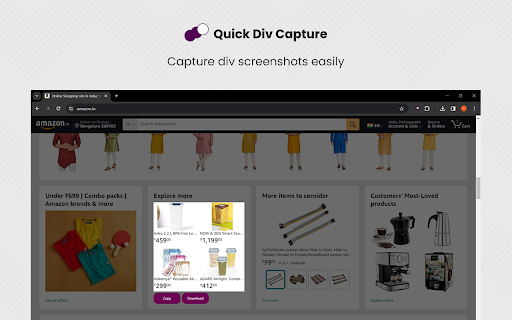
Introducing Div Capture, the ultimate screenshot tool for Chrome users! Simplify your screen capturing experience with this user-friendly Chrome extension, designed to seamlessly integrate into your browsing workflow. Precision Selection: Easily select and capture specific webpage elements or entire pages. Our intuitive interface allows for precise control, ensuring you capture exactly what you need. One-Click Capture: Say goodbye to cumbersome snipping tools. With Div Capture, a simple click is all it takes to snap your screenshot. High-Quality Images: Enjoy crisp, clear screenshots every time, perfect for presentations, tutorials, or sharing information. Whether you're a professional capturing screens for work, a student organising study materials, or someone who loves saving snippets of digital content, Div Capture is the tool for you. Enhance your productivity and simplify your screen capture process with Div Capture for Chrome! version 1.0.0 - 1.0.4 >> Removed Unnecessary permissions, bug fixes and addition of selectable mode. Shortcut added

Canvas downloader. Find and export.
Extension helps detect if canvas is used at the web page and allows to export and save canvas content. Extension helps detect if canvas is used at the web page and allows to export and download static canvas content in multiple formats. Extension could be helpful if creator of the web site disabled the canvas context menu with "Save As" option. Just click on the extension icon and it will try to find all the canvas data on the page and show you a list of detections for downloading. Check "Settings" in order to select the way images are downloaded and enable extra logic for finding "tainted" canvas elements or downloading images with blob urls.

DivMagic - Copy Style from any website
Unleash the power of effortless web element conversion with DivMagic. With just a click, you can capture any element from any website, seamlessly transforming it into clean, reusable CSS or Tailwind CSS code. Beyond that, DivMagic empowers you to convert elements into React/JSX components, and effortlessly switch between HTML and React/JSX. Experience the convenience of: - One-click design, style, and element copy and conversion - Ability to copy style as CSS or Tailwind CSS (including colors) - Conversion of any element from HTML to React/JSX and vice versa - Generation of minimalistic, reusable output - Seamless copying of styles, even through iframes Save time, streamline your workflow, and unlock your creative potential with DivMagic. Try DivMagic now and revolutionize your web development workflow! (Note: DivMagic is a paid subscription-based product, but you can try it for free.)

ElementSnip
Capture specific DOM elements or selected screen areas. Save as PNG or copy to clipboard. Capture specific web page elements or selected screen areas with pixel-perfect precision using ElementSnip! Save as PNG or copy directly to your clipboard—instantly! Key Features: 🎯 DOM Element Capture: Select any specific DOM element (like a button, image, paragraph, or container div) on the page with a simple click. Perfect for developers, designers, and anyone needing to capture exact web components. 🖼️ Optional Padding: Add customizable padding around your selected DOM element for better context in your screenshot. 🖱️ Flexible Area Selection: Prefer to draw a box? Just select the area region you want to capture anywhere on your screen. 💾 Save as PNG: Get a clean, high-quality PNG file of your capture with one click. 📋 Copy to Clipboard: Instantly copy the captured image to your clipboard for quick pasting into documents, support tickets, chats, or image editors. ⚡ Lightweight & Fast: No bloat, no unnecessary features. ElementSnip is designed purely for speed and efficient capture. 🔒 Minimal Permissions: Does only what it needs to do, respecting your privacy and browser performance. How it Works: Click the ElementSnip extension icon, choose your capture mode (Element or Area), select what you need, and then instantly Save or Copy.

ElemSnap - Quick capture elements
Quick capture of webpage elements, conversion to images, and automatic beautification. ElemSnap is a tool for quickly capturing webpage elements and converting them into images. Usage 1️⃣ Click the icon or use the shortcut (⌘ + ⇧ + X) to start 2️⃣ Slide the mouse to start capturing elements or press the button for scrolling screenshots Features 🌀 Quickly capture elements and convert them into images 📷 Scrolling screenshots and full-screen screenshots are also available 📤 Drag, paste, or upload local images for beautification 🎑 Multiple beautiful gradient backgrounds to choose from 💈 Crop images again for further editing 💻 Accessibility-friendly, all operations can be completed through keyboard navigation 🔒 All operations are performed locally, no login required, protecting your privacy ...and more features are currently under development! ElemSnap is developed and maintained by Ayden (https://twitter.com/AydenGen). If you have any questions or feature suggestions, feel free to contact me at hi@elemsnap.com.
