
hgbdjafjcidfmpgbcadmccmfinoinffe
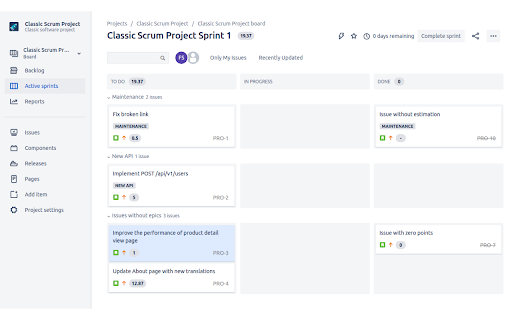


Sum of Jira point and time estimates for columns and total for sprint Displays a sum of estimates (works for both points and time) at the top of each column and a total next to the sprint title. Works with: - Classic Scrum Board (both points and time estimates) - Next Gen Scrum Board For time estimates it takes Jira defaults - 60 minutes, 8 hours, 5 days. Feature requests, issues and suggestions welcome at https://github.com/filip-savic/jira-estimates-sum-chrome-ext

Pitch Avatar Customer Catcher
Pitch Avatar Customer Catcher helps you create a link to a presentation and set it up without leaving Gmail, Outlook or Linkedin. Pitch Avatar (formerly ROI4Presenter) is a AI-powered solution for product demo, lead generation and outreach what helps businesses and individuals maximize their presentation and other content effectiveness and conversions. You can easily share your sales presentations, product demos, marketing, training and other content and hit your goals. Just upload your presentation, generate a script to it in any language, add voice-over or create a video avatar. Generate a personalized link and send it to your contact. The listener can invite you by clicking the “Call presenter” button or schedule a meeting with you, using a link directly to your calendar. At the end of each session you'll get a detailed analytics on the listener's interaction with slides. Customer Catcher integrates Pitch Avatar with your email and LinkedIn. After its installation you will see an icon of presentation in your Gmail, Outlook or LinkedIn mailbox. You can put a weblink to your presentation in your message by clicking this icon directly from messaging application, set up the parameters and forget about it. Pitch Avatar sets up and shows the presentation, even without your presence. Catch leads and clients for your content 24/7 --- Important: To get full access to all features, you need to register on pitchavatar.com.

Pact for Google Calendar
Boost your productivity with Pact for Google Calendar Effortlessly track and manage your work commitments using Pact's Google Calendar extension. Now, visualize your daily pacts and interact with them directly from your calendar. Pact brings accountability to teams through smart reminders, analytics, and automated workflows. It integrates seamlessly into your calendar, email, or Slack for enhanced team collaboration. Pact empowers teams with: 15x more visibility into outcomes, 3x more accurate delivery dates, and a remarkable 91% task completion rate. With our Chrome extension, you can: - Instantly view your commitments (think of them as ‘pacts’) and due dates right in your calendar. - Easily create, view, edit, and update your commitments, all within Google Calendar. - Improve accountability, both with yourself and your team, right from your calendar.

Jira Backlog Status
This extension displays Jira Ticket Statuses in the Backlog Board View for those that use the Software Project type. This extension only works on the Jira Website and only on the specific Backlog View starting with https://*.atlassian.net/jira/software/. If you're using a different Project Type this extension will not work. The extension does not work out of the box, you need to first configure in Board Settings displaying extra fields under the Card Layout tab. Make sure you add the Status field as the first Extra Field for both the Backlog and Active Sprint sections. UPDATE (v1.0.2): We now load all of the project statuses from Jira - all of your projects custom statuses should now be stored and color-highlighted correctly.

JobTarget Navigator
Seamlessly access JobTarget tools and services directly from your browser. Using JobTarget is now easier than ever! JobTarget Navigator was created to bring your favorite JobTarget tools and services to you, right in your browser, so you can easily access them throughout your day. You'll be able to check the status of your jobs, write job descriptions using AI, find new job sites, discover new candidates, and so much more. 1. Add and install the extension to your browser. 2. Log-in to your JobTarget account using your employer log-in information. 3. Pin the extension for easy access. 4. Start using JobTarget Navigator!
