
nhipgdfgjapmnokceglaldeoiibjhemi


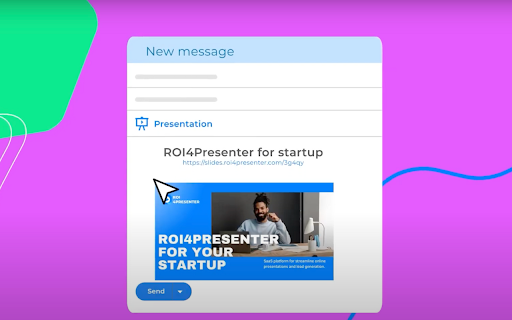
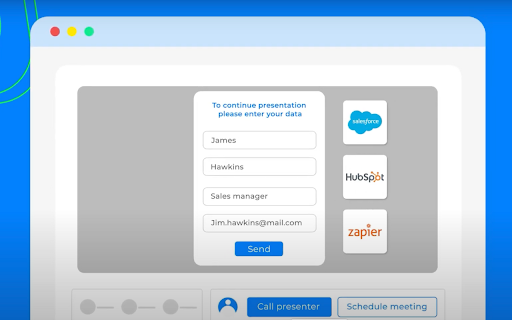

Pitch Avatar Customer Catcher helps you create a link to a presentation and set it up without leaving Gmail, Outlook or Linkedin. Pitch Avatar (formerly ROI4Presenter) is a AI-powered solution for product demo, lead generation and outreach what helps businesses and individuals maximize their presentation and other content effectiveness and conversions. You can easily share your sales presentations, product demos, marketing, training and other content and hit your goals. Just upload your presentation, generate a script to it in any language, add voice-over or create a video avatar. Generate a personalized link and send it to your contact. The listener can invite you by clicking the “Call presenter” button or schedule a meeting with you, using a link directly to your calendar. At the end of each session you'll get a detailed analytics on the listener's interaction with slides. Customer Catcher integrates Pitch Avatar with your email and LinkedIn. After its installation you will see an icon of presentation in your Gmail, Outlook or LinkedIn mailbox. You can put a weblink to your presentation in your message by clicking this icon directly from messaging application, set up the parameters and forget about it. Pitch Avatar sets up and shows the presentation, even without your presence. Catch leads and clients for your content 24/7 --- Important: To get full access to all features, you need to register on pitchavatar.com.

Apiary - Web Highlighter & Annotator
Highlight and take notes directly on what you read online and instantly share them with friends and colleagues. Easily highlight and take notes on what you read online and then easily save them for later and share them with friends and colleagues in one click. Apiary is a free to try chrome extension based product that allows you to easily highlight and take notes on what you read online. After you have annotated something online it will be saved to your Apiary account where you can then organize in any way you like with our folder system. You can than easily share directly from the website where you took the notes or from your Apiary account later on with anyone you want. Just highlight and get a shareable link you can send to anyone with one click. When using Apiary on a website or email online you have two options. You can choose to just highlight some text or you can highlight and add a comment to that highlight. Allowing you to save and share you favorite parts and current thoughts while reading it with others. You can view your annotations live by clicking the chrome extension and having the Apiary sidebar appear showing all the highlights and notes you have made on that page. Or you can view them later in your Apiary account where we save all the contents of what you were reading and the highlights and notes you took. Allowing you to get the full context of whatever you were taking notes on. Annotate, save, and share what you read online instantly today. ----------------------------------------- Key Features: Web and Email Highlighting Take Notes On What You Read Online Apiary Account Access With Organization Systems Quick and Easy Shareable Notes Private Notes That Only You Can See Automatically Saving Notes ------------------------------------------- How To Use: In order to use the Apiary Chrome Extension you will need an account with Apiary. Please visit www.myapiary.io to create an account today. 1) Create An Account On Apiary (www.myapiary.io) 2) Download Chrome Extension 3) Sign Into Chrome Extension w/ Your Apiary Account 4) Select Text (Left Click & Drag) You Wish To Annotate 5) Click On Apiary Popup To Either Highlight Or Take Note On Selected Text 6) Delete An Annotation By Clicking On A Highlight And clicking Delete Icon 7) Share Your Notes For A Page By Clicking The Apiary Share Button On Bottom Left Corner Of Window 8) View A Note By Either Visiting Your Apiary Account Or By Clicking View On A Currently Annotated Web Page ------------------------------------ Pro Tips: 1) Make Sure You Are Logged Into Apiary Chrome Extension If You Are Having Issues Annotating 2) Organize Your Notes Into Folders On Apiary To Easily Find Notes Later 3) Share Your Notes With Friends By Clicking Share Button And Sending Link To Friends. --------------------------- Got Feedback? Please reach out to us at support@myapiary.io If you find bugs please let us know at https://forms.gle/rHvoLZwaXfVcbAMJ7. If you have a feature request please let us know at https://forms.gle/vguFD2Rxi2FCsSQi8. By installing the extension, you agree to Apiary's Terms of Service, Privacy Policy, and Community Guidelines (which can be found here: https://www.myapiary.io/term-services and https://www.myapiary.io/privacy-policy)

brocrobes
Browser plugin for https://transcrob.es Brocrobes is the Chrome-compatible web extension for interacting with the open source foreign language content enrichment system of Transcrobes (https://transcrob.es). It allows you to take any webpage and enrich it with personalised, hypertext-based comprehension aids. It requires an existing account on a Transcrobes server. Free accounts are available at https://am.transcrob.es NEW! Now with personalised language learning support for watching many of your favourite movies on Netflix or Youku (in Mainland China)!

Buy Local Sunshine Coast
Boost your LinkedIn outreach with this tool. Initiate quality connections, track chats, and expand your network seamlessly. With an overwhelming number of LinkedIn connections and the rise of spam, bots, and fake profiles, business professionals on the Sunshine Coast struggle to cultivate authentic relationships. The time and effort spent sifting through superficial interactions is exhausting and unproductive. As the digital realm becomes increasingly impersonal, professionals miss out on genuine business opportunities. The core essence of networking—trust, reliability, and human connection—becomes lost amidst the noise. Without genuine connections, your business loses potential collaborations, client opportunities, and essential growth avenues. The B2B Sunshine Coast Chrome extension, in collaboration with My Most Trusted Network, is the answer. It’s tailor-made to filter out the noise and focus on what truly matters: authentic connections. Designed to bring together your trusted business community, it allows you to tap into each other’s networks, request referrals, and foster genuine collaborations. Say goodbye to spam and bots and welcome meaningful, human-centred business relationships.

Linqbase - LinkedIn CRM & Outreach
Effortlessly collect, organize, and export detailed LinkedIn profiles for an enhanced networking experience. Linqbase - Simplify and Enhance Your LinkedIn Experience Effortlessly collect, organize, and export LinkedIn profiles for better networking. Here's how Linqbase makes it easy: 📊 Collect LinkedIn Profiles with One Click Quickly gather important profile details with a single click—no more manual work. 📂 Organize Your Connections Automatically sort and group profiles into categories for better management. 📋 Export Data Easily Export your organized LinkedIn data for further review or sharing with your team. 🚀 Boost Your Productivity Automate key tasks like profile extraction and grouping to save time and improve efficiency. 👥 Perfect for Professionals Ideal for recruiters, sales teams, and business owners looking to streamline LinkedIn tasks. 🔗 Optimize Your LinkedIn Strategy Turn LinkedIn into a powerful tool for business growth and connection management. Explore how Linqbase can transform your networking. Visit linqbase.io or contact support at support@linqbase.io for more information.
