
akgnkdmkhpgnhmhmanhfclpkencoebbb

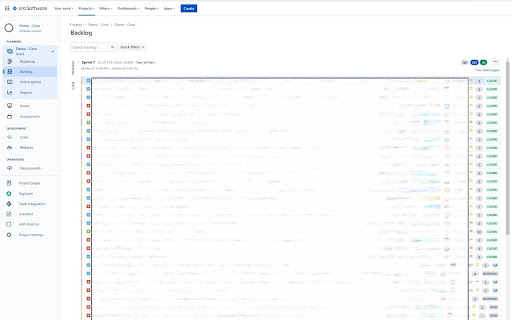
This extension displays Jira Ticket Statuses in the Backlog Board View for those that use the Software Project type. This extension only works on the Jira Website and only on the specific Backlog View starting with https://*.atlassian.net/jira/software/. If you're using a different Project Type this extension will not work. The extension does not work out of the box, you need to first configure in Board Settings displaying extra fields under the Card Layout tab. Make sure you add the Status field as the first Extra Field for both the Backlog and Active Sprint sections. UPDATE (v1.0.2): We now load all of the project statuses from Jira - all of your projects custom statuses should now be stored and color-highlighted correctly.

Ride With Jira
Ride With Jira Chrome Extension Ride With Jira ⭐ All of the missing features We've ever wanted in Jira! New Version! (3.3.0) Includes: *️⃣ Fix sticky header in issues *️⃣ Fix showing sprint value on child issues and sorting by it Version (2.5.2) Includes: *️⃣ Fix for the new Chrome update (Security adjustments to make the extension work) Version 2.4 major fix: *️⃣ Sprints display is now fixed for everyone! Following some complains that the sprint value showed "none" in child issues the code was updated to dynamically find the custom field which represents the sprint value so now it should work! Features: *️⃣ Supporting custom domains: The extension will run on every domain/subdomain that contains the word "Jira". Custom domains can be set from the Options page of the extension *️⃣ QUICKLY OPEN issues from anywhere - by clicking on the extension's icon or by using keyboard shortcut Ctrl+Alt+J (mac: Option+J), and type the issue ID *️⃣ STICKY HEADER in Issue view! No more guessing what issue is it while scrolling down to the content/comments *️⃣ SORTING by sprint all child issues in Epic view! Now you can quickly tell which child issues belongs to what sprint (and which doesnt have a sprint at all) *️⃣ FAVORITE fields in Create Issue modal - set and hide non-favorites fields to easily access only your personal relevant fields *️⃣ Mark in RED any pinned field with "None" value in Issue View *️⃣ Backlog feature: hiding the Issue ID to have more room for the title *️⃣ Backlog feature: split the sprints view to be side by side *️⃣ Copy Issue ID button inside issue page: copy an HTML formatted issue id *️⃣ BOLD out (with red color) the "BLOCKED" status *️⃣ Support for both Light and Dark modes of Jira Have a productive ride with Jira! Q: Is this Chrome extension safe to use? A: The extension is completely safe as it uses your existing credentials and functions solely on your personal computer, ensuring data security and integrity. Q: Why is it free? What's it in for you? A: I offer the extension free of charge to share its productivity benefits with the community, without any personal gain, as a way to contribute positively to others' work experiences. Disclaimer: This extension is designed to enhance the experience of Jira users by providing additional functionality. Please note that this extension is independently developed by the Developer and is not officially endorsed, authorized, or affiliated with Atlassian, the company behind Jira, or with any other company and its subsidiaries and affiliates. Jira is a trademark of Atlassian and is used here only to describe the compatibility and purpose of this extension. All rights belong to their respective owners. This extension is provided 'as is' without liability or warranty of any kind. Under no circumstance shall the Developer have any liability to you for any loss or damage of any kind incurred as a result of the use of this extension. Your use of this extension is solely at your risk. Additionally, this extension does not store any data, does not send any data to external servers, and utilizes only the existing Chrome user credentials, ensuring a high level of security and privacy for users.

Jira Product Discovery
Jira Product Discovery Chrome Extension With the Jira Product Discovery Chrome Extension you can: - Attach links to web pages to your Ideas - Add text snippets and images from the web to Jira Product Discovery - Take screenshots - Create new Ideas in place

Jira Optimizer
Jira. Adds buttons to Collapse Right Panel, Expand Create Modal, Expand Images, and View Linked Tickets. Jira Full Screen. Enhance your Jira experience with this powerful extension! Add buttons to automatically expand the workspace, collapse unnecessary panels, expand images, and view related tickets in expanded modals. Perfect for developers, product managers, and agile teams working extensively in Jira Cloud and Server. Features: Collapse Right Panel Expand Creation and View Modal Expand Images View Linked Tickets Boost your productivity and keep your workspace organized!

Jira Issue Quick Open
Open issue in Jira by keyboard shortcut or by highlight and right click context menu. Omnibox. Recently visited issues. This extension allow users to open issues in Jira by: 1. Clicking on the extension icon and providing issue id like 56 or SOC-56 2. Choosing option from the context menu by right click after selecting the issue id. This is helpful when the story/issue id is mentioned in email or pull requests etc.. User can just select the issue id and right click to open issue in jira. 3. Supports keyboard shortcuts. (A) Alt+J to open issue opener popup (B) Alt+Shift+J to open the selected/highlighted issue id in jira directly 4. Supports Omnibox. In the address bar type J + TAB then issue id to open issue in current tab. This also suggests matching issues. 5. See recently visited issues. * This extension does not make any api calls to JIRA ** This extension does not share any data with the extension developer
