
hflbochcfgcogoappafanhgopooakega
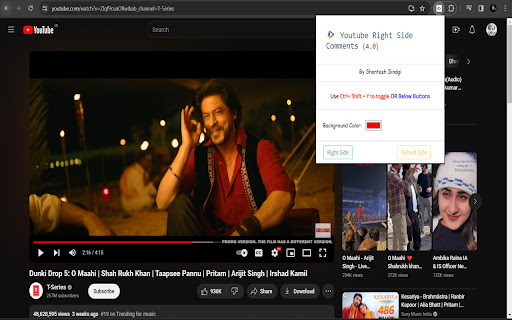


Easily toggle YouTube comments to the right or default left side with our Chrome extension for a more organized viewing experience. Simplify your YouTube viewing experience with our Chrome extension! Tired of constantly scrolling through comments on the left side of your screen? Our extension allows you to easily toggle comments to the right side or back to the default left side with just one click. Enjoy a clean and organized video viewing experience, while still keeping up with the conversation. Get it now and make your YouTube experience more convenient. Feature Alert : - Now you can use hot key Ctrl + Shift + Y to toggle. The new feature of this Chrome extension allows you to customize the background color of the comments box according to your preference, making it easier to read and interact with. You can choose from a variety of colors to find the one that suits you best. With this added feature, you can now personalize your commenting experience and make it more comfortable for you.

Comment Nomad - Move Youtube Comments Right
Read your comments while watching your YouTube videos! Read your comments while watching your YouTube videos! We are bringing back an experimental YouTube feature! Toggle your comment section to the right of the video and back! If you have any issues, feel free to click on the extension to open the popup and contact us through the email provided. If you'd like to support the developers, there is also a button to buy us a coffee :)

Youtube Popup Comments
Ever wanted to read the comments on a YouTube video, without scrolling down to the comments section and missing any of the action? With this extension, you can. Simply click on the button added to the top of the YouTube UI (next to the watch later button), and scroll through the comments using the newly created pop-up window that appears on top of your video. Click on the button again to close the pop-up when you want to focus on your video.

YT Layout Tweak
Introducing YT Layout Tweak – Elevate Your Comment Reading Experience on YouTube! YT Layout Tweak is your go-to Chrome extension… Introducing YT Layout Tweak – Elevate Your Comment Reading Experience on YouTube! YT Layout Tweak is your go-to Chrome extension for optimizing the way you engage with YouTube comments while watching videos. This extension offers a set of layout adjustments specifically designed to enhance your ability to read and interact with comments seamlessly. Default Layout: Stick with the classic YouTube design you're familiar with. Swap Layout: Re imagine your YouTube interface by swapping the positions of comment and related video sections. Tabbed Layout: Immerse yourself in video content while simultaneously keeping an eye on comments. The Tabbed Layout places comments in a dedicated tab beside the video, allowing you to effortlessly switch between the comments and related videos. YT Layout Tweak revolves around a simple idea: enabling you to read comments without sacrificing your video-watching experience. No distractions, no frills – just the tools you need to make the most out of your time on YouTube. Upgrade your YouTube experience with YT Layout Tweak and never miss out on those engaging comment discussions again. Download now and unlock the power of seamless comment reading while watching videos!

Youtube hover play comments in Sidebar
Show YouTube comments in a sidebar and autoplay videos on hover with one popup. See YouTube comments next to the video. Read comments as you watch! Want to read comments while watching a YouTube video? Fed up with scrolling or pausing to read comments? Comments now show up beside the video player, and suggested videos are below the video player. Show YouTube comments on the right of the video. Read comments while you watch videos!
