
ofhkahopkjfhgeifffppnojcoakiieph
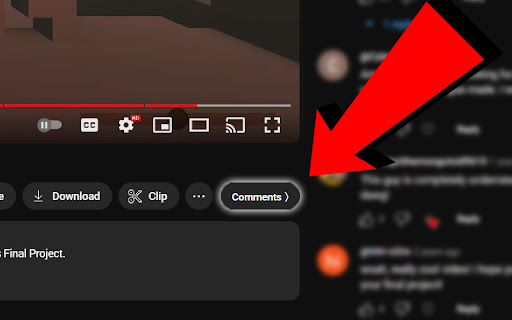


Read your comments while watching your YouTube videos! Read your comments while watching your YouTube videos! We are bringing back an experimental YouTube feature! Toggle your comment section to the right of the video and back! If you have any issues, feel free to click on the extension to open the popup and contact us through the email provided. If you'd like to support the developers, there is also a button to buy us a coffee :)

Scroll Youtube Comments
Scroll YouTube comments and watch video simultaneously! I use it when I watch live shows and jump on timecodes, or when I'm just curious what others think and don't want to take my eyes off the video. Initially made for personal use, but recently I thought that someone can find it pretty handy too, please enjoy!

MegaComments: YouTube Twitter Twitch & Reddit
** Turn off and on features through the extension icon This is a visual update to social media to make your commenting experience better. Each platform has an off / off Switch so you can independently control which interface upgrades you want. YouTube: Comments are reformatted into a more compact, 2-column arrangement, and the video will move to the right and scroll with your screen as you read the comments. You can browse comments while the video plays. Twitter: A search button is added to the header of user tweets. You can quickly search twitter profiles to learn what they think about a topic and whether you want to follow them. Twitch: Comments are reformatted for a faster reading experience, especially useful on large channels where the scroll is so fast you can't read the names. Reddit: Directs to an alternative Reddit experience with column style format.

Youtube hover play comments in Sidebar
Show YouTube comments in a sidebar and autoplay videos on hover with one popup. See YouTube comments next to the video. Read comments as you watch! Want to read comments while watching a YouTube video? Fed up with scrolling or pausing to read comments? Comments now show up beside the video player, and suggested videos are below the video player. Show YouTube comments on the right of the video. Read comments while you watch videos!

Youtube Comment Position Switcher
Enhance your YouTube viewing experience by freely switching between comments and related videos positions. 📌 Youtube Comment Position Switcher Take control of your YouTube layout. Youtube Comment Position Switcher is a lightweight Chrome extension that lets you freely switch the position of the comment section and related videos on YouTube. Enjoy a more comfortable viewing experience with a layout that works best for you. 🔧 Key Features 🎬 Swap Comments and Related Videos Display comments below the video and move related videos to the side — or vice versa. See both in the position that suits you. 🔄 Persistent Layout Your preferred layout stays in place, even after refreshing the page or navigating to another video. ⚡ Toggle with a Click Quickly enable or disable the feature using the popup menu — no need to reload or dig into settings. Make YouTube work your way. Install Youtube Comment Position Switcher and enjoy a cleaner, smarter interface.
