
hfjmanafnpfepjekhmbdbehgnfaclbkf
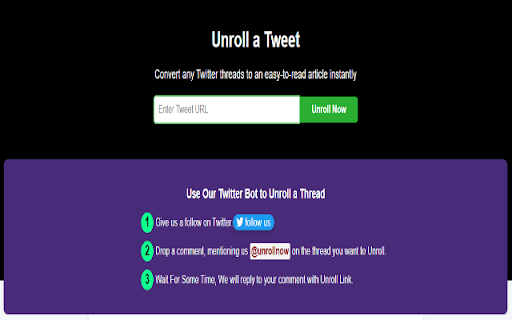

Convert twitter/x threads to easy to read article. It is a New thread reader app and it unrolls a twitter thread. Keeping up with long threads or series of tweets can be very difficult and extremely frustrating. To help our Twitter users, we have developed an easy-to-use tool. UnrollNow v2: UnrollNow v2 comes with more features. You can now directly unroll any thread from the "Home" and "Search" pages. A small icon appears below every post on Twitter. Simply click the unroll icon on any tweet. For v1 and v2 users: Go to any parent tweet of a thread on X (formerly Twitter). Click on the UnrollNow extension, and then click the "Unroll This Thread" button. Your longer threads will now be converted into easy-to-follow articles.

Twillot - Your Twitter, Organized
Search, organize and export your Twitter history Search, organize and export your Twitter history Never Lose a Tweet Again - For Twitter Users Who Want Secure, Smart, and Seamless Data Management - Filter out unwanted content and recommendations in your timeline - Search Twitter Bookmarks by keywords, time range, folder, username - Search Twitter Likes by keywords, time range, folder, username - Search Twitter Posts by keywords, time range, folder, username - Mass delete Twitter Bookmarks - Mass delete Twitter Likes - Mass delete Twitter Posts - Mass unfollow your following - Mass block or unblock Twitter users - AI-powered organization for Twitter Bookmarks / Likes / Posts - AI-powered organization for Twitter Following - Mass add Twitter List members - Smart create Twitter List Fix a bug that caused the syncing process to fail or take a long time to complete. Twillot 2.0 is out! This version is For Twitter Users Who Want Secure, Smart, and Seamless Data Management for Your Twitter Account. It covers all aspects of your Twitter account, including your bookmarks, tweets, and more. - Fixed a bug that caused the extension to stop smart tagging - Ending the free trial for smart tagging - Added AI-powered smart categorization to automatically organize your bookmarks! - You can upgrade to Pro Plan to auto categorize 500 bookmarks per day. - Export bookmarks with threads and engagement metrics to CSV / JSON - Download media files from bookmarks Note: Due to adjustments in our product strategy, the Workflow feature will be removed from the current version. If you're looking for similar functionality, we invite you to try our newly launched, more lightweight extension https://s.twillot.com/x-bookmarks. We're excited to announce that you can now use Twillot as a workflow in X/Twitter now. Know more about workflow, check it out https://twillot.com/docs/workflows/guide. We're excited to announce that you can now use tt for quick searches in the Omnibox. To use this feature, follow these steps: - Type tt in the Omnibox. - Press the Tab key. - Input your keyword. By doing this, you'll be taken directly to Twillot search results, enhancing your search efficiency. Click on the Twillot icon in the Chrome toolbar to open the extension.

Tweet Copier - Copy Twitter / X Threads
Copy tweets and full X (Twitter) threads in one click. Instantly save clean text for research, notes, writing, and archiving. Tweet Copier is a Chrome extension that lets you copy tweets and entire Twitter/X threads instantly with one click. Save clean, structured tweet text directly to your clipboard for research, writing, archiving, or reuse. 🚀 Key Features ✅ Copy Single Tweet Instantly copy the full text of any tweet, including quoted tweets and emojis. Copy tweet text instantly without screenshots or manual selection. ✅ Copy Twitter / X Threads Automatically detects and copies the entire thread by the same author. ✅ Auto-Scroll for Long Threads Loads hidden tweets so you can copy long Twitter threads in one click. ✅ Clean, Structured Formatting Preserves emojis, line breaks, and auto-numbers tweets (e.g., 1/12, 2/12). ✅ Native X Integration Adds Copy and Thread buttons directly to the X action bar (left of Grok). 👨💻 Who This Is For Content Creators – Save tweets and threads for blogs, newsletters, or social media. Researchers & Students – Archive Twitter discussions and primary sources. Journalists – Preserve tweets and threads before edits or deletion. How to Use - Install Tweet Copier. - Refresh X (Twitter). - Click Copy or Thread on any tweet. - The tweet text is copied instantly to your clipboard. 🔒 Privacy-First Twitter Extension No data collection No tracking or analytics No external servers Runs entirely locally Tweet Copier does not automate engagement, modify content, or interact with your account. It only reads tweet text you explicitly choose to copy.

Unroller - Unroll Twitter/x Threads
This extension transforms long Twitter threads into a clean, readable, and printable format right within your browser. Once activated on a Twitter thread, it automatically scrolls through all the tweets, collects their text (including quoted tweets and full URLs), and displays them in an easy-to-read blog-like view. You can then copy the entire text, print it as a PDF, or simply read it in a distraction-free environment. Additionally, the extension can reveal truncated tweets ("Show more" tweets) and integrate their fully expanded text into the final view, ensuring you never miss important details. It also provides functionality to pause and resume the unrolling process if the tab becomes inactive, offering a seamless experience even if you navigate away temporarily. * Automatic Unrolling: Collects all tweets in a thread, including quoted tweets, and arranges them chronologically in a clean, scrollable modal view. * Adjustable Speed Control: Choose from 4 speed settings (0.5x, 1x, 2x, 3x) to optimize unrolling speed based on your connection quality and thread length. Slower speeds are safer for long threads or slower connections, while faster speeds quickly process shorter threads. * Truncated Tweet Expansion: Detects "Show more" segments, clicks them automatically, and fetches the full tweet text. * Image Integration: Captures and embeds tweet images. If an image cannot be accessed, a placeholder ensures layout consistency. * Single-Page Reading Experience: Presents the entire thread as a unified "blog" view for easy reading. * Dark Mode: Toggle between light and dark themes for comfortable reading in any lighting condition. * Font Size Control: Adjust text size with convenient +/- buttons to suit your reading preferences. * Copy & Print: Effortlessly copy all text to your clipboard or print the entire thread to PDF for offline reading or archiving. * Resume After Inactivity: If you leave the tab during unrolling, the extension gracefully pauses and lets you resume the process, preserving the collected tweets. * Keyboard Shortcuts: Access all features quickly using keyboard shortcuts (C for copy, P for print, D for dark mode, +/- for font size, ESC to close). * User-Friendly Controls: Buttons to copy text, print as PDF, toggle dark mode, adjust font size, close the modal, and re-unroll the thread are all clearly provided. Instructions for Use: 1. Configure Speed Settings (Optional): - Click the extension icon in your browser toolbar to open the popup menu. - Under "Unroll Speed," select your preferred speed: - 0.5x: Slower (safer) - Best for very long threads or slow internet connections - 1x: Normal speed - Default balanced setting - 2x: Fast - 2x faster for quicker processing - 3x: Very fast - Maximum speed for short threads on fast connections - Your speed preference is saved automatically and will be used for all future unrolls. 2. Open a Twitter Thread: - Navigate to any tweet thread you wish to unroll. A thread page is typically a single tweet followed by multiple replies forming a conversation. 3. Activate Unroll: - Click the "Unroll" button that appears in the top-right corner of your screen. The extension will begin reading and scrolling through the thread automatically at your selected speed. 4. Wait for Completion: - The extension will process all tweets, including any "Show more" expansions. A loading message will appear until all content is ready. 5. Interact with the Result: - Once unrolling is complete, a modal view will appear with the entire thread displayed in a blog-like format. - Copy: Click the "Copy" button to copy all text to your clipboard for easy sharing or saving. - Print PDF: Click "Print PDF" to generate a PDF of the entire thread for printing or archiving. - Dark Mode: Toggle the moon icon to switch between light and dark themes. - Font Size: Use the A- and A+ buttons to decrease or increase text size. - Close: Click "✕" to return to the normal Twitter view. - Re-Unroll: Click "Re-unroll" to redo the process or refresh the content if the thread updates. 6. Use Keyboard Shortcuts (Optional): - ESC: Close the modal - C: Copy thread text - P: Print/download as PDF - D: Toggle dark mode - +: Increase font size - -: Decrease font size 7. Resume if Interrupted: - If you switch tabs and return later, the extension may prompt you to "Resume." Click "Resume" to continue unrolling where it left off. 8. Complete Your Session: - After you're done, simply close the modal or navigate away. The extension automatically resets so you can use it again on a new thread. Tips for Best Results: - Use slower speeds (0.5x-1x) for threads with 50+ tweets or when experiencing slow internet - Use faster speeds (2x-3x) for shorter threads (under 20 tweets) to save time - If tweets are being missed at higher speeds, reduce the speed setting and re-unroll - The extension works best on complete threads - start from the first tweet in the thread By following these simple steps, you can effortlessly read, copy, and save entire Twitter threads at your preferred speed with just a few clicks!

dewey.
Save all your favorite bookmarks in one place. Join Dewey to search, sort, organize, export all your bookmarks from your social networks. Add Dewey to your browser in seconds and bookmark posts on any of your favorite social media sites. We’ll handle the rest. 🗂 Organize Built-in organization tools like folders, nested folders, and tags to control the clutter. Keep track of all your saved posts with ease and find what you're looking for in seconds. 🔎 Search Lightning-fast search of every bookmark, tag, author and note. 📥 Export With Dewey’s export options, you can easily export your entire library with one click - formatted as CSV, searchable PDFs, or a Google Sheet spreadsheet. Even export all associated media like images and videos. It’s all yours. 🤝 Share Dewey lets you turn on public sharing of bookmark folders to collaborate with others, as well as RSS feeds for any folder you create. ✨ AI Bulk Tagging Type a few keywords about your interests and our AI tags your bookmarks in bulk. No more hours wasted manually tagging. Our AI tool will let you review a proposed sample set before applying bulk tags across all content. Adjust and refine the suggestions until perfectly aligned with how you categorize information. ◆ And more… From dark mode to keyboard shortcuts and Google Sheets integration, we’re constantly on the hunt to find small but impactful quality of life improvements. We think the internet is amazing and want to help you find, and remember, your favorite content. -------------------------------------- Note: You must have an existing Dewey account to use this extension. If you do not, you will be asked to create one after installing this extension. If you are not already a subscriber, you can get a free 7-day trial with no credit card upfront. At the end of the trial, you will not be charged unless you choose to subscribe. -------------------------------------- By using the Dewey browser extension, you agree to Dewey’s terms and conditions. (https://getdewey.co/terms-and-conditions)
