
flkokionhgagpmnhlngldhbfnblmenen

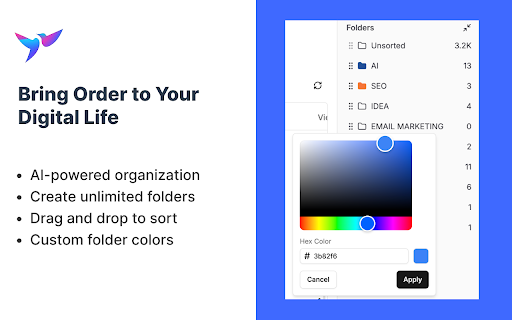

Search, organize and export your Twitter history Search, organize and export your Twitter history Never Lose a Tweet Again - For Twitter Users Who Want Secure, Smart, and Seamless Data Management - Filter out unwanted content and recommendations in your timeline - Search Twitter Bookmarks by keywords, time range, folder, username - Search Twitter Likes by keywords, time range, folder, username - Search Twitter Posts by keywords, time range, folder, username - Mass delete Twitter Bookmarks - Mass delete Twitter Likes - Mass delete Twitter Posts - Mass unfollow your following - Mass block or unblock Twitter users - AI-powered organization for Twitter Bookmarks / Likes / Posts - AI-powered organization for Twitter Following - Mass add Twitter List members - Smart create Twitter List Fix a bug that caused the syncing process to fail or take a long time to complete. Twillot 2.0 is out! This version is For Twitter Users Who Want Secure, Smart, and Seamless Data Management for Your Twitter Account. It covers all aspects of your Twitter account, including your bookmarks, tweets, and more. - Fixed a bug that caused the extension to stop smart tagging - Ending the free trial for smart tagging - Added AI-powered smart categorization to automatically organize your bookmarks! - You can upgrade to Pro Plan to auto categorize 500 bookmarks per day. - Export bookmarks with threads and engagement metrics to CSV / JSON - Download media files from bookmarks Note: Due to adjustments in our product strategy, the Workflow feature will be removed from the current version. If you're looking for similar functionality, we invite you to try our newly launched, more lightweight extension https://s.twillot.com/x-bookmarks. We're excited to announce that you can now use Twillot as a workflow in X/Twitter now. Know more about workflow, check it out https://twillot.com/docs/workflows/guide. We're excited to announce that you can now use tt for quick searches in the Omnibox. To use this feature, follow these steps: - Type tt in the Omnibox. - Press the Tab key. - Input your keyword. By doing this, you'll be taken directly to Twillot search results, enhancing your search efficiency. Click on the Twillot icon in the Chrome toolbar to open the extension.

Xbase
The ultimate bookmark manager for X If you have any suggestions, please email them to our team at team@xbase.so.

Favourites.io Search X/Twitter Likes and Bookmarks
Searching and organizing your X/Twitter Likes and Bookmarks is a pain. Favourites.io makes it so much easier! The Favourites.io Twitter Bookmarks extension enables you to search, tag and export your Twitter Likes & Bookmarks. Used with favourites.io, you can search your likes and bookmarks by keyword, username, tweet date, media type and tag. You can also organize your Bookmarks (and likes) into categories for easy retrieval. The extension enables you search, filter and exports your Bookmarks (and likes). Once the extension is installed, you will have the option of signing up for a favourites.io account.

X Bookmarks Exporter - Export Twitter Bookmarks
Download X (Twitter) bookmarks instantly as CSV, JSON, or XLSX. One-click export for backup, offline access, or sharing. 📌 X Bookmarks Exporter – Export & Download Your Twitter/X Bookmarks with Ease Tired of losing track of your saved posts on X (formerly Twitter)? X Bookmarks Exporter is the ultimate tool to download, back up, and manage your X bookmarks effortlessly. Whether you’re bookmarking insightful threads, viral tweets, or important media, this extension helps you export everything to your computer in seconds — no tech skills required! X Bookmarks Exporter is a fast, secure, and privacy-focused extension that lets you export your bookmarks from X (Twitter) in one click. Save your favorite posts in easy-to-use formats like CSV, JSON, and Excel (XLSX), so you can organize, search, or archive them however you want. Unlike Twitter’s limited interface, this tool gives you full control over your bookmarks — including the ability to download images and videos from bookmarked posts! - Export all your Twitter/X bookmarks in a single flow - Include tweet text, author, timestamps, and engagement metrics - Simple, intuitive UI inside your browser Choose how you want your data: • CSV for spreadsheet lovers • JSON for developers and automation workflows • XLSX (Excel) for business users and advanced sorting/filtering Want to keep the images and videos from your bookmarks? Simply enable the Download Media option to save all embedded media with your export. Once you’ve safely exported your bookmarks, you can bulk delete them directly from the extension. This helps you clean up your X bookmarks without worrying about losing important content. 📁 5. Folder-Based Export for X Premium Users If you’re an X Premium user, you can choose a specific bookmark folder to export instead of exporting everything. This is ideal for organizing exports by topic, project, or collection. Your data never leaves your browser. No data is uploaded, stored, or tracked. All processing happens on your device for 100% security and peace of mind. Perfect for: • 🧑🎓 Researchers saving insightful threads • 📝 Writers collecting references • 📈 Marketers archiving campaign inspiration • 👩💻 Developers building tools using saved tweet data • 🗃️ Archivists keeping personal records Using the extension is super simple: 1. 🌐 Visit your X Bookmarks page: https://x.com/i/bookmarks 2. ⚙️ Optional: Enable “Download Media” in the extension settings 3. 🔽 Open the extension and click the “Start” button 4. ⏳ Watch the export progress in a popup window 5. 💾 When complete, click “Download” again to save the file in your chosen format You can select your preferred format (CSV, JSON, XLSX) in the extension’s settings by clicking the icon in your browser toolbar. 🔍 Why Export Your Twitter/X Bookmarks? Many users rely on X Bookmarks to keep track of important content — but the platform provides no built-in export option. This extension solves that problem by giving you a reliable backup of everything you’ve saved. Benefits: • 🧾 Create searchable, local archives • 📊 Organize bookmarks in spreadsheets • 💡 Use saved content for research, content creation, or personal growth • 🔄 Sync your data across platforms • 🧼 Clean up your bookmarks without fear of losing anything Yes! Your data stays on your device. The extension doesn’t collect, transmit, or store anything — period. Yes! Simply enable the “Download Media” option in the extension before exporting. This includes images, GIFs, and videos embedded in your bookmarked tweets. ❓ Does this work with private accounts or protected tweets? Only if you’re logged into X and can view those bookmarks yourself. The extension only has access to what your browser can see. No. This is an independent third-party tool not affiliated with or endorsed by X Corp. In addition to exporting your bookmarks, this extension includes a **“More Tools”** tab that introduces you to other X-focused companion extensions to help you go even deeper with your data: • X Likes Exporter • X Post Exporter • X/Twitter Followers Exporter For just $9.90, go Pro and enjoy: • 📥 Unlimited bookmarks export • 🖼️ Download bookmark media • ⚙️ Priority support We believe your data belongs to you. That’s why X Bookmarks Exporter works 100% locally in your browser — no servers, no data harvesting, no tracking. Your bookmarks are yours alone. This extension is an independent product and is not affiliated, associated, authorized, or endorsed by X Corp or Twitter Inc. All trademarks are property of their respective owners. Don’t risk losing access to your valuable bookmarks. Get X Bookmarks Exporter today and create your own personal archive of saved content — media and all! 🧲 Download now and take back control of your X bookmarks!

SumBuddy - AI Assistant
SumBuddy is a browser AI assistant allows you to chat based on web page content and use your own AI models Introducing Your Personal Browser AI Assistant 🌟 - 🚀 No login required for basic functionality - 🤖 Use your own AI models - ✨ Customize your summary assistant prompts - 💬 Engage freely with webpage content or YouTube video captions - 🔒 Runs directly in your browser, ensuring your privacy without any server involvement Discover the ultimate AI companion that truly belongs to you. Experience seamless interaction and enhanced productivity while keeping your data secure.
