
abgjpimjfnggkhnoehjndcociampccnm

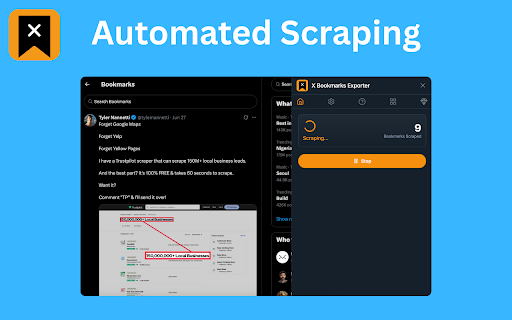


Download X (Twitter) bookmarks instantly as CSV, JSON, or XLSX. One-click export for backup, offline access, or sharing. 📌 X Bookmarks Exporter – Export & Download Your Twitter/X Bookmarks with Ease Tired of losing track of your saved posts on X (formerly Twitter)? X Bookmarks Exporter is the ultimate tool to download, back up, and manage your X bookmarks effortlessly. Whether you’re bookmarking insightful threads, viral tweets, or important media, this extension helps you export everything to your computer in seconds — no tech skills required! X Bookmarks Exporter is a fast, secure, and privacy-focused extension that lets you export your bookmarks from X (Twitter) in one click. Save your favorite posts in easy-to-use formats like CSV, JSON, and Excel (XLSX), so you can organize, search, or archive them however you want. Unlike Twitter’s limited interface, this tool gives you full control over your bookmarks — including the ability to download images and videos from bookmarked posts! - Export all your Twitter/X bookmarks in a single flow - Include tweet text, author, timestamps, and engagement metrics - Simple, intuitive UI inside your browser Choose how you want your data: • CSV for spreadsheet lovers • JSON for developers and automation workflows • XLSX (Excel) for business users and advanced sorting/filtering Want to keep the images and videos from your bookmarks? Simply enable the Download Media option to save all embedded media with your export. Once you’ve safely exported your bookmarks, you can bulk delete them directly from the extension. This helps you clean up your X bookmarks without worrying about losing important content. 📁 5. Folder-Based Export for X Premium Users If you’re an X Premium user, you can choose a specific bookmark folder to export instead of exporting everything. This is ideal for organizing exports by topic, project, or collection. Your data never leaves your browser. No data is uploaded, stored, or tracked. All processing happens on your device for 100% security and peace of mind. Perfect for: • 🧑🎓 Researchers saving insightful threads • 📝 Writers collecting references • 📈 Marketers archiving campaign inspiration • 👩💻 Developers building tools using saved tweet data • 🗃️ Archivists keeping personal records Using the extension is super simple: 1. 🌐 Visit your X Bookmarks page: https://x.com/i/bookmarks 2. ⚙️ Optional: Enable “Download Media” in the extension settings 3. 🔽 Open the extension and click the “Start” button 4. ⏳ Watch the export progress in a popup window 5. 💾 When complete, click “Download” again to save the file in your chosen format You can select your preferred format (CSV, JSON, XLSX) in the extension’s settings by clicking the icon in your browser toolbar. 🔍 Why Export Your Twitter/X Bookmarks? Many users rely on X Bookmarks to keep track of important content — but the platform provides no built-in export option. This extension solves that problem by giving you a reliable backup of everything you’ve saved. Benefits: • 🧾 Create searchable, local archives • 📊 Organize bookmarks in spreadsheets • 💡 Use saved content for research, content creation, or personal growth • 🔄 Sync your data across platforms • 🧼 Clean up your bookmarks without fear of losing anything Yes! Your data stays on your device. The extension doesn’t collect, transmit, or store anything — period. Yes! Simply enable the “Download Media” option in the extension before exporting. This includes images, GIFs, and videos embedded in your bookmarked tweets. ❓ Does this work with private accounts or protected tweets? Only if you’re logged into X and can view those bookmarks yourself. The extension only has access to what your browser can see. No. This is an independent third-party tool not affiliated with or endorsed by X Corp. In addition to exporting your bookmarks, this extension includes a **“More Tools”** tab that introduces you to other X-focused companion extensions to help you go even deeper with your data: • X Likes Exporter • X Post Exporter • X/Twitter Followers Exporter For just $9.90, go Pro and enjoy: • 📥 Unlimited bookmarks export • 🖼️ Download bookmark media • ⚙️ Priority support We believe your data belongs to you. That’s why X Bookmarks Exporter works 100% locally in your browser — no servers, no data harvesting, no tracking. Your bookmarks are yours alone. This extension is an independent product and is not affiliated, associated, authorized, or endorsed by X Corp or Twitter Inc. All trademarks are property of their respective owners. Don’t risk losing access to your valuable bookmarks. Get X Bookmarks Exporter today and create your own personal archive of saved content — media and all! 🧲 Download now and take back control of your X bookmarks!

BookmarkX - The place for all your x.com bookmarks.
Take control of your x.com bookmarks with tags, collections, notes, smart search, and more. The best way to organize and explore your X.com bookmarks. Save, categorize, and rediscover your favorite content effortlessly with tags, collections, notes, and advanced search. This extension keeps your saved posts at your fingertips, letting you create collections for different topics, tag posts for easy filtering, and add notes to capture key insights. Finding that one post you bookmarked weeks ago is now simple and fast. Whether you’re curating inspiration, research, or just organizing your saved content, BookmarkX brings order and ease to your bookmarks on X.com.

Bookmark Save: Export Twitter & X Bookmarks (PDF, CSV, MD)
The fastest way to export and backup your X (Twitter) bookmarks. Save tweets to PDF, CSV, or Markdown. Secure, Private & 100% Free. Don't let your valuable X (Twitter) bookmarks disappear. Bookmark Save is the premium tool for professionals, researchers, and creators who need to preserve their digital knowledge base. Export, organize, and back up your X bookmarks in seconds—completely for free. 🚀 WHY BOOKMARK SAVE? Unlike clunky alternatives, Bookmark Save offers a beautiful, dark-mode first experience that feels just like a native app. We prioritize your privacy and data ownership. 📄 Instant Export Formats Download your data in the format that works for you: * PDF: Perfect for reading and archiving visual content. * CSV: Ideal for spreadsheets and data analysis. * Markdown: Great for Notion, Obsidian, and personal wikis. * TXT: Simple plain text backups. 🧹 Smart Cleanup * Auto-Remove Feature: specificy to automatically un-bookmark tweets on X after they are successfully exported. Keep your feed clean and organized. 🔒 Privacy First * No Data Storage: Your bookmarks are processed locally. We do not store, sell, or analyze your data. * Secure Sign-In: Powered securely by Google authentication. 🎨 Premium Experience * Modern Dark Mode: A sleek interface designed for night-mode lovers. * Export History: Easily re-download previous exports without re-scraping. 🏆 PERFECT FOR: * Researchers building archives of industry insights. * Content Creators saving inspiration for future posts. * Developers keeping track of code snippets and tech threads. * You, so you never lose that funny tweet again. --- Note: Bookmark Save is currently free to use. Enjoy the premium experience without the premium price tag.

X Bookmarks Exporter - Export Twitter Bookmarks
Export your X (Twitter) bookmarks in one click. Save them as CSV, JSON, or XLSX for easy backup and offline use. X Bookmarks Exporter is a powerful, privacy-focused browser extension designed to help you effortlessly export X bookmarks and take control of your data. With just a single click, you can download your entire bookmark collection, ensuring you never lose access to important posts, threads, and media. This tool streamlines the process, serving as your personal Twitter bookmark manager. It allows you to save X bookmarks to a file on your local machine, providing a secure and reliable archive. Whether you're a researcher, writer, or avid information collector, this extension is built to streamline your workflow. One of the standout features of X Bookmarks Exporter is its versatility. You can choose to export your data in multiple formats, including CSV, JSON, and XLSX (Excel). This flexibility makes it easy to analyze, sort, or import your bookmarks into other applications. The ability to export X bookmarks to CSV is perfect for those who prefer spreadsheets, while the JSON format is ideal for developers and data analysis. New: Download Media You can now choose to download any images and videos (media) contained in your bookmarked posts at the same time. To enable this feature, simply select the “Download Media” option in the extension’s main interface. 1. Navigate to your X bookmarks page https://x.com/i/bookmarks. 2. Enable Media Download (Optional): In the extension’s main interface, check the “Download Media” option to include images and videos in your export. 3. Click the "Download Bookmarks" button that appears at the top of the page. The extension will begin fetching your posts, showing the progress in a clear pop-up window. 4. Once the process is complete (or you choose to pause it), click the "Download Bookmarks" button in the pop-up to save the captured posts to your computer. You can easily customize the output format. Simply click the extension's icon in your browser toolbar, open the settings menu, and select your preferred format (CSV, JSON, or XLSX). To include media files in your downloads, check the “Download Media” option in the same settings menu. Stop worrying about losing your curated content. Use X Bookmarks Exporter today and create a secure, offline backup of your Twitter bookmarks. It's the simple, reliable solution for anyone wondering how to export Twitter bookmarks effectively. Data Privacy Your data stays on your device and is not stored or transmitted to our servers. We prioritize keeping your information secure and confidential. In-App Purchases Our Extension is a freemium product with a nominal subscription fee. With a paid subscription, you can download up to 10,000 items simultaneously and receive premium support. The exact cost is displayed in the extension's interface, ensuring transparency and ease of understanding. Disclaimer This software is a third-party browser extension independently developed by an unaffiliated developer. This software is not an official product of X Corp.

BookmarkPilot
Easily manage your X bookmarks. Explore the power of BookmarkPilot – your all-in-one X/Twitter Bookmark manager. Conveniently view and organize your X/Twitter Bookmarks. Search by Name, Handle, or Tweet Text with ease. View insights. Export selected tweets to CSV for your convenience. Rest easy with our complete privacy guarantee. It's 100% free, with no login required. And don't forget to discover bookmarks from users worldwide!
