
hdonjoppcjfaojggdiliigclajklepdg
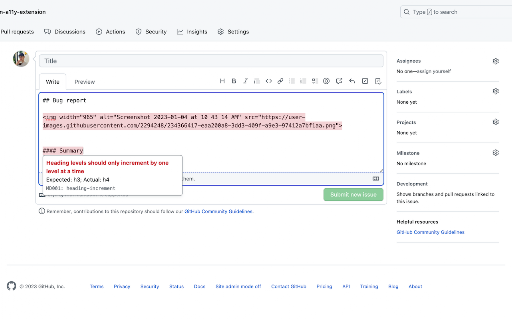
Highlight accessibility issues as you write Markdown on github.com. Highlights accessibility issues as you write issues, pull requests, discussions, comments in Markdown editors on GitHub.com. After installation, the extension will automatically highlight known issues, including missing 'alt' text, empty links, incorrect link syntax, skipped heading levels, duplicate headings, and more. Navigate to or hover over an issue to learn more about it.

Refined GitHub
Simplifies the GitHub interface and adds useful features Highlights: - Linkifies issue/PR references and URLs in code. - Makes whitespace characters visible. - Reduces tabs’ size to 4 spaces instead of 8. - Adds one-click merge conflict fixers. - Adds reaction avatars showing who reacted to a comment. - Adds a button to revert all the changes to a file in a PR. - Adds a build/CI status icon next to the repo’s name. - Adds a button to view the source of Markdown files. - Shows PRs that touch the current file. - Highlights the most useful comment in conversations. - Shows the first Git tag a merged PR was included in. - Adds a link to an automatic changelog for each tag/release. - Adds possible related pages and alternatives on 404 pages. - Displays the age of the repository in the sidebar. And so much more! 200+ features. See the website for a full list of features. The GITHUB and REFINED GITHUB trademarks are owned by GitHub, Inc. and used under license.

GitHub Code Folding
Code folding - the ability to selectively hide and display sections of a code - is an invaluable feature in many text editors and IDEs. Now, developers can utilize that same style code-folding while poring over source code on the web in GitHub. Works for any type of indentation, spaces or tabs. v0.1.0 - remove jQuery dependency - use event page instead of permanent background

GitHub Markdown Printer
Print GitHub Flavored Markdown exactly as it appears on GitHub, with just two clicks. Print GitHub Flavored Markdown exactly as it appears on GitHub, with just two clicks. Faster and easier to use than other methods, such as downloading the markdown file and running it through a converter. Works on any page on GitHub or GitHub Enterprise that has a markdown preview. Post issues and suggestions here: https://github.com/jerry1100/github-markdown-printer/issues

Markdown Editor
Features ================== * Save your data at real time * Open local markdown file * Save content as markdown file * Print to pdf with Chrome native printer * Support Github Flavored Markdown syntax * Almost same as Github editor & preview format
