
hcgieiojhdobejojmkmdnahddimmhdbn


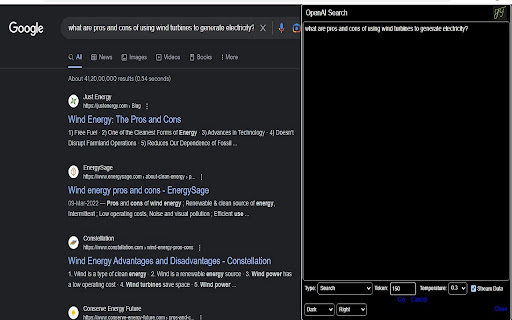
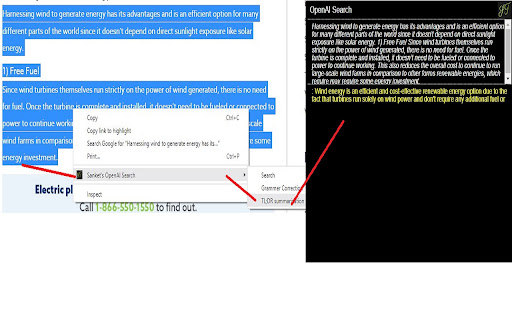
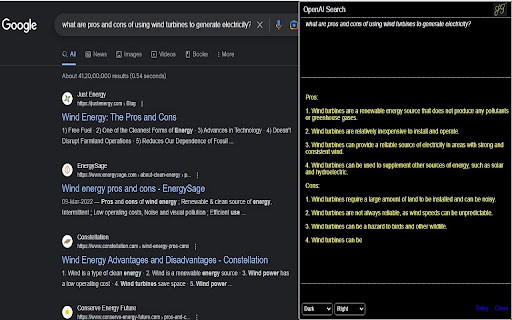
Chrome Extension for OpenAI Search This Chrome extension uses the OpenAI API, and the user must provide API keys, which are stored in the Chrome Store. It can be accessed by clicking the icon or using the Context menu, and it gives the user the option to search both Google and OpenAI APIs. This extension also allows the user to adjust the token and temperature to get better results. Effectively, this component takes the input of an OpenAPI key, a search prompt, and calls the OpenAI API, displaying the results. This version can search, summarize, and correct English grammar. Version 0.3.0 1) Fixed bugs 2) Dark and Light Mode 3) Window can be move to left or right side 4) Added some search features like TL;DR, Notes etc Version 0.2.0 1) Changed UI to right side window 2) Handled Exception 3) Added Chrome Context Menu 4) Checked Moderation for OpenAI Content Policy Here is Demo of Chrome Extension https://storybook7.blob.core.windows.net/images/Sanket OpenAI ChromeX.gif

OpenAI API Explorer
Use OpenAI to summarize, ask questions, and explain text. Make a OpenAI models work with web page text for you. 1️⃣ You'll need OpenAI api key. Here is link to obtain it: https://platform.openai.com/account/api-keys. 2️⃣ Select text. 3️⃣ Choose "OpenAI API Explorer - TextAigist" -> "Summarize" or any other option, like "Answer the question" (if the the question is selected). Or even ask your own question about selected text with "Ask question about selected text" menu item. ❇️ See the summary from the OpenAI model as a popup window and the price (for example, the summary of a page chapter costs $0.000253) Features: ℹ️ Pick one of many OpenAI models available ℹ️ Ask model anything about selected text like, in this case selected text is the context for the answer ℹ️ Create custom menu item to ask your own questions about selected text (like "explain it in Turkish language for 14 year old", or "make a tweet out of this text, add emoji and excitement"). Security notes: 🔒 API key stored in your browser and used for OpenAI open API calls only. 🔒 The selected text is sent directly to the OpenAI API and is not stored anywhere. The OpenAI response is the summary itself; it is displayed on your screen and is not stored anywhere.

newtabpro
newtabpro是一款提高效率的新标签页,提供免费的ChatGPT、PDF转换、谷歌翻译、OCR识别、智能搜索、图片压缩放大、音视频格式转换、音视频剪切、思维导图、待办事项、时事热搜、日历与星座等功能,重新定义打工人的新标签页。 newtabpro是一款免费专注高效办公的新标签页。提供免费的智能搜索、智能AI、PDF转换、OCR识别、谷歌翻译、图片压缩、图片放大、视频格式转换、音频格式转换、视频剪切、音频剪切、思维导图、待办事项、时事热搜、日历与星座、精美壁纸、自定义网站图标等功能,重新定义打工人的新标签页。 【智能办公工具】 - 智能AI:AI聊天助手,随时解答您的疑问,让您的工作更加轻松愉快。 - PDF转换:一键转换Word、Excel、PPT等文件为PDF,简化文档管理。 - OCR识别:精准识别图片文字,快速提取,提高办公效率。 - 精准翻译:多语言即时翻译,让您的沟通无界限。 - 待办事项:智能管理您的日常任务,确保工作有序进行。 - 智能抠图:上传图片,即可一键抠图,速度极快。 - 在线解压: 免费在线解压工具,全程无广,一秒解压。 - 图表生成:19种常见图表可选,功能简单实用,新手友好。 -思维导图: 创建和编辑思维导图,帮助您整理思路和规划项目。 【多媒体处理】 - 图片处理:无损压缩、放大图片,优化存储与打印质量。 - 视频转换:支持多种视频格式,满足不同播放需求。 - 音频转换:轻松转换音频格式,适应不同设备播放。 - 剪辑工具:快速剪切视频和音频,捕捉精彩瞬间。 【精选网址】 - 资讯:新浪、网易、搜狐、hao123、百度等,一触即达。 - AI科技:Mijourney、网易天音、美图AI、Google Bard等,紧跟科技前沿。 - 娱乐:抖音、知乎、微博、小红书、豆瓣、淘宝等,工作之余轻松一刻。 - 办公:网易邮箱、QQ邮箱、腾讯文档、百度网盘等,办公资源一应俱全。 【趣味组件】 - 电子木鱼:工作间隙的积德小工具,放松心情。 - 热点事件:实时更新,掌握最新资讯,不落人后。 - 星座运势:每日更新,查看当日宜忌,为生活增添乐趣。

ChatGPT Utilities by innaton.com
ChatGPT Utilities to make working with ChatGPT more efficient. Starting with a smart 'continue' button. Initial Version of ChatGPT Utilities to make working with ChatGPT more efficient. Starting with a smart "continue" button. A "smart" continue button - forces ChatGPT to continue right from where it stopped. No more skipped, repeated, or malformed responses when working with long responses. Especially useful when dealing with code or long text responses. Currently at a 90%+ success rate since the first release of ChatGPT. (Still outperforming the official continue functionality released by OpenAI) Example dynamic continue prompt: " Your last response stopped here: ``` [LAST_FEW_LINES_BEFORE_STOP] ``` Please continue. " Currently it uses pre-defined prompts, but in the future might allow the user to customise as needed. If this get's enough traction and support, we might follow up with a larger and more powerful toolkit for ChatGPT. Ideas for future versions: - Button/prompt to accept large code as input and wait until all data is provided before initiating a conversation - Special buttons/prompts for developers that are optimised for generating boiler-plate code for specific languages - Export conversation to PDF - Customisation of prompts used in any of the buttons - Schedule and execute prompts (schedule multiple prompts and auto-continue) For any questions, comments, or suggestions, please reach out on info@innaton.com To support this project you can use the following link: https://bmc.link/waelmas V2.12 Updates: - Usual frequent fixes for breaking UI changes introduced to the ChatGPT UI. V2.11 Updates: - Usual fixes for breaking UI changes introduced to the ChatGPT UI. V2.10 Updates: - Minor fixes to button mounting due to UI changes introduced to the ChatGPT UI. V2.9 Updates: - Minor UI fix to the appearance of the Continue button. V2.8 Updates: - Fixing button disappearing issue after changes introduced to the ChatGPT UI. V2.7 Updates: - Minor fixes after changes introduced to the ChatGPT UI. V2.6 Updates: - Major changes to injecting continue prompt to the input text after OpenAI introduced breaking changes apparently in attempts to make automated messages harder for non-humans. - Minor improvements to performance and handling edge cases. V2.5 Updates: - Support for GPT-4 Browsing & Plugin chats. - Minor performance improvements. V2.4 Updates: - Fixing breaking changes introduced in the ChatGPT version of May 3rd causing the button to fail to mount. V2.2 & V2.3 Updates: - Minor fix to allow the mounting of the button on the new format of ChatGPT URLs (silent change pushed by OpenAI) V2.1 Updates: - Minor fix of an issue that prevented the attachment of the continue button on the page for new chats with model selected being GPT-4 or GPT-3.5-Legacy. V2.0 Updates: - Rework of all page selectors due to breaking changes introduced in the ChatGPT Mar 23 version. - Improved functionalities making ChatGPT continue without repetitions - Handling of content in ordered/unordered lists - Better handling of codeblocks V1.1 Updates: - Fixing dynamic content pickup after OpenAI introduced breaking changes with the ChatGPT Jan 30 version -> BEFORE adding a review, please check the release notes above AND wait a couple of days after a new ChatGPT version was released. OpenAI keeps introducing breaking changes, and every-time we deploy a fix we have to wait for approval from Google before the extension is updated. This extension is maintained by 1 person with work commitments, so please be patient.

CG No Login Master - ChatGPT cannot log in to special tools
Specially serve for education, scientific research, games, news, foreign trade, cross-border e-commerce, overseas shopping and… ChatGPT Unable to Login Master is an efficient, free, safe, and stable plug-in for Magic Internet access. It can break through network blockade, browse various contents and resources of ChatGPT freely in an anonymous manner, and avoid being tracked and monitored. ChatGPT Unable to Login Master is an efficient, free, safe, and stable scientific online plug-in, which can help users break through network blockade and access foreign websites and applications across borders. Users can easily access blocked websites and applications, including ChatGPT's social networking, entertainment, academic, news, e-commerce, games, video, music and other platforms in different fields to obtain more and wider information and resources , Improve the efficiency and quality of work and study. It is dedicated to education, scientific research, games, news, foreign trade, cross-border e-commerce, online shopping and developers, solving the problem of ChatGPT not being able to log in and Internet acceleration tools, dedicated to the Chrome kernel browser, and can access GPT-4, DALL.E2, OpenAI's products such as Whisper, Alignment, and API. It can be used with one-click installation, and the operation is simple, and you can access and browse after getting started. The best Chrome acceleration plug-in, which can help users increase the speed and regional restrictions of visiting websites overseas, and improve the efficiency of work and study! trial version: You can experience the trial version of TRY for free every day. It is free and does not require any payment. You can enjoy a trial period of 5 to 30 minutes every day. After logging in, the TRY logo will be displayed in the upper right corner of the user, and the selectable node has the word "trial"; Premium version: You can also upgrade to the PRO professional advanced version, which requires payment. There is no limit to the use of nodes, duration, and bandwidth every day. After logging in, the PRO logo will be displayed in the upper right corner of the user, and all the selectable nodes "trial" and "professional" have no Any restrictions, the subscription price is: ¥14.8/month, ¥138.6/year, the pricing may fluctuate according to the exchange rate, please refer to the display on the official website. Rest assured, the premium version is not enabled by default unless you actively upgrade!
