
hoiceilmkjekbpmcgediodmmpdbfhejp


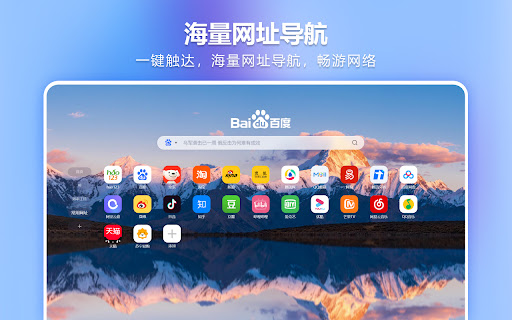


newtabpro是一款提高效率的新标签页,提供免费的ChatGPT、PDF转换、谷歌翻译、OCR识别、智能搜索、图片压缩放大、音视频格式转换、音视频剪切、思维导图、待办事项、时事热搜、日历与星座等功能,重新定义打工人的新标签页。 newtabpro是一款免费专注高效办公的新标签页。提供免费的智能搜索、智能AI、PDF转换、OCR识别、谷歌翻译、图片压缩、图片放大、视频格式转换、音频格式转换、视频剪切、音频剪切、思维导图、待办事项、时事热搜、日历与星座、精美壁纸、自定义网站图标等功能,重新定义打工人的新标签页。 【智能办公工具】 - 智能AI:AI聊天助手,随时解答您的疑问,让您的工作更加轻松愉快。 - PDF转换:一键转换Word、Excel、PPT等文件为PDF,简化文档管理。 - OCR识别:精准识别图片文字,快速提取,提高办公效率。 - 精准翻译:多语言即时翻译,让您的沟通无界限。 - 待办事项:智能管理您的日常任务,确保工作有序进行。 - 智能抠图:上传图片,即可一键抠图,速度极快。 - 在线解压: 免费在线解压工具,全程无广,一秒解压。 - 图表生成:19种常见图表可选,功能简单实用,新手友好。 -思维导图: 创建和编辑思维导图,帮助您整理思路和规划项目。 【多媒体处理】 - 图片处理:无损压缩、放大图片,优化存储与打印质量。 - 视频转换:支持多种视频格式,满足不同播放需求。 - 音频转换:轻松转换音频格式,适应不同设备播放。 - 剪辑工具:快速剪切视频和音频,捕捉精彩瞬间。 【精选网址】 - 资讯:新浪、网易、搜狐、hao123、百度等,一触即达。 - AI科技:Mijourney、网易天音、美图AI、Google Bard等,紧跟科技前沿。 - 娱乐:抖音、知乎、微博、小红书、豆瓣、淘宝等,工作之余轻松一刻。 - 办公:网易邮箱、QQ邮箱、腾讯文档、百度网盘等,办公资源一应俱全。 【趣味组件】 - 电子木鱼:工作间隙的积德小工具,放松心情。 - 热点事件:实时更新,掌握最新资讯,不落人后。 - 星座运势:每日更新,查看当日宜忌,为生活增添乐趣。

SKYLLSYFT
Overview: SKYLLSYFT is an innovative FREE Chrome extension designed to streamline the job application process by leveraging AI technology to match your resume with job descriptions. Whether you're actively job hunting or just exploring opportunities, this extension helps you ensure that your resume includes the essential skills employers are seeking. Key Features: 1. AI-Powered Skill Extraction: ◦ Our extension uses advanced AI models to extract key skills and competencies from job descriptions you highlight on any job portal. ◦ The AI identifies both hard and soft skills, ensuring a comprehensive analysis. 2. Instant Skill Matching: ◦ Simply highlight the relevant portion of any job description on any webpage and click the extension to initiate the scan. ◦ The AI compares the job description's skills with those present in your resume, instantly providing the number of missing skills. 3. Optimize Resume: ◦ Receive a detailed report of the skills that are missing from your resume. ◦ Option to optimize your resume with the list of missing skills and download in .DOC / .PDF format to submit on job application. 4. User-Friendly Interface: ◦ A clean and intuitive interface ensures that even users with minimal technical skills can navigate the extension effortlessly. ◦ The extension is designed to integrate seamlessly into your browsing experience without unnecessary distractions. 5. Secure Data Handling: ◦ User data, including login details, resumes and skill analysis, is stored securely and is not shared with third parties. ◦ Compliance with all data privacy regulations is ensured. How It Works: 1. Upload your resume directly into the extension and store it for future use. 2. Navigate to any job portal or company website. 3. Highlight the job description or the relevant portion you want to analyze. 4. Click the "Scan" button. 5. The AI will process the highlighted text and your resume, providing instant feedback on missing skills. 6. Update your resume directly with the missing skills and download in relevant format. Why SKYLLSYFT? • Instant Shortlisting: Conveniently scan as many jobs on any portal without switching elsewhere to find the most suitable job for you. • Save Time: Eliminate the guesswork involved in matching your resume with job descriptions. • Improve Accuracy: Ensure your resume is aligned with the specific requirements of the job you're applying for. • Stay Competitive: Identify gaps in your resume that could make the difference in landing an interview. Compliance and Privacy Policy: User Data Protection: SKYLLSYFT is committed to protecting your personal data. All resumes and job description texts analyzed by the extension are securely stored in our database and locally in your browser and are not shared with any third-party services. Permissions: To function effectively, Skyllsyft requires the following permissions: • Read and change your data on all websites: This allows the extension to access and analyze job descriptions highlighted by the user. • Storage: This allows users to securely store their login details and resumes for future comparison. Support: Skyllsyft is actively maintained and regularly updated to ensure compatibility with the latest web standards and job portals. For any issues, suggestions, or support requests, users can contact us via contact@skyllsyft.com or visit our support page on www.skyllsyft.com. Additional Compliance Information: • Content Policy Compliance: The extension adheres to the Chrome Web Store’s content policies. It does not engage in misleading practices, collects user data only for the purpose of providing the described functionality, and provides clear and accurate descriptions of its features. • User Experience: The extension is designed to be non-intrusive, providing value only when actively used by the user. • Security: Skyllsyft has been developed following industry-standard security practices, ensuring that user data is encrypted and protected against unauthorized access. Submit Your Feedback: We value your feedback! Please leave a review and let us know how skyllsyft has helped in your job application journey.

Twitter/X Response Generator
Generate responses for selected tweets in your timeline Elevate your Twitter/X interactions with the "Twitter/X Response Generator"! Say goodbye to writer's block and hello to seamless, expressive tweeting. Whether you're replying to friends, colleagues, or your favorite celebrity, our extension empowers you to craft the perfect response tailored to any mood. **Key Features:** - **Diverse Tweet Tones**: Choose from a rich variety of tones like Friendly, Professional, Sarcastic, Angry, Sad, Excited, Funny, Informative, Persuasive, Curious, Inspirational, Sympathetic, Grateful, Critical, Supportive, Motivational, Cautious, Optimistic, Reflective, and Nostalgic. - **Automatic Generation**: Our AI reads the tweet you’re responding to and instantly generates a response based on your chosen tone. Simply select your mode and watch the magic happen! - **User-Friendly Design**: Easy to use with a clean, intuitive interface. Just a few clicks, and you're ready to go. - **Increase Engagement**: Boost your interaction rates by responding in exactly the right tone, making your tweets more engaging and relatable. - **Time-Saving Tool**: Save valuable time crafting responses, allowing you to focus on what matters most - connecting with your audience. **How it Works:** 1. Install the "Twitter/X Response Generator" Chrome Extension. 2. Open a tweet you want to respond to. 3. Select your desired tone from the list of 20 tweet modes. 4. Let the extension generate a response tailored to your selected tone. 5. Edit if needed, and hit send! This innovative tool is perfect for social media managers, influencers, businesses, or anyone looking to enhance their Twitter/X communication effortlessly. It's time to bring personality and precision to every tweet. Download "Twitter/X Response Generator" today and transform your social media presence with the power of perfectly tailored responses! 🚀

Trupeer - AI Screen Recorder for Video Documentation, SOPs & Screenshots
Create Video & Documentation in minutes with AI. Share polished video and step-by-step guides/SOPs in seconds. Instead of traditional video editing let AI handle your videos & documentation without manually editing and copy/pasting screenshots and text instructions. 90% reduction in video editing & documentation cycles. Whether you are showing a new feature, building a training guide, creating a support article, or recording a walkthrough for customers, create it with Trupeer without cameras, retakes, or complex editing. What people use Trupeer for Teams use Trupeer to: 1. create product demo videos 2. record software tutorials and walkthroughs 3. make training videos for onboarding and sales enablement 4. build knowledge base articles and step-by-step guides 5. create help center content for customer support 6. share product updates with customers and prospects 7. document workflows, SOPs, and process changes If someone on your team has ever said, “This would be easier to explain in a video,” Trupeer is built for that workflow. Start by recording your screen or uploading a video. Trupeer captures your screen, voice, and internal audio, then helps turn that recording into content your team can actually use. From one recording, you can create: 1. polished video walkthrough 2. narrated product demo 3. training or onboarding video 4. structured document with steps and screenshots 5. shareable knowledge base library This is what makes Trupeer useful for teams that need both video and documentation, not just another screen recorder. * Edit with AI, not with complicated timelines. Trupeer helps you clean up and improve recordings without advanced editing skills. You can: 1. turn speech into an editable script 2. rewrite the script with AI 3. trim video using the script 4. remove filler words automatically 5. add or delete pauses 6. delete chunks or skip sections 7. add clips anywhere in the video 8. use AI voiceovers and AI avatars 9. add custom voices, including ElevenLabs voices 10. keep or use the original transcript 11. add captions and chapters 12. adjust timing with timeline controls 13. use zoom effects, crop tools, and aspect ratio changes 14. add intro slides, outro slides, backgrounds, transitions, music, and text These features help teams create cleaner tutorial videos, explainer videos, customer training content, and sales demos much faster. * Build documentation and knowledge base content at the same time Trupeer also works as a documentation generator and knowledge base software. You can create and edit documents with: 1. step-by-step instructions 2. screenshots and external images 3. new steps added manually 4. AI rewrites 5. find and replace 6. rich text formatting 7. document templates 8. image cropping 9. bulk image cropping 10. annotations like blur, arrows, and text This makes Trupeer useful for teams searching for: 1. step-by-step documentation software 2. SOP documentation tools 3. help center content tools 4. product knowledge base software * Create on-brand content for your team- Trupeer supports brand customization so your videos and docs stay consistent across teams. You can use: 1. video templates 2. documentation templates 3. custom avatars 4. custom voices 5. custom backgrounds 6. custom music 7. brand kits 8. custom glossary 9. custom pronunciation settings * Translate for global teams Trupeer helps global teams create multilingual content faster with: 1. video translation 2. document translation 3. support for 65+ languages This is especially useful for customer education, onboarding, support, and internal training across regions. Trupeer makes it easy to publish content as a shareable page and keep improving it over time. You can: 1. share with one link 2. update the content without changing the URL 3. use shared pages for docs and videos 4. track engagement with share page analytics That makes it useful for teams maintaining help centers, training libraries, product docs, and sales collateral. * Built for teams and organizations Trupeer supports team workflows with: 1. organization setup 2. team invites 3. shared assets 4. centralized administration 5. organization analytics Trusted by thousands of teams like Glean, United Health Group, SAP, Adobe, Berkshire Hathaway etc to create product demos, walkthroughs, training videos, onboarding content, documentation, and knowledge base pages faster. What is Trupeer? Trupeer is an AI screen recorder and content creation tool that helps you turn screen recordings into product demos, tutorials, training videos, and step-by-step documentation. Who is Trupeer for? Trupeer is built for product teams, sales teams, customer success teams, support teams, operations teams, and anyone who needs to explain software, workflows, or processes clearly. Can Trupeer create both videos and documentation? Yes. Trupeer can turn one recording into both a polished video and a structured document with steps, screenshots, and annotations. Can I use Trupeer for product demos and software walkthroughs? Yes. Trupeer is designed for product demos, feature walkthroughs, onboarding training, customer education, and tutorial content. Does Trupeer support AI avatars and voiceovers? Yes. Trupeer supports AI avatars, AI voiceovers, and custom voices, including ElevenLabs voice options. Can I edit my video by editing the script? Yes. You can edit the script, rewrite it with AI, trim using the script, remove filler words, add pauses, and clean up sections without traditional video editing complexity. Can I create knowledge base articles and help center content? Yes. Trupeer can create step-by-step documents, guides, SOPs, help center content, and knowledge base pages from your recordings. Does Trupeer support captions, chapters, and translations? Yes. Trupeer supports captions, chapters, video translation, and document translation in 65+ languages. Can I brand my videos and docs? Yes. You can use templates, brand kits, custom avatars, custom voices, custom backgrounds, music, glossary rules, and pronunciation settings. Can teams collaborate in Trupeer? Yes. Trupeer supports organization setup, team invites, shared assets, centralized administration, and analytics for team workflows. For support or feedback, contact hello@trupeer.ai This Screen Recorder Chrome Extension builds on Screenity, originally created by Alyssa X and licensed under the GNU GPLv3, with enhancements developed by the Trupeer team. Source code available https://github.com/trupeer-ai/trupeer-chrome-capture For more information about how to use Trupeer.ai, please visit https://www.trupeer.ai/

Leaf - Twitter Content Template Generator
Leaf is a Chrome extension to generate Twitter Content Templates. 👉 Generate Templates: - Leaf helps you create content templates from successful tweets using Claude AI - No more starting from scratch or spending hours brainstorming tweet ideas - Quickly generate templates for different content types 👉 Easy-to-Use: - Copy generated templates to your clipboard with a single click - Seamlessly integrate templates into your Twitter workflow 👉 Personalized AI Access: - Add your own Anthropic API key - Maintain control over your AI usage and costs 👉 Pay per Use: - Use Leaf with your own Anthropic API key - Your costs depend on your usage and will be charged directly by Anthropic ◆ Click the "Add to Chrome" button and pin it to your toolbar ◆ Add your Anthropic API key in the extension settings ◆ Navigate to Twitter/X and click the Leaf icon to start generating templates 📌 How does Leaf generate templates? Leaf uses Claude AI to analyze successful tweets and extract their structural elements to create customizable templates. 📌 Do I need to pay for Leaf? You will need to provide your own Anthropic API key to start using Leaf, which you can obtain from Anthropic's website. 📌 How do I use the generated templates? Once a template is generated, you can easily copy it to your clipboard and paste it directly into your tweet composer on Twitter/X. 📌 Is my API key secure? Your Anthropic API key is stored locally on your device. Leaf does not have access to or store your key on any external servers. Try Leaf now and accelerate your Twitter content creation process!
