
doedlfgeilocafjipkkhegndbhlkoedo
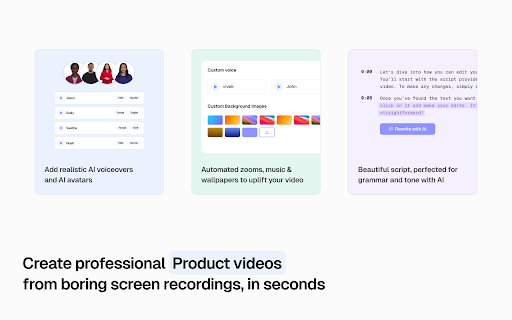


Create Video & Documentation in minutes with AI. Share polished video and step-by-step guides/SOPs in seconds. Instead of traditional video editing let AI handle your videos & documentation without manually editing and copy/pasting screenshots and text instructions. 90% reduction in video editing & documentation cycles. Whether you are showing a new feature, building a training guide, creating a support article, or recording a walkthrough for customers, create it with Trupeer without cameras, retakes, or complex editing. What people use Trupeer for Teams use Trupeer to: 1. create product demo videos 2. record software tutorials and walkthroughs 3. make training videos for onboarding and sales enablement 4. build knowledge base articles and step-by-step guides 5. create help center content for customer support 6. share product updates with customers and prospects 7. document workflows, SOPs, and process changes If someone on your team has ever said, “This would be easier to explain in a video,” Trupeer is built for that workflow. Start by recording your screen or uploading a video. Trupeer captures your screen, voice, and internal audio, then helps turn that recording into content your team can actually use. From one recording, you can create: 1. polished video walkthrough 2. narrated product demo 3. training or onboarding video 4. structured document with steps and screenshots 5. shareable knowledge base library This is what makes Trupeer useful for teams that need both video and documentation, not just another screen recorder. * Edit with AI, not with complicated timelines. Trupeer helps you clean up and improve recordings without advanced editing skills. You can: 1. turn speech into an editable script 2. rewrite the script with AI 3. trim video using the script 4. remove filler words automatically 5. add or delete pauses 6. delete chunks or skip sections 7. add clips anywhere in the video 8. use AI voiceovers and AI avatars 9. add custom voices, including ElevenLabs voices 10. keep or use the original transcript 11. add captions and chapters 12. adjust timing with timeline controls 13. use zoom effects, crop tools, and aspect ratio changes 14. add intro slides, outro slides, backgrounds, transitions, music, and text These features help teams create cleaner tutorial videos, explainer videos, customer training content, and sales demos much faster. * Build documentation and knowledge base content at the same time Trupeer also works as a documentation generator and knowledge base software. You can create and edit documents with: 1. step-by-step instructions 2. screenshots and external images 3. new steps added manually 4. AI rewrites 5. find and replace 6. rich text formatting 7. document templates 8. image cropping 9. bulk image cropping 10. annotations like blur, arrows, and text This makes Trupeer useful for teams searching for: 1. step-by-step documentation software 2. SOP documentation tools 3. help center content tools 4. product knowledge base software * Create on-brand content for your team- Trupeer supports brand customization so your videos and docs stay consistent across teams. You can use: 1. video templates 2. documentation templates 3. custom avatars 4. custom voices 5. custom backgrounds 6. custom music 7. brand kits 8. custom glossary 9. custom pronunciation settings * Translate for global teams Trupeer helps global teams create multilingual content faster with: 1. video translation 2. document translation 3. support for 65+ languages This is especially useful for customer education, onboarding, support, and internal training across regions. Trupeer makes it easy to publish content as a shareable page and keep improving it over time. You can: 1. share with one link 2. update the content without changing the URL 3. use shared pages for docs and videos 4. track engagement with share page analytics That makes it useful for teams maintaining help centers, training libraries, product docs, and sales collateral. * Built for teams and organizations Trupeer supports team workflows with: 1. organization setup 2. team invites 3. shared assets 4. centralized administration 5. organization analytics Trusted by thousands of teams like Glean, United Health Group, SAP, Adobe, Berkshire Hathaway etc to create product demos, walkthroughs, training videos, onboarding content, documentation, and knowledge base pages faster. What is Trupeer? Trupeer is an AI screen recorder and content creation tool that helps you turn screen recordings into product demos, tutorials, training videos, and step-by-step documentation. Who is Trupeer for? Trupeer is built for product teams, sales teams, customer success teams, support teams, operations teams, and anyone who needs to explain software, workflows, or processes clearly. Can Trupeer create both videos and documentation? Yes. Trupeer can turn one recording into both a polished video and a structured document with steps, screenshots, and annotations. Can I use Trupeer for product demos and software walkthroughs? Yes. Trupeer is designed for product demos, feature walkthroughs, onboarding training, customer education, and tutorial content. Does Trupeer support AI avatars and voiceovers? Yes. Trupeer supports AI avatars, AI voiceovers, and custom voices, including ElevenLabs voice options. Can I edit my video by editing the script? Yes. You can edit the script, rewrite it with AI, trim using the script, remove filler words, add pauses, and clean up sections without traditional video editing complexity. Can I create knowledge base articles and help center content? Yes. Trupeer can create step-by-step documents, guides, SOPs, help center content, and knowledge base pages from your recordings. Does Trupeer support captions, chapters, and translations? Yes. Trupeer supports captions, chapters, video translation, and document translation in 65+ languages. Can I brand my videos and docs? Yes. You can use templates, brand kits, custom avatars, custom voices, custom backgrounds, music, glossary rules, and pronunciation settings. Can teams collaborate in Trupeer? Yes. Trupeer supports organization setup, team invites, shared assets, centralized administration, and analytics for team workflows. For support or feedback, contact hello@trupeer.ai This Screen Recorder Chrome Extension builds on Screenity, originally created by Alyssa X and licensed under the GNU GPLv3, with enhancements developed by the Trupeer team. Source code available https://github.com/trupeer-ai/trupeer-chrome-capture For more information about how to use Trupeer.ai, please visit https://www.trupeer.ai/

Create interactive demos,videos,how-to guides
Create interactive product guides and explainer videos With Floik, you can turn your product workflows into amazing self-serve explainer videos, interactive demos, step-by-step guides and more in minutes. You can do all of this & more with purpose built editing tools on a single platform. Get started for FREE 🙂 Install the chrome extension, capture your workflow and let Floik do the rest. With Floik, showcase how your product is helping solve your prospects and customers problems in 3 simple steps. ⓵ Choose the screen (tab or a window) and start your screen capture ⓶ Customize: Use our edit options & tailor you're output like a pro ⓷ Engage: Share it anywhere on the web, integrate with your CRM and view real-time user insights Floik enables you in supercharging your product-led-growth and achieving your goals 🎯 faster. 👀 Drive product-qualified leads by giving a sneak peek of your product's aha moment 🏃Steer faster product adoption with visually engaging on-boarding guides 🤩Increase customer satisfaction by answering repeated queries much faster with lesser effort No more typing or tying screenshots together. Use Floik's all-in-one platform to capture and showcase your product perfectly! 🎉

Clueso
Transform any ordinary screen-recording into a studio-style video and a step-by-step how-to article with screenshots. Clueso turns raw screen recordings into stunning, studio-quality videos and step-by-step documentation – in minutes. No editing or design expertise needed. With Clueso, anyone can create stunning product videos and documentation for their product quickly. Just record or upload a raw screen recording and let Clueso handle the rest. Here’s the magic it does for you: 🗣️ AI-generated Script & Voiceovers: Clueso transcribes your audio, polishes it into a clean script, and then lets you make quick edits. It then generates studio-quality voiceovers, perfectly synced to your video. 🔍 Auto-Zoom & Smart Effects: Clueso automatically highlights key areas of your UI with zoom-in effects. You can also add spotlights, callouts, and other animations in a single click. 🎨 Branded Templates: Create and save branded intros, outros, backgrounds, thumbnails, and transitions to use across all your videos. 🌏 Translations: Translate your videos into 40+ languages. Use our glossary to fine-tune terms and ensure translation accuracy. 📃 Step-by-step documentation: Clueso automatically creates detailed step-by-step articles with embedded screenshots and GIFs from any video. Use our AI agent to get the tone and formatting you want. Who’s Clueso for? - Founders & Product Teams: Create product demo videos for customers or internal stakeholders. - Product Marketing Teams: Launch new features with polished videos and GIFs. - Customer Education, Success & Support Teams: Build onboarding flows, how-to guides, training videos, and help articles. - Sales Enablement, L&D & IT Teams: Produce internal training videos and SOPs for tools, workflows, and processes. And anyone else who wants to create engaging videos and documentation fast.

Guideless: AI Documentation & Video Guides
Guideless captures your flow and turns it into a narrated video guide — ready to share or embed. Create polished AI video guides in seconds. Guideless turns your click-through flows into narrated walkthroughs - no manual screen recording, no retakes, no editing. Just click through your workflow and Guideless automatically captures, scripts, voices, and packages a professional video guide. Why Guideless? Teams waste hours recording, editing, and updating training content. Guideless removes the busywork by generating on-brand narration and natural-sounding voiceovers automatically, with instant sharing or embed options for docs, help centers, wikis, and LMS. Popular use cases: - Onboarding - Step-by-step product tours new users actually follow. - Customer support - Clear visual walkthroughs that reduce back-and-forth. - Training and SOPs - Keep process guides up to date without re-recording videos. - Feature launches - Announce new features with guided product walkthroughs. - Internal operations - Ensure workflows are followed consistently. Key features: - One-click capture - Automatically record every step of your workflow. - AI narration - Script and natural voiceover generated in seconds. - Auto-captions and highlights - Improve clarity and accessibility. - Share or embed anywhere - Links, embeds, video, or GIF export. - Engagement analytics - Track views, drop-offs, and performance. - Roles and permissions - Control who can create and access guides. - Secure by design - SOC 2 compliance in progress. Built for modern teams. Guideless is trusted by product, support, and operations teams who need to create guides 10x faster - without editing timelines or recording their voice.

Synthesia - AI Screen Recorder & Editor
Record screen and create pro-level video in minutes. Edit recording in Synthesia for quality - shareable content in just one take. Synthesia’s screen recorder transcribes what you say in the recording, makes an AI avatar say it for you—fear of bed-hair instantly gone—and automatically removes those filler-words (um, ah, eh) that distract your audience. You don’t even need a camera! Synthesia is the number #1 AI video editor worldwide, with ⭐️ 4.7 stars on G2.com. 1 million users make videos in Synthesia without the need for expensive sets, cameras, editing software or actors. We’re used by half of the Fortune 500 in their day-to-day work. Now with our AI screen recorder Synthesia gives you yet another way to make quality video content that is evergreen, editable, and ready to share with your colleagues and the outside world. 🎥 Record your screen, microphone and internal computer audio 🔒 Content Blur: Apply Blur to any element on the tab to hide sensitive content from the recording 🗣️ Automatic Transcription: Convert your voiceover to text effortlessly 🙋🏻♀️ AI Avatar: Your words are read out by an AI avatar (no camera necessary!) ✂️ Filler Word Removal: Enhance your video by eliminating unnecessary filler words 🎬 Scene Splitting: Automatically divide your video into logical, easy-to-follow scenes 🎤 Voiceover Alignment: Perfectly sync your voiceover with the video ✈️ Share your video with colleagues for review before publication 📽️ Screen Recorder - Record your screen, microphone and internal computer audio - An AI Avatar will then read your script for you in Synthesia (no camera required) - Use Chrome to record your full screen or just your current window - Add camera blur to hide sensitive information - Easily edit your recording in Synthesia’s video editor - Add animations, scene transitions, background music and more - Share your work in progress with colleagues and let them edit alongside you - Only one take required (because fully editable!) - Translate your clip into 20+ languages automatically 💾 Share your video with just a link - Using Synthesia’s very own media player in multiple languages - Choose whether your video is private or public - Download and embed as an MP4 on social media, websites and more - Download as a SCORM package for integration into your LMS - Update your video and retain the same link (no dead links!) What people use the AI screen recorder for: 📊 Creating professional product demos for sales outreach 📚 Making easy-to-follow help centre tutorials 🎥 Showcasing features effectively in marketing videos 🆕 Highlighting new product updates 📝 Explaining process changes clearly to your team 🙋🏻♀️ Guiding users through the app or website 🤓 Helping explain core IT and cybersecurity processes 50% OF THE FORTUNE 500 1 million users make videos with Synthesia from individual creators to employees across half of the Fortune 500. Our clients include Xerox, Reuters, Heineken, Zoom, in addition to 50,000 other world-class companies. ”I’ve never even used a tutorial, because the platform is so easy to use. This actually is the first time in my career that I've been an early adopter of new technology.” - Frank van der Grijspaarde, Global TPM Manager of Customer Service and Logistics at Heineken ”Since we started working with Synthesia, we have seen massive improvements in reducing production time.” — Jason Etherington, Global L&D Sales Training Strategy Manager at Xerox ”Switching from text to video has significantly boosted our engagement. Creating videos is no more difficult than assembling slides, and reviewing them is faster since it skips in-person review sessions.” - Stephanie Diaz, Director Health & Wellness at Spirit Airlines
