
gdaanompcnmhpbaogmddepcfnbdoimpl


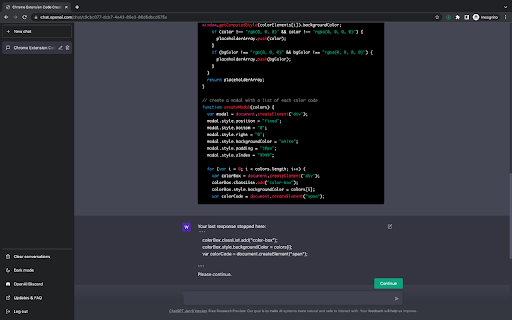
ChatGPT Utilities to make working with ChatGPT more efficient. Starting with a smart 'continue' button. Initial Version of ChatGPT Utilities to make working with ChatGPT more efficient. Starting with a smart "continue" button. A "smart" continue button - forces ChatGPT to continue right from where it stopped. No more skipped, repeated, or malformed responses when working with long responses. Especially useful when dealing with code or long text responses. Currently at a 90%+ success rate since the first release of ChatGPT. (Still outperforming the official continue functionality released by OpenAI) Example dynamic continue prompt: " Your last response stopped here: ``` [LAST_FEW_LINES_BEFORE_STOP] ``` Please continue. " Currently it uses pre-defined prompts, but in the future might allow the user to customise as needed. If this get's enough traction and support, we might follow up with a larger and more powerful toolkit for ChatGPT. Ideas for future versions: - Button/prompt to accept large code as input and wait until all data is provided before initiating a conversation - Special buttons/prompts for developers that are optimised for generating boiler-plate code for specific languages - Export conversation to PDF - Customisation of prompts used in any of the buttons - Schedule and execute prompts (schedule multiple prompts and auto-continue) For any questions, comments, or suggestions, please reach out on info@innaton.com To support this project you can use the following link: https://bmc.link/waelmas V2.12 Updates: - Usual frequent fixes for breaking UI changes introduced to the ChatGPT UI. V2.11 Updates: - Usual fixes for breaking UI changes introduced to the ChatGPT UI. V2.10 Updates: - Minor fixes to button mounting due to UI changes introduced to the ChatGPT UI. V2.9 Updates: - Minor UI fix to the appearance of the Continue button. V2.8 Updates: - Fixing button disappearing issue after changes introduced to the ChatGPT UI. V2.7 Updates: - Minor fixes after changes introduced to the ChatGPT UI. V2.6 Updates: - Major changes to injecting continue prompt to the input text after OpenAI introduced breaking changes apparently in attempts to make automated messages harder for non-humans. - Minor improvements to performance and handling edge cases. V2.5 Updates: - Support for GPT-4 Browsing & Plugin chats. - Minor performance improvements. V2.4 Updates: - Fixing breaking changes introduced in the ChatGPT version of May 3rd causing the button to fail to mount. V2.2 & V2.3 Updates: - Minor fix to allow the mounting of the button on the new format of ChatGPT URLs (silent change pushed by OpenAI) V2.1 Updates: - Minor fix of an issue that prevented the attachment of the continue button on the page for new chats with model selected being GPT-4 or GPT-3.5-Legacy. V2.0 Updates: - Rework of all page selectors due to breaking changes introduced in the ChatGPT Mar 23 version. - Improved functionalities making ChatGPT continue without repetitions - Handling of content in ordered/unordered lists - Better handling of codeblocks V1.1 Updates: - Fixing dynamic content pickup after OpenAI introduced breaking changes with the ChatGPT Jan 30 version -> BEFORE adding a review, please check the release notes above AND wait a couple of days after a new ChatGPT version was released. OpenAI keeps introducing breaking changes, and every-time we deploy a fix we have to wait for approval from Google before the extension is updated. This extension is maintained by 1 person with work commitments, so please be patient.

MetaPrompt - AI Prompt Engineer & Optimizer for ChatGPT & Claude
Transform unclear questions into expert prompts. Get better AI responses from ChatGPT and Claude with one click. Metaprompt: Your AI Whisperer Transform how you interact with AI MetaPrompt transforms your ChatGPT and Claude experience by intelligently enhancing your prompts. Powered by advanced GPT 4.1 models, our Chrome extension analyzes your questions and refines them to generate clearer, more precise AI responses - saving you time and frustration. Simple, Powerful Workflow 1. Type your question as you normally would 2. Click the MetaPrompt button to apply expert prompt engineering 3. Watch as your request transform into an optimized prompt that gets real results What Sets MetaPrompt Apart - Instant Optimization: Turn unclear questions into structured prompts that deliver exactly what you need - Seamless Integration: Works naturally within ChatGPT's and Claude's interface with zero learning curve - Universal Compatibility: Use our popup anywhere you interact with AI tools Choose Your Perfect Plan MetaPrompt Pro ($5.99/month) - 5000 monthly prompt enhancements - Access to larger, more powerful models for even better results Who Needs MetaPrompt? - Students seeking deeper explanations and research assistance - Professionals requiring accurate information for critical tasks - Writers looking for better creative input - Developers needing precise code solutions - Researchers formulating complex queries - Anyone tired of wasting time on unhelpful AI responses Stop struggling with AI miscommunications. Download MetaPrompt today and start getting the quality responses you deserve.

ChatGPT Keyboard Shortcuts
Enhance your ChatGPT experience with easy-to-use keyboard shortcuts. Terminal like behavior inside ChatGPT/Perplexity and more coming... ⭐ CTRL + ArrowUp: previous prompts. Continue press to cycle through earlier prompts. ⭐ CTRL + ArrowDown: recent prompts. Continue press to cycle through your prompt history. If prompt box is empty, it starts cycling from the first prompt. ⭐ More to come... Please refresh ChatGPT/Perplexity tab after installing the extension. ✅ Added automatic functionality to expand the textarea to the ChatGPT maximum default (200px) when the text is too long. (v0.2) 🔧 Fixed bug where user couldn't send unchanged prompt. (v0.3) ✅ Added support for Perplexity AI (www.perplexity.ai). (v0.3) 🔧 Fixed support for Perplexity AI after UI change. (v0.3.1) 🔧 Fixed bug in ChatGPT where user could not cycle through recent prompts by pressing CTRL + ArrowDown. (v0.3.2) 🔧 Fixed support for Perplexity AI after UI change. (v0.3.3) 🔧 Fixed support for Perplexity AI after UI change. (v0.3.4) 🔧 Fixed support for ChatGPT after UI change. (v0.3.5) 🔧 Fixed support for ChatGPT after change. (v0.3.6) 🔧 Fixed support for ChatGPT & Perplexity AI after UI changes. (v0.3.7)

ChatGPT Prompt Generator for Business
Your instant gateway to expert business advice from ChatGPT, without the hassle. Are you an entrepreneur or small business owner that wants to get the best business advice from ChatGPT? But, you don't want to spend hours doing research or writing long, complex prompts? Well now you can with just One Click: Introducing One Click GPT for Business! "It's like a Business Browser for Chat GPT!" Here's Why One Click GPT for Business is a Game-Changer: Say goodbye to the headache of creating complex prompts. With just one click, you can now generate high-quality prompts tailored to your specific business needs. 🔥 High-Level and Advanced Business Strategies: Get access to targeted advice in areas like marketing, sales, finance, operations, and more. Our extension is designed to understand the intricacies of your business, and providing solutions that lead to 10X returns with 10X less effort. 🕒 Time-Saving and Efficient: No more hours wasted on tedious research. Get the advice you need, right when you need it, anytime and anywhere. 🔒 Your Privacy is Our Priority: We respect your data privacy. One Click GPT for Business operates without recording or collecting any private information. 📈 Customized Advice for Growth: Leverage the full potential of ChatGPT but without the hard work. Get immediate strategies that deliver real results, transforming generic advice into personalized action plans that will 10X your business results. How One Click GPT for Business Elevates Your Business In the fast-paced world of business, time is money. Our extension cuts down your effort, delivering the insights you need at lightning speed. Harness the power of AI to make informed, strategic decisions that propel your business forward. Designed with simplicity in mind, our extension integrates seamlessly with your Chrome browser and ChatGPT, making high-level business strategy more accessible than ever. Ready to Revolutionize Your Business? Embrace the future of business strategy with One-Click GPT for Business. This Chrome Extension is more than a tool; it’s your AI partner in giving you an edge in the complex world of entrepreneurship. Download Now and 10X Your Business Today! Click 'Add to Chrome' to begin your journey towards streamlined, efficient, and impactful business growth. With One Click GPT for Business, you’re not just keeping up with the competition; you’ll blow past them all.

ChatGPT Sheets – Use ChatGPT for Sheets
Boost your Google Sheets with ChatGPT! Get instant answers, copy-paste solutions, and easy shortcuts with ChatGPT Sheets! Looking to elevate your business using ChatGPT for Google Sheets?🚀 The ChatGPT Extension for Google Sheets revolutionizes your workflow. HOW DOES ChatGPT HELP YOUR BUSINESS? ➡️Get instant results. ⏱️Our ChatGPT for Sheets extension enables a swift conversation window. ➡️Efficient copy-paste solutions. 🗓️ChatGPT for Google Sheets easily transfers new knowledge to your spreadsheet. ➡️User-friendly shortcuts. 🎯Every feature of ChatGPT for Sheets was implemented with YOU in mind. Wait no longer to boost your business! Let our ChatGPT in Google Sheets Extension let your productivity soar!🚀📈 In today's digital age, businesses are constantly in need of seamless tools and technologies that can simplify data handling and analytics. Amidst a plethora of available extensions and tools, the ChatGPT Extension for Google Sheets stands out as a beacon of innovation. Let's dive deeper into what makes this extension a game-changer for professionals across industries.🌟 MAIN FEATURES AND ADVANTAGES OF ChatGPT: 1. Seamless Integration🔗: The data analytics landscape is constantly evolving, making it essential for businesses to be equipped with tools that enable smooth transitions. Enter ChatGPT Extension for Google Sheets. This tool allows users to seamlessly integrate AI capabilities into their Google Sheets environment, eliminating the hassles of shifting between platforms and ensuring effortless information interpretation. 2. Dynamic Data Conversations💬: Gone are the days when you had to manually interpret complex data. With the ChatGPT Google spreadsheet, real-time interactions with your data are now possible. Imagine having an intelligent conversation with your spreadsheets, asking questions and receiving answers in real-time. This revolutionizes data understanding, making it more intuitive and actionable. 3. Collaboration Made Easy🤝: Modern businesses thrive on teamwork. The ChatGPT Extension for Google Sheets acts as a bridge, connecting team members and enabling them to derive insights from shared data effortlessly. It fosters a collaborative environment where numbers tell a story that everyone can understand. 4. Top-Tier Security🔐: Data security is a top concern for businesses today. With the ChatGPT Chrome Extension, there's no need to compromise on safety. Your data remains under stringent protection protocols, ensuring that you can analyze, share, and interpret your data with total peace of mind. The age of AI-powered solutions is here. These intelligent systems are not just about automation; they redefine how we perceive and interact with data. Among the forefront of these advancements is the ChatGPT Extension for Google spreadsheets. HERE'S HOW: 🎯Tailored AI Responses: GPT for Google spreadsheets isn’t just another tool. It actively learns and provides customized answers, ensuring precision, relevance, and clarity in every response.🌠 ♟️Broad Compatibility: In a diverse data landscape, the GPT for Sheets Extension stands out with its ability to accept a wide range of data formats and structures. This versatility ensures that no matter how your data is structured, the tool can handle it. 📊 🏄🏻♂️User-Centric Design: Beyond its technical prowess, every facet of the ChatGPT Extension for Google tables has been meticulously crafted with users in mind. The design emphasizes a user-friendly experience, ensuring that even those without a technical background can harness its power effortlessly. 👤 WHY EMBRACE ChatGPT FOR GOOGLE SHEETS? 🤔 In an era where data is the new gold, having tools that streamline its analysis is invaluable. The ChatGPT Extension offers: 1. Intelligent Data Processing: This isn’t just another analytics tool. The AI for Google Tables delves deep, offering not just numbers, but valuable insights that can shape business strategies. 🧠 2. Plug and Play: Simplicity is at the core of the ChatGPT plugin for Google Sheets. Without any complex setups, it integrates smoothly into your workflow. ⚙️ 3. Diverse Use Cases: Whether you’re a budding startup or a multinational corporation, ChatGPT for Google Sheets adapts to your unique requirements, proving its versatility across varied business landscapes. CONCLUSION: 💡 We stand on the brink of a new era in information analytics. Integrating AI with traditional spreadsheet tools like Google Sheets isn't just about staying updated; it's about anticipating the future. By investing in the ChatGPT for spreadsheets extension, you’re not just enhancing your data interpretation abilities; you’re also paving the way for unprecedented insights and business growth. 🚀 Dive into the realm of advanced data analytics with ChatGPT for Google Sheets. Embrace the future, redefine your data journey, and witness the revolution. Join the revolution. Download and use with pleasure!🔥📥
