
hbllenmdmefjcjehmhppghifgnhncjha
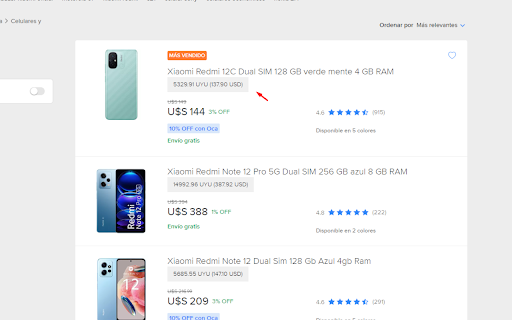
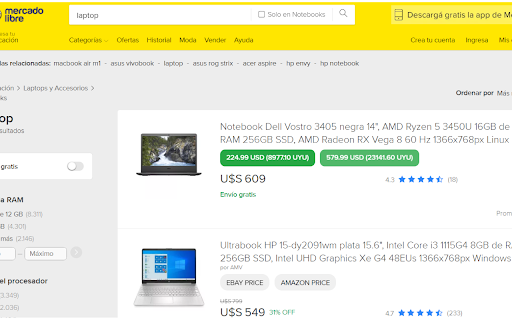
Compara precios entre MercadoLibre y eBay de manera inteligente UN BOTÓN aparecerá debajo del producto en MercadoLibre, permitiendo obtener su precio en ebay / amazon desde el listado. El precio será determinado en base a una búsqueda realizada acorde al nombre del producto.

eBay Hot Product Finder
Product research made easy for eBay sellers. Find out what to sell on eBay fast! This eBay best selling item finder is a product research tool that allows you to find the top items to sell on eBay. If you’ve tried to research products to sell on eBay you’ll know that it can be a slow and arduous process, having to go into every item and look at the sales history for each to see how fast they are selling so you can decide whether it will be profitable to sell that kind of product, while making lots of notes to try and keep track of it all! Well, with this eBay seller tool, you can find out in moments what’s selling, at what volume and clearly see what is already making money on eBay so you can decide on the best items to sell. There are lots of Amazon seller tools out there to help sellers find hot products but until now there hasn’t been an extension for eBay sellers that does the same job. And it’s been brought to you by Frooition, an official eBay partner. To use it, simply install the plugin and register at www.frooition.com/insights. Then, go to eBay and search as normal with whatever search term you want for the products you’d like to research. Once the results page loads up, our tool will display a list of the fastest selling items on eBay for that specific search term, with all the sales information you need, such as average weekly sales and average prices, to make the decision if you should be selling the same or similar products. It will even show you the level of demand for each product and, if you want to, with one click you can then source a similar item from AliExpress or Alibaba, all from within the extension. When you find an item that you want to sell on eBay you can save it to your Favourites within your own dashboard at www.frooition.com/insights. That allows you to keep track of profitable items you've found. Not only that, but you can also then list them directly to eBay at the click of a button right from your dashboard, just adding your own images, price and description.

eBay Fee Calculator 2022
Know your eBay selling fees, profit, and correct sale price The 3Dsellers.com eBay Fee Calculator Chrome Extension makes calculating selling fees and profits a snap: How much will you profit from a sale? How do costs of shipping and handling, as well as your purchase price affect your earnings? Find out with the eBay Fee Calculator and even see what it would take for the same sale to break even! What's more, this eBay Fee Calculator is famous for researching competitor pricing. For example, it is a valuable extension for retailers who want to see if they can get away with selling an item at the same price as their competitors. Simply enter your (or supplier's) details to see if it is profitable to sell at a similar price! To use, visit an eBay item and open the extension to insert the item's price and item information automatically. If charging the buyer for shipping, you can include a shipping price as well. Most importantly, you can enter the cost you pay for the item and shipping, select which payment processor you'll be using (eBay Managed Payments or PayPal), and view how much profit you will collect from the sale. The eBay calculator also has several features that allow you to quickly see how your fees will be affected with either PayPal or eBay Managed Payments. The custom-fee options give even more insight into what's happening with this calculation, and switching the payment option will apply default fee data for your selection! After entering your selling information, the middle panel on the plugin will display your total eBay and payment fees, a breakeven price, expenses, and profit.

Cross - Compare Amazon Prices
Find the best Amazon price in the world. Cross helps you find the best possible price for any product on Amazon. Compare prices from all 17 Amazon stores in your local currency. Hover over the Best Region button to see the price tags from different regions. Select a currency from the drop down menu to convert them using up-to-date exchange rates. If you have any questions, you can contact us at team@trycross.com Disclaimer: Prices from other regions are estimates and may be different from the actual price at checkout. Exchange rates are not fixed and may change at any given moment.

eBit: Your eBay Profit Calculator
Easily calculate the profit and expenses from an eBay sale. The ultimate companion for eBay sellers, designed to simplify the process of calculating your profit with ease and accuracy. Say goodbye to manual calculations and hello to streamlined profitability analysis. Features: - Instant Profit Calculation: With eBit, determining your profit from an eBay item is just a click away. Enter the purchase cost, selling price, shipping fees, and any additional expenses, and eBit will swiftly calculate your net profit. - Comprehensive Expense Tracking: Keep track of all expenses associated with your eBay sales effortlessly. eBit allows you to record shipping costs, eBay fees, PayPal fees, and other relevant expenses, ensuring accurate profit calculations. - Advanced Fee Calculation: eBit goes beyond basic profit calculation by factoring in eBay and PayPal fees. It provides you with a clear breakdown of all associated fees, enabling you to understand the true financial impact of your eBay transactions.
