
onfanodndpmofdnaikidaplbpceapnbj

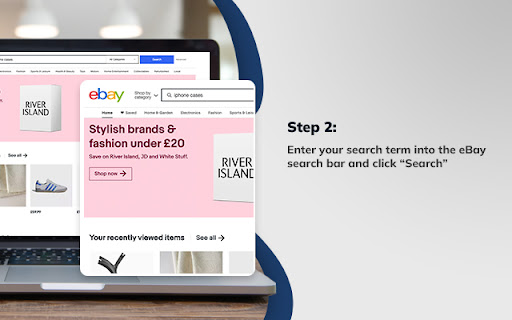


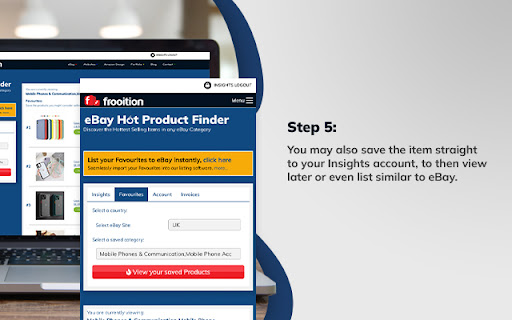
Product research made easy for eBay sellers. Find out what to sell on eBay fast! This eBay best selling item finder is a product research tool that allows you to find the top items to sell on eBay. If you’ve tried to research products to sell on eBay you’ll know that it can be a slow and arduous process, having to go into every item and look at the sales history for each to see how fast they are selling so you can decide whether it will be profitable to sell that kind of product, while making lots of notes to try and keep track of it all! Well, with this eBay seller tool, you can find out in moments what’s selling, at what volume and clearly see what is already making money on eBay so you can decide on the best items to sell. There are lots of Amazon seller tools out there to help sellers find hot products but until now there hasn’t been an extension for eBay sellers that does the same job. And it’s been brought to you by Frooition, an official eBay partner. To use it, simply install the plugin and register at www.frooition.com/insights. Then, go to eBay and search as normal with whatever search term you want for the products you’d like to research. Once the results page loads up, our tool will display a list of the fastest selling items on eBay for that specific search term, with all the sales information you need, such as average weekly sales and average prices, to make the decision if you should be selling the same or similar products. It will even show you the level of demand for each product and, if you want to, with one click you can then source a similar item from AliExpress or Alibaba, all from within the extension. When you find an item that you want to sell on eBay you can save it to your Favourites within your own dashboard at www.frooition.com/insights. That allows you to keep track of profitable items you've found. Not only that, but you can also then list them directly to eBay at the click of a button right from your dashboard, just adding your own images, price and description.

eBay Chat Tuesday API Extension
eBay Chat Tuesday API - Product, Sales: eBay Chat Tuesday API - eBay Chat Tuesday Chrome Extension, integrated with the Chat Tuesday API, is an intuitive and powerful tool for extracting detailed product, price, sales rank, and review data from eBay. With its seamless integration into Chat Tuesday’s generative AI platform, users can effortlessly organize and modify eBay data to meet their unique requirements. The extension allows users to insert extracted data directly into Chat Tuesday, where the AI assists in arranging, analyzing, and customizing the data based on individual preferences. Whether you need tailored reports, dynamic reorganization of data, or insights for decision-making, this combined solution offers a streamlined approach to handling eBay data with precision and ease. This extension is completely FREE, making web scraping and data downloading effortless and accessible. With our tool, you can extract valuable information with ease while ensuring your data security and privacy. All scraped data stays within your browser, guaranteeing complete control and protection of your information. *Using the Chrome browser, use our unique point-and-click feature to retrieve data from trusted sources. For the first time, you can scrap and organize data from many sources without download any learning programs. Download and use our web scraper for free. The difference between our extension and other eBay scrapers is not only extracted the ASIN and Price. Comprehensive Data Retrieval and Integration with Chat Tuesday Generative AI - The extension retrieves almost all page data from eBay, including pricing, product specifications, sales, ASIN, product features, client reviews, and even services offered by consumers who purchased the item. - By selecting the Synchronized button, you can sync scraped product data—such as Product Title, Price, and Brand—with the Chat Tuesday Generative AI platform. Once the data is inserted, a new chat is generated containing the imported data. You can then interact with the AI to reorganize the data, ask questions, or gain insights, with the AI providing accurate and helpful guidance. - The Bulk URL functionality allows you to add up to 100 product URLs, including single product URLs, category URLs, or a mix of both, separated by commas. The data can be saved directly to an Excel spreadsheet for easy access and management. - In case the Data Scraper closes unexpectedly during a task, you can click the Restart button to quickly resume operations. Mandatory Step : Go to ChatTuesday.com to set up the free account and start the below steps in the same browser session. 2. Search for Products - Enter any keywords in the search bar, such as a brand name or product-specific keywords. - Use eBay's filtering options to refine the search results as needed, then press Enter. 3. Activate the Chrome Extension - Once the search results are displayed, open the Chat Tuesday Chrome Extension. - A new tab will open, prompting you to either create a Chat Tuesday account or log in if you already have one. - After verifying your login details, the system will confirm your plan status as Active. Click Start, and the data will begin extracting in Excel format. 4. Sync Data with Chat Tuesday AI - After the desired data has been extracted, click the Sync button. The extracted data will be inserted into the Chat Tuesday Generative AI platform, creating a new chat. - You can now interact with the AI to ask questions, organize the data, or gain insights based on the data you’ve imported. 5. Add More Data with a Bot ID - If you want to insert additional extracted data into the same session, retrieve the UID from your Chat Tuesday profile (visible upon login) and use it to sync the new data. This product has the following advantages: 1. Competitor Analysis - Extract the entire product list, sales rank, and pricing information in Excel format. - Conduct in-depth competitor comparisons to refine your business strategies and stay ahead of the competition. 2. Get to Know Your Clients - Access customer feedback and reviews on specific products. - Gain valuable insights into client preferences to improve offerings and boost customer satisfaction. 3. Market Research - Identify the number of resellers and competitors offering the same products in your target market. - Understand market trends and saturation for more informed decision-making. 4. Unauthorized Sales Channel Monitoring - Detect merchants listing products below the reseller pricing by analyzing extracted data. - Identify potential parallel importers or imitation resellers to maintain control over your distribution channels. 5. Seamless Integration with Chat Tuesday Generative AI - Insert extracted eBay data directly into Chat Tuesday AI to organize and analyze it effortlessly. - Generate tailored chats where you can ask the AI to arrange, customize, or provide insights based on the data. 6. Data Customization and Reporting - Utilize Chat Tuesday’s AI to create dynamic reports and reorganize data to meet your specific requirements. - Simplify workflows by automating tasks like data categorization, visualization, and detailed analysis. What data you can extract : - Product specification - Price - Seller price and details - Sales rank - Inventory - Product image - Customer review Technical support : We welcome any comments or ideas to enhance the products. Please contact:

ebay Sold History, Offer History - Average High Mid Low Price - eBextractor
Displays Highest, Lowest, Median, Average Price per search result + hide items, hide sellers, sold analytics, and sold-history-page button v3.0.12---------------(3.11.26) | Fix Errors - Fix blank data (the html structure changes) v3.0.10---------------(2.13.26) | Minor Style Change and logic - Move all options to Quick Options - Hoverable to make it clean and not consume too much space - Hidden items are not included in exported/downloaded csv (Thanks to ROBERT for suggesting to add this) v3.0.9---------------(12.24.25) | Minor fix - Fix the display of sold history in the Analyze pop-up v3.0.7----------------(8.31.25) | New Features and improve speed - add hide items, hide sellers and analyze button for sold insights - faster display of price analytics using local code instead of api - instead of going instantly to amazon or ebay when you click amazon or ebay button it will first go to my website and from their you can click to ebay or amazon v3.0.6----------------(7.1.25) | Minor update - remove affliate tag checker for ebay and amazon (no more redirects 😁) v3.0.5----------------(7.1.25) - fixed issue on amazon, ebextractor, sold history button on ebay search result - fixed issue in broken exported csv data - minor UI changes on amazon to ebay buttons - popular prize on ebay search result is now clickable - added ebay-tag-checker for accurate checking if the traffic is from us v3.0.4----------------(12.29.24) - minor changes on product page on amazon the ebay and ebextractor button is placed below the title - fix checking the srt (source of redirection traffic) on url for my associate program on amazon v3.0.3-----------------(12.26.24) - new ui using react template - https://github.com/Jonghakseo/chrome-extension-boilerplate-react-vite - more option on the popup to enable/disable specific feature (Thanks tiva for the suggestion) Note: Enabling the Show Sold Quantity on Search Result can result to ebay temporarlity blocks you. The extension is fetching to the item url and scrape the quantity sold, ebay sometimes see it as bot and not good so they block it. v3.0.2-----------------(11.19.24) - added watcher counter, quantity sold, brand, return and delivery - refactor the code for better maintainability In Progress (ebay and amazon) for upcoming VERSION 3.0.3: - Ability to filter every time you search such as: - always check sold listings - (will be on paid version) - specific location using zip code or just US only, north america and such (will be on paid version) - show BSR rating, and more filters (full access for feature will be available on paid version) v3.0.01---------------------- (10.09.24) -- added search on ebay and search on ebextractor on amazon sites -- current issue (not yet resolved) - saving and deleting searches on other site is not updating the UI immediately v3.0.0 ---------------------- (09.30.24) Minor fixes and feature - added ebextractor search in each image - added tag checking - search on amazon now supports - United States - Canada - France - Germany - Italy - Netherlands - Poland - Spain - Sweden - United Kingdom v2.0.15 -------------------- (09.23.24) Minor fixes and ebextractor.com is integrated - remove tag checker - added "search on ebextractor" v2.0.13 -------------------- (08.07.24) Minor feature, UI changes and fixes - Added popular price in price analytics - added tagChecker for my affliate (thank you) - added youtube button - fix discord link - added other tools link - change minimize button text to "Hide" v2.0.12 -------------------- (07.23.24) Minor feature and fixes - In search result each item has now search on amazon button located at the bottom right of each item image - fix margin when you open sidebar in item page v2.0.11 -------------------- (07.08.24) New Features and minor changes - Ability to save searches and view them (I only added the url and keywords used so you can go back to it and load it) - I will be considering adding the data itself so you can download it - You can now see the total amount of sold history v2.0.10 -------------------- (05.30.24) Minor changes - NO ADDED FEATURE JUST FIXED SOME ISSUES - Fix sold history data(if you are logged you wont see the "log in to ebay" when you go to the SOLD HISTORY PAGE P.S - Thank you for Tiva for reporting the issue and for the donation 🎉 v2.0.9 ---------------------- (05.8.24) Minor Changes and coding refactors - Adjusted the code in 'Days' period filter New feature - Added 'Facebook Marketplace' for the 'Search it on' feature, using only a few words to increase the likelihood of finding similar items.) v2.0.8 ---------------------- (04.29.24) New features - Search on amazon, walmart and google shopping (you see it on each item page https://www.ebay.com/itm/285705547610) - Prices in price counter can now be clicked and it will highlight the price and will scroll into it - Each listings on search result has now "SOLD-OFFER HISTORY PAGE" button v2.0.7 ---------------------- (04.22.24) New features - Sold & Offer History up to 90 days period - You can now click Highest Price, Lowest Price, Middle Price and it will highlight the items v2.0.6 Minor changes: - keyword and price counter is now below Price analytics - Google, Walmart, Amazon Clickable Link FIXED 🔍 The eBay Search Data Extraction Extension offers comprehensive data analysis capabilities for single-page search results, providing valuable insights through the following features: - 💰 Highest Price: Obtain the maximum price observed in the search results. - 💵 Lowest Price: Identify the minimum price found among the listings. - 📊 Average Price: Calculate the mean price across the search results. - 🎯 Middle Price: Determine the median price, offering a representative value. - 🔑 Keyword Occurrence: Track and quantify the frequency of each keyword throughout the listings. - 💲 Price Occurrence: Gain an understanding of how often different price points appear in the search results. -1 click search, if you go to listing page you will see on the top right of the listing section an option to search your item via google, wallmart, amazon or search it all - Sold/Purchase and offer History: For a max period of 90 days you can now see the history of that item (offer and sold history). Some of the item price may show Sold as special offer. 💾 In addition to these powerful features, the extension allows users to conveniently download the extracted data in CSV format. This empowers users to further analyze the data, perform custom calculations, and seamlessly integrate it into their preferred tools and workflows. 🔁 Moreover, the extension offers a unique capability to extract identical items directly from the search results. This means that the extracted data precisely matches the items displayed in the search. 🔄 If you like or dislike the item please leave a feedback. Thank You!!!! : You can support me via buy me a coffee: https://buymeacoffee.com/wcawasa or via paypal: https://www.paypal.com/paypalme/walidcawasa

eBay Sold History Button - See Item Purchase History
Add a 'HISTORY' button to the title on eBay product pages, to open purchase history. Quickly access it with a shortcut key! Unlock powerful insights directly on eBay with the ZIK Analytics eBay Sold History Chrome Extension your all-in-one tool to view eBay sold history, item purchase history, competitor research, and product performance data in one click. Designed for eBay sellers, dropshippers, and product researchers, this extension helps you find eBay best selling items, analyze real sales data, and understand exactly what’s driving results. View eBay sold history with real transaction data Access item purchase history including price, date, and quantity sold Understand demand trends and sales velocity Identify and find eBay best selling items faster Just open any eBay product page and click the “HISTORY” button next to the title. Analyze product performance over time Spot trends, seasonal demand, and pricing strategies Discover opportunities to find best selling products on eBay Understand your competition like never before: Analyze eBay competitors’ performance View competitor listings and selling strategies Learn how top sellers consistently find eBay best selling items Build your research database: Save winning products for later Track competitors and monitor their activity Organize your workflow to quickly identify best selling items on eBay - Fast, Simple & Built for eBay Sellers One-click access directly on eBay Clean, upgraded UI/UX for faster research Keyboard shortcut: Alt+Z / Option+Z to open history instantly Start for free and unlock advanced insights with premium tools from ZIK Analytics. - Why Use This Extension? This extension gives you everything you need to find winning products, analyze competitors, and grow your eBay business faster. With love, designed for dropshippers and eBay sellers. www.zikanalytics.com

AliExpress & eBay | Best price
With this plugin, You can compare prices for similar products on the details page. AliExpress & eBay | Best price is a Comparison of prices Chrome extension.With this plugin, You can compare prices for similar products on the details page. Are you still worried about the high price of goods?It can help you find the best value for money in the same category.All you have to do is install the AliExpress & eBay | Best price quickly. *No bloat, no ads, no unnecessary permissions, Just click the button.* If you encounter an issue, please report it via the customer support flag icon on the capture page, so we can improve the extension for you and everyone else who uses it. Support the details pages of the following websites
