
dkoidcgcbmejimkbmgjimpdgkgilnncj
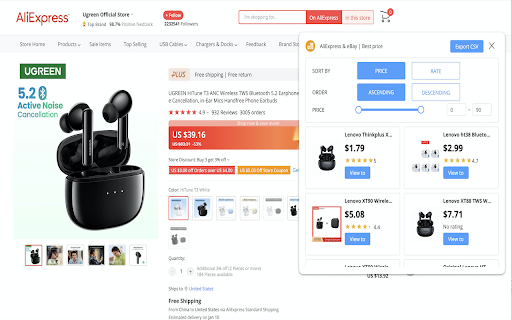

With this plugin, You can compare prices for similar products on the details page. AliExpress & eBay | Best price is a Comparison of prices Chrome extension.With this plugin, You can compare prices for similar products on the details page. Are you still worried about the high price of goods?It can help you find the best value for money in the same category.All you have to do is install the AliExpress & eBay | Best price quickly. *No bloat, no ads, no unnecessary permissions, Just click the button.* If you encounter an issue, please report it via the customer support flag icon on the capture page, so we can improve the extension for you and everyone else who uses it. Support the details pages of the following websites

AliExpress: Search similar products
The extension for AliExpress finds similar products and identical at a better price. Looking for a way to save money on AliExpress? 🤔 Our extension is your perfect assistant! 🛍️ 🔸 Finds similar products among thousands of offers 🔍 🔸 Compares prices and helps you choose the best deal 💰 🔸 Easy and convenient: just click the "Find similar items" button, and you're good to go! No more endless searching — the extension will do it for you! Get the best deals from trusted sellers and save on every purchase 🎉 ℹ️ Important to know: This extension is monetized through the official AliExpress affiliate program 🛒. This means we may receive a small commission from your purchases, but the price remains the same for you. Your support helps us improve and develop the extension. Thank you for your trust and understanding! ❤️

ShopAssist
This extension helps you compare prices and find the best deals on Amazon and Flipkart while shopping online. Introducing ShopAssist, your ultimate shopping companion! This extension helps you make informed purchasing decisions by providing you with a detailed comparison of products from multiple online retailers such as Amazon and Flipkart. With ShopAssist, you can easily access the best deals, prices and reviews of products while you shop online. Simply navigate to a product page or search page on either Amazon or Flipkart and click on the ShopAssist icon in your browser. This extension will then provide you with a comparison of the product, making your shopping experience easier, faster and more convenient. Say goodbye to endless browsing and hello to smart shopping with ShopAssist!

Amazon Unit Price
Filters items on Amazon pages by unit price -- enabling you to find the lowest price by unit! This Chrome extension displays price per unit (e.g., per ounce, liter, count) on search pages, helping you identify the best deals instantly. It’s compatible with all Amazon domains, including .com, .co.uk, .ca, .de, and more. Key Features: • Automatically calculates and displays unit prices on Amazon product listings. • Supports various units like ounces, liters, pounds, and counts. • Works seamlessly across all Amazon country sites. • Lightweight and user-friendly interface. Why Choose Amazon Unit Price Shopper? Make informed purchasing decisions by seeing the true cost of products. Whether you’re shopping for groceries, household items, or personal care products, this tool ensures you get the best value for your money. Affiliate Disclosure: All links in the extension’s popup include my Amazon Affiliate Tag. If you click on these links and make a purchase, I may earn a small commission at no additional cost to you. This helps support the development and maintenance of the extension. Thank you for your support!

Best Amazon Price
Compare and discover the best deals effortlessly across European Amazon stores and find the best deals. Search products, compare prices and get the best deals. Buying items from Amazon's European stores can often save you a lot of money. In fact, this missing service was one of our strong points in creating a tool that allowed us to improve our shopping experience. What started as a project to satisfy our needs has today turned into an extension called "Best Amazon Prime". Thanks to the extension you can find the best offer of any product on the largest e-commerce site in the world. The comparison tool is an extension that selects different Amazon stores and other sellers at the best possible price, including shipping and taxes. -------------------------------- *** How does it work *** -------------------------------- You don't need to have an Amazon account to use the extension. Simply go to any country's Amazon product page to view the price comparison. The default pricing currency will be the first Amazon language loaded. If available, additional tax information will appear when you log in to your Amazon account. -------------------------------- ### Usage ### Compare button for various countries -------------------------------- The button that appears just below the price indicated on the page will show the best price available among those of the various Amazon stores compared. By hovering the mouse over the button, the list of compared prices will be displayed. If the product is not available in another country, it will appear as unavailable. Products not sold in another country will be listed as not found and crossed out for easy identification. Additionally, if shipping is available in your country, an airplane icon will appear to the right of your location. You can view this comparison in different currencies by selecting a currency in the drop-down menu at the bottom of this popup. This will trigger a page refresh with a new price comparison in the selected currency. Clicking on a new language URL will take you to that language's product page. Note: To quickly redirect to the best prices page of the product, simply click on the button that lists the best international price. If you are already in the country with the best price, the button will display "Best Region". -------------------------------------- ### More sellers button -------------------------------------- When you get to the country with the lowest price by clicking on the local product entry, the newly loaded page will show a price comparison with other sellers in this region in the button. Hovering over this button will display the other seller's best price on the right side and the current page's price on the left. Additionally, shipping information and estimated tax are also displayed when you log in and are available. The total will be listed with the price difference shown in the button. Click this button to be redirected to a page with all other sellers listed. The top listing is the best new price for this item. Click "Add to Cart" to proceed to checkout for this item.
