
hhhiehkcebfngopnldhiaeefdnmpnbch

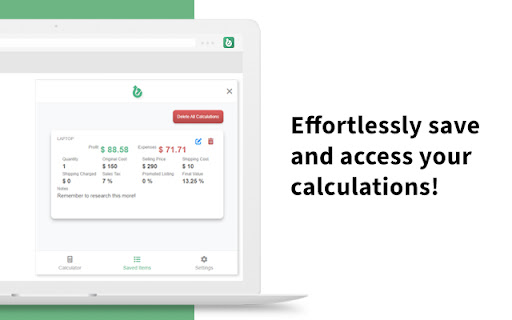


Easily calculate the profit and expenses from an eBay sale. The ultimate companion for eBay sellers, designed to simplify the process of calculating your profit with ease and accuracy. Say goodbye to manual calculations and hello to streamlined profitability analysis. Features: - Instant Profit Calculation: With eBit, determining your profit from an eBay item is just a click away. Enter the purchase cost, selling price, shipping fees, and any additional expenses, and eBit will swiftly calculate your net profit. - Comprehensive Expense Tracking: Keep track of all expenses associated with your eBay sales effortlessly. eBit allows you to record shipping costs, eBay fees, PayPal fees, and other relevant expenses, ensuring accurate profit calculations. - Advanced Fee Calculation: eBit goes beyond basic profit calculation by factoring in eBay and PayPal fees. It provides you with a clear breakdown of all associated fees, enabling you to understand the true financial impact of your eBay transactions.

ebay Sold History, Offer History - Average High Mid Low Price - eBextractor
Displays Highest, Lowest, Median, Average Price per search result + hide items, hide sellers, sold analytics, and sold-history-page button v3.0.12---------------(3.11.26) | Fix Errors - Fix blank data (the html structure changes) v3.0.10---------------(2.13.26) | Minor Style Change and logic - Move all options to Quick Options - Hoverable to make it clean and not consume too much space - Hidden items are not included in exported/downloaded csv (Thanks to ROBERT for suggesting to add this) v3.0.9---------------(12.24.25) | Minor fix - Fix the display of sold history in the Analyze pop-up v3.0.7----------------(8.31.25) | New Features and improve speed - add hide items, hide sellers and analyze button for sold insights - faster display of price analytics using local code instead of api - instead of going instantly to amazon or ebay when you click amazon or ebay button it will first go to my website and from their you can click to ebay or amazon v3.0.6----------------(7.1.25) | Minor update - remove affliate tag checker for ebay and amazon (no more redirects 😁) v3.0.5----------------(7.1.25) - fixed issue on amazon, ebextractor, sold history button on ebay search result - fixed issue in broken exported csv data - minor UI changes on amazon to ebay buttons - popular prize on ebay search result is now clickable - added ebay-tag-checker for accurate checking if the traffic is from us v3.0.4----------------(12.29.24) - minor changes on product page on amazon the ebay and ebextractor button is placed below the title - fix checking the srt (source of redirection traffic) on url for my associate program on amazon v3.0.3-----------------(12.26.24) - new ui using react template - https://github.com/Jonghakseo/chrome-extension-boilerplate-react-vite - more option on the popup to enable/disable specific feature (Thanks tiva for the suggestion) Note: Enabling the Show Sold Quantity on Search Result can result to ebay temporarlity blocks you. The extension is fetching to the item url and scrape the quantity sold, ebay sometimes see it as bot and not good so they block it. v3.0.2-----------------(11.19.24) - added watcher counter, quantity sold, brand, return and delivery - refactor the code for better maintainability In Progress (ebay and amazon) for upcoming VERSION 3.0.3: - Ability to filter every time you search such as: - always check sold listings - (will be on paid version) - specific location using zip code or just US only, north america and such (will be on paid version) - show BSR rating, and more filters (full access for feature will be available on paid version) v3.0.01---------------------- (10.09.24) -- added search on ebay and search on ebextractor on amazon sites -- current issue (not yet resolved) - saving and deleting searches on other site is not updating the UI immediately v3.0.0 ---------------------- (09.30.24) Minor fixes and feature - added ebextractor search in each image - added tag checking - search on amazon now supports - United States - Canada - France - Germany - Italy - Netherlands - Poland - Spain - Sweden - United Kingdom v2.0.15 -------------------- (09.23.24) Minor fixes and ebextractor.com is integrated - remove tag checker - added "search on ebextractor" v2.0.13 -------------------- (08.07.24) Minor feature, UI changes and fixes - Added popular price in price analytics - added tagChecker for my affliate (thank you) - added youtube button - fix discord link - added other tools link - change minimize button text to "Hide" v2.0.12 -------------------- (07.23.24) Minor feature and fixes - In search result each item has now search on amazon button located at the bottom right of each item image - fix margin when you open sidebar in item page v2.0.11 -------------------- (07.08.24) New Features and minor changes - Ability to save searches and view them (I only added the url and keywords used so you can go back to it and load it) - I will be considering adding the data itself so you can download it - You can now see the total amount of sold history v2.0.10 -------------------- (05.30.24) Minor changes - NO ADDED FEATURE JUST FIXED SOME ISSUES - Fix sold history data(if you are logged you wont see the "log in to ebay" when you go to the SOLD HISTORY PAGE P.S - Thank you for Tiva for reporting the issue and for the donation 🎉 v2.0.9 ---------------------- (05.8.24) Minor Changes and coding refactors - Adjusted the code in 'Days' period filter New feature - Added 'Facebook Marketplace' for the 'Search it on' feature, using only a few words to increase the likelihood of finding similar items.) v2.0.8 ---------------------- (04.29.24) New features - Search on amazon, walmart and google shopping (you see it on each item page https://www.ebay.com/itm/285705547610) - Prices in price counter can now be clicked and it will highlight the price and will scroll into it - Each listings on search result has now "SOLD-OFFER HISTORY PAGE" button v2.0.7 ---------------------- (04.22.24) New features - Sold & Offer History up to 90 days period - You can now click Highest Price, Lowest Price, Middle Price and it will highlight the items v2.0.6 Minor changes: - keyword and price counter is now below Price analytics - Google, Walmart, Amazon Clickable Link FIXED 🔍 The eBay Search Data Extraction Extension offers comprehensive data analysis capabilities for single-page search results, providing valuable insights through the following features: - 💰 Highest Price: Obtain the maximum price observed in the search results. - 💵 Lowest Price: Identify the minimum price found among the listings. - 📊 Average Price: Calculate the mean price across the search results. - 🎯 Middle Price: Determine the median price, offering a representative value. - 🔑 Keyword Occurrence: Track and quantify the frequency of each keyword throughout the listings. - 💲 Price Occurrence: Gain an understanding of how often different price points appear in the search results. -1 click search, if you go to listing page you will see on the top right of the listing section an option to search your item via google, wallmart, amazon or search it all - Sold/Purchase and offer History: For a max period of 90 days you can now see the history of that item (offer and sold history). Some of the item price may show Sold as special offer. 💾 In addition to these powerful features, the extension allows users to conveniently download the extracted data in CSV format. This empowers users to further analyze the data, perform custom calculations, and seamlessly integrate it into their preferred tools and workflows. 🔁 Moreover, the extension offers a unique capability to extract identical items directly from the search results. This means that the extracted data precisely matches the items displayed in the search. 🔄 If you like or dislike the item please leave a feedback. Thank You!!!! : You can support me via buy me a coffee: https://buymeacoffee.com/wcawasa or via paypal: https://www.paypal.com/paypalme/walidcawasa

DSM Auto-Paste Chrome Extension
DSM Auto-Paste Dropshipping Chrome Extension DSM Auto-Paste Dropshipping Chrome Extension by AutoDS DSM is now part of AutoDS — The largest all-in-one dropshipping company AutoDS along with the DSM Chrome extension is the best software to automate your dropshipping workflow. AutoDS with DSM will help you: - Import dropshipping products from more than 50 suppliers to your online stores in one click - Automate the order processing flow - Automate tracking numbers updating Help automating dropshipping work for thousands of people. Product Sourcing: - Add products to your online stores from 60+ retails & marketplaces within one click of a button - Import products easily straight from an entire category / search page

Search eBay - Find Stuff Fast
Highlight text, right-click, and search eBay instantly. Supports 30+ international sites with powerful filters. No tracking, no ads. Search eBay Canada, UK, USA and 27 more countries instantly from anywhere on the web. HOW IT WORKS Highlight any text on a webpage, right-click, and select "Search eBay" - that's it. Your search opens immediately with all your saved preferences applied. No copy-pasting, no switching tabs, no typing. THREE WAYS TO SEARCH • Right-click any selected text • Click the extension icon and type your search • Type "ebay" in the address bar, press Tab, then enter your search POWERFUL SEARCH OPTIONS Set your preferences once, use them every time: • Choose from 30+ international eBay sites • Filter by Auction, Buy It Now, or Best Offer • Set price ranges and free shipping filters • Search completed/sold listings for price research • Sort by price, ending time, newly listed, and more KEYBOARD SHORTCUT Press Alt+Shift+E to instantly search your selected text. Customize this shortcut in your browser settings. PRIVACY FOCUSED No tracking, no ads, no data collection. Your search preferences are stored locally in your browser and synced only to your own account. We don't see or store any of your searches. DARK MODE Full dark theme support that follows your system preference, or set it manually to light or dark. FEATURES ✓ 30+ international eBay sites ✓ Search history with autocomplete ✓ Export/import your settings ✓ Title & description search ✓ Price range filters ✓ Free shipping filter ✓ Buying format filters ✓ Multiple sort options ✓ List or gallery view ✓ Open in new tab, window, or same tab Perfect for eBay sellers researching prices, collectors hunting for deals, or anyone who shops eBay regularly.Search eBay instantly from anywhere on the web. Bug Fixes - Fixed completed/sold listings filter - Searches no longer include completed listings when the option is unchecked Search Options • Title & Description Search - Search in listing descriptions, not just titles • Buying Format Filters - Filter by Auction, Buy It Now, or Accepts Offers • Price Range - Set minimum and maximum price filters • Free Shipping Only - Filter to show only free shipping listings • Display Mode - Choose Default, List View, or Gallery View User Experience • Dark Mode - Full dark theme support with Light/Dark/Auto options • Keyboard Shortcut - Press Alt+Shift+E to search selected text instantly • Omnibox Search - Type "ebay" in address bar, press Tab, then type your search • Search Autocomplete - Previous searches appear as you type • Configurable History - Set history limit from 5-20 items • Export/Import Settings - Backup and restore your preferences Technical • Complete codebase rewrite with ES Modules • Removed Milligram CSS dependency • Improved error handling • Cleaner, more maintainable codebase

eBay Fee Calculator 2022
Know your eBay selling fees, profit, and correct sale price The 3Dsellers.com eBay Fee Calculator Chrome Extension makes calculating selling fees and profits a snap: How much will you profit from a sale? How do costs of shipping and handling, as well as your purchase price affect your earnings? Find out with the eBay Fee Calculator and even see what it would take for the same sale to break even! What's more, this eBay Fee Calculator is famous for researching competitor pricing. For example, it is a valuable extension for retailers who want to see if they can get away with selling an item at the same price as their competitors. Simply enter your (or supplier's) details to see if it is profitable to sell at a similar price! To use, visit an eBay item and open the extension to insert the item's price and item information automatically. If charging the buyer for shipping, you can include a shipping price as well. Most importantly, you can enter the cost you pay for the item and shipping, select which payment processor you'll be using (eBay Managed Payments or PayPal), and view how much profit you will collect from the sale. The eBay calculator also has several features that allow you to quickly see how your fees will be affected with either PayPal or eBay Managed Payments. The custom-fee options give even more insight into what's happening with this calculation, and switching the payment option will apply default fee data for your selection! After entering your selling information, the middle panel on the plugin will display your total eBay and payment fees, a breakeven price, expenses, and profit.
