
hbckgdbghlcgnlnfplokfapekmjckjdd
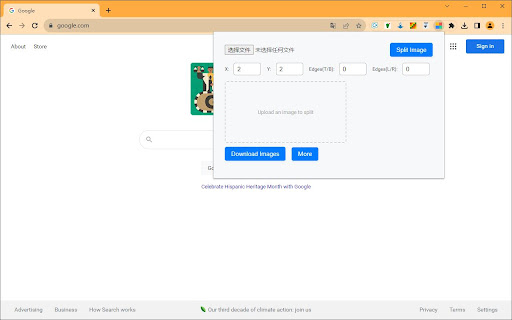
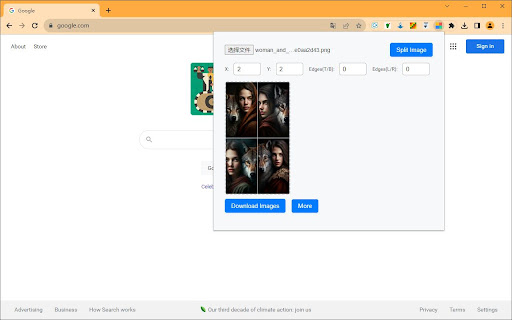
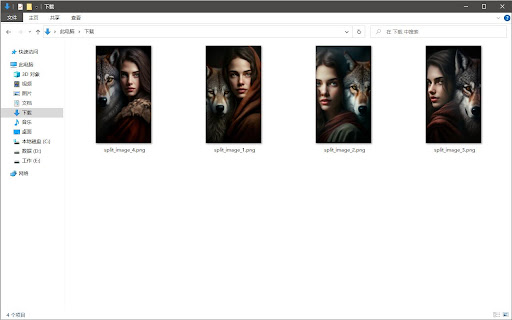

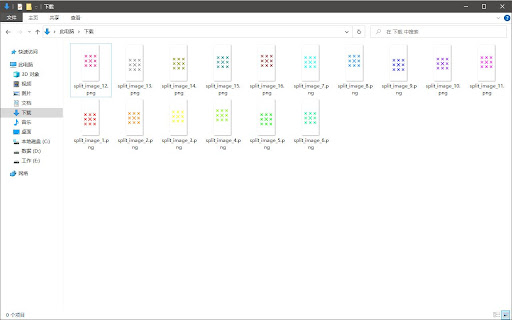
Allows you to easily divide images generated by Midjourney, as well as split photo lists arranged in rows and columns. Midjourney Image Splitter / Photo cutting is a versatile tool tailored for users who wish to dissect images into smaller segments. Whether you're dealing with images generated by Midjourney or have a photo list arranged in multi-row and multi-column formats, our extension streamlines the splitting process. With an intuitive UI, users can upload a photo, determine how many rows and columns they want to split the image into, and then download the segmented images seamlessly. The preview feature also ensures that you're aware of how the final segments will look before the split. Enhance your image processing workflow with Midjourney Image Splitter.

review.legal
Review.legal is your AI legal assistant that will take your legal document and: Review.legal is your AI legal assistant that will take your legal document and: This tool is built for everyone, whether you're reviewing a business contract, signing a rental agreement, looking at mortgage papers - review.legal can help save you time and effort. With review.legal, you no longer have to open new tabs and Google unfamiliar terms or concepts every time you come across something complicated. Just ask review.legal, and get a concise, clear explanation right away. Visit our website www.review.legal to shorten and simplify full legal documents

HighlightAI
Chat on highlighted cell number on Whatsapp. Search highlighted text on FB, LinkedIn, X, Quora and TikTok. Search using AI Unlock a smarter way to browse and connect with Highlight AI, the Chrome extension that transforms your online experience. Highlight text to instantly search across Quora, TikTok, X, and Facebook, or start a WhatsApp chat by selecting a phone number—no copying or pasting needed. With its intuitive design, Highlight AI seamlessly boosts your productivity and engagement. Perfect for social media fans, researchers, and professionals. Download now and elevate your digital life! This concise, engaging description highlights key benefits, targets a broad audience, and includes a strong call to action to attract more users.

Shoden Ai
Nezumi AI is a powerful sales automation tool designed to streamline the outbound sales process and maximize efficiency for sales… Nezumi AI is a powerful sales automation tool designed to streamline the outbound sales process and maximize efficiency for sales development representatives (SDRs). By combining cutting-edge AI-driven technology with seamless integrations, Nezumi simplifies lead generation, outreach, and follow-up, ultimately driving higher conversion rates and more meetings. Here's an in-depth overview of what Nezumi AI does and why it’s a must-have for sales teams: What Nezumi AI Does: One-Click Lead Export and Enrichment: Nezumi enables users to export leads from Sales Navigator in just one click. The platform enriches these leads by automatically finding key contact information, such as email addresses, directly from LinkedIn. This ensures that sales teams can quickly gather accurate data on potential prospects. Seamless Lead Management and Integration: Once leads are enriched, they can be exported directly into the Shoden web app, where users can efficiently manage and organize them for outreach. Nezumi integrates effortlessly with your existing tech stack, including platforms like LinkedIn, Gmail, and Apollo, allowing for a smooth workflow and reducing the need for extensive training. Automated Email Outreach: Nezumi takes care of the entire email outreach process. It generates and launches personalized email campaigns, adhering to best practices and ensuring high deliverability. The AI tailors messages to each lead, improving response rates and engagement. Calendar Scheduling and Auto Responses: With Nezumi, sales teams can automate responses and qualification call scheduling, directly filling calendars with confirmed meetings. This allows SDRs to focus on closing deals rather than manual administrative tasks. Lead Extraction from Existing Lists: Nezumi also supports lead extraction from existing Sales Navigator lists, making it easy to re-engage with prospects or follow up on leads already in your pipeline. Why Users Should Install Nezumi AI: Increased Productivity: Nezumi AI saves valuable time by automating prospect research, lead enrichment, and email outreach. This enables sales teams to handle a higher volume of leads without sacrificing personalization, leading to more booked meetings and improved performance. Higher ROI and Revenue: By focusing on quality outreach and reducing operational overhead, Nezumi enhances the overall efficiency of your sales efforts. With more meetings on the calendar and faster follow-up times, your team will drive more revenue at a lower cost. Domain Reputation Protection: Nezumi constantly monitors your domain reputation to ensure that your outreach efforts focus on quality over quantity. This protects your email deliverability rates and ensures a positive brand image. Data-Driven Sales Strategy: Nezumi provides valuable insights and analytics on outreach performance, helping sales teams continuously refine their approach and optimize their strategies for better results. Adaptable and Scalable: Nezumi is designed to fit various industries and sales environments. Its adaptability makes it a perfect tool for businesses of any size looking to supercharge their sales outreach. In Summary: Nezumi AI is the ultimate tool for sales teams looking to automate and enhance their outreach efforts. By simplifying lead enrichment, managing prospect data, and automating email campaigns, Nezumi helps sales professionals save time, book more meetings, and improve sales efficiency. Its integration with existing tools and AI-powered personalization ensures that every message resonates with the recipient, giving sales teams a competitive edge in a rapidly changing digital landscape.

Split midjourney Images
Right-click on any image within a webpage and effortlessly batch cut MidJourney's grid image (like a 4-by-4) into single images Split a grid of images, such as a 4-by-4 grid generated by diffusion models like Midjourney or Stable Diffusion, into individual images effortlessly. Use the "Split midjourney Images" tool to easily split your Midjourney Grid into separate images with just one click. Download and save them directly to your computer hassle-free. Right-click on any image within a webpage and effortlessly batch cut MidJourney's grid image. Allow users to select the images they want to keep, allow users to set the size of the cropped images, and the image quality. Note: Split midjourney Imagesis not affiliated with Midjourney. By default, Midjourney generates images in a 4-grid format. However, if users wish to have them split into 4 individual images, they would typically need to manually perform the task or generate each image separately, which can be time-consuming and inconvenient for those seeking a quick image generation solution. To address this, we have developed the Image Cutter plugin. With a simple right-click on the image, users can access the 'Midjourney Image Cutter' option from the menu. This powerful tool automatically splits the 4-grid image into 4 distinct and high-quality individual images, eliminating any blurriness or loss of detail. This streamlined process allows users to effortlessly download and view each image separately, saving valuable time and ensuring a seamless user experience.
