
eaiaifikpnmoafjlljhgakelanadngnk
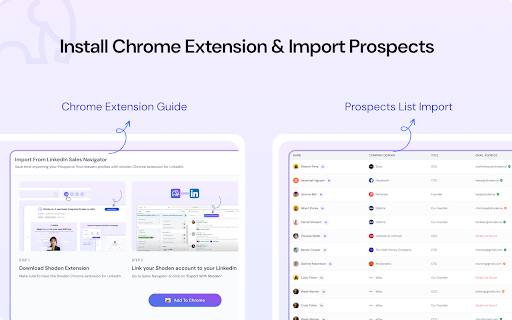


Nezumi AI is a powerful sales automation tool designed to streamline the outbound sales process and maximize efficiency for sales… Nezumi AI is a powerful sales automation tool designed to streamline the outbound sales process and maximize efficiency for sales development representatives (SDRs). By combining cutting-edge AI-driven technology with seamless integrations, Nezumi simplifies lead generation, outreach, and follow-up, ultimately driving higher conversion rates and more meetings. Here's an in-depth overview of what Nezumi AI does and why it’s a must-have for sales teams: What Nezumi AI Does: One-Click Lead Export and Enrichment: Nezumi enables users to export leads from Sales Navigator in just one click. The platform enriches these leads by automatically finding key contact information, such as email addresses, directly from LinkedIn. This ensures that sales teams can quickly gather accurate data on potential prospects. Seamless Lead Management and Integration: Once leads are enriched, they can be exported directly into the Shoden web app, where users can efficiently manage and organize them for outreach. Nezumi integrates effortlessly with your existing tech stack, including platforms like LinkedIn, Gmail, and Apollo, allowing for a smooth workflow and reducing the need for extensive training. Automated Email Outreach: Nezumi takes care of the entire email outreach process. It generates and launches personalized email campaigns, adhering to best practices and ensuring high deliverability. The AI tailors messages to each lead, improving response rates and engagement. Calendar Scheduling and Auto Responses: With Nezumi, sales teams can automate responses and qualification call scheduling, directly filling calendars with confirmed meetings. This allows SDRs to focus on closing deals rather than manual administrative tasks. Lead Extraction from Existing Lists: Nezumi also supports lead extraction from existing Sales Navigator lists, making it easy to re-engage with prospects or follow up on leads already in your pipeline. Why Users Should Install Nezumi AI: Increased Productivity: Nezumi AI saves valuable time by automating prospect research, lead enrichment, and email outreach. This enables sales teams to handle a higher volume of leads without sacrificing personalization, leading to more booked meetings and improved performance. Higher ROI and Revenue: By focusing on quality outreach and reducing operational overhead, Nezumi enhances the overall efficiency of your sales efforts. With more meetings on the calendar and faster follow-up times, your team will drive more revenue at a lower cost. Domain Reputation Protection: Nezumi constantly monitors your domain reputation to ensure that your outreach efforts focus on quality over quantity. This protects your email deliverability rates and ensures a positive brand image. Data-Driven Sales Strategy: Nezumi provides valuable insights and analytics on outreach performance, helping sales teams continuously refine their approach and optimize their strategies for better results. Adaptable and Scalable: Nezumi is designed to fit various industries and sales environments. Its adaptability makes it a perfect tool for businesses of any size looking to supercharge their sales outreach. In Summary: Nezumi AI is the ultimate tool for sales teams looking to automate and enhance their outreach efforts. By simplifying lead enrichment, managing prospect data, and automating email campaigns, Nezumi helps sales professionals save time, book more meetings, and improve sales efficiency. Its integration with existing tools and AI-powered personalization ensures that every message resonates with the recipient, giving sales teams a competitive edge in a rapidly changing digital landscape.

Michael's Upgrade for TrakED
Upgraded features for TrakED in the THS. (This extension is not an official product of the THS or Intersystems TrakCare software.) Upgraded features for Trak ED in the LGH. Features: - Re-enable spell check in the triage page - Use the enter key when logging in - Handover sheet for ED Main Floor and EMU - ED Main Floor filters and persistent sort - Triage Summary print out - Filter and count results of an enquiry - Count patients currently breaching length of stay targets -- This extension is not an official product of the LGH or InterSystems Trak software.

Apiary - Web Highlighter & Annotator
Highlight and take notes directly on what you read online and instantly share them with friends and colleagues. Easily highlight and take notes on what you read online and then easily save them for later and share them with friends and colleagues in one click. Apiary is a free to try chrome extension based product that allows you to easily highlight and take notes on what you read online. After you have annotated something online it will be saved to your Apiary account where you can then organize in any way you like with our folder system. You can than easily share directly from the website where you took the notes or from your Apiary account later on with anyone you want. Just highlight and get a shareable link you can send to anyone with one click. When using Apiary on a website or email online you have two options. You can choose to just highlight some text or you can highlight and add a comment to that highlight. Allowing you to save and share you favorite parts and current thoughts while reading it with others. You can view your annotations live by clicking the chrome extension and having the Apiary sidebar appear showing all the highlights and notes you have made on that page. Or you can view them later in your Apiary account where we save all the contents of what you were reading and the highlights and notes you took. Allowing you to get the full context of whatever you were taking notes on. Annotate, save, and share what you read online instantly today. ----------------------------------------- Key Features: Web and Email Highlighting Take Notes On What You Read Online Apiary Account Access With Organization Systems Quick and Easy Shareable Notes Private Notes That Only You Can See Automatically Saving Notes ------------------------------------------- How To Use: In order to use the Apiary Chrome Extension you will need an account with Apiary. Please visit www.myapiary.io to create an account today. 1) Create An Account On Apiary (www.myapiary.io) 2) Download Chrome Extension 3) Sign Into Chrome Extension w/ Your Apiary Account 4) Select Text (Left Click & Drag) You Wish To Annotate 5) Click On Apiary Popup To Either Highlight Or Take Note On Selected Text 6) Delete An Annotation By Clicking On A Highlight And clicking Delete Icon 7) Share Your Notes For A Page By Clicking The Apiary Share Button On Bottom Left Corner Of Window 8) View A Note By Either Visiting Your Apiary Account Or By Clicking View On A Currently Annotated Web Page ------------------------------------ Pro Tips: 1) Make Sure You Are Logged Into Apiary Chrome Extension If You Are Having Issues Annotating 2) Organize Your Notes Into Folders On Apiary To Easily Find Notes Later 3) Share Your Notes With Friends By Clicking Share Button And Sending Link To Friends. --------------------------- Got Feedback? Please reach out to us at support@myapiary.io If you find bugs please let us know at https://forms.gle/rHvoLZwaXfVcbAMJ7. If you have a feature request please let us know at https://forms.gle/vguFD2Rxi2FCsSQi8. By installing the extension, you agree to Apiary's Terms of Service, Privacy Policy, and Community Guidelines (which can be found here: https://www.myapiary.io/term-services and https://www.myapiary.io/privacy-policy)

Linqbase - LinkedIn CRM & Outreach
Effortlessly collect, organize, and export detailed LinkedIn profiles for an enhanced networking experience. Linqbase - Simplify and Enhance Your LinkedIn Experience Effortlessly collect, organize, and export LinkedIn profiles for better networking. Here's how Linqbase makes it easy: 📊 Collect LinkedIn Profiles with One Click Quickly gather important profile details with a single click—no more manual work. 📂 Organize Your Connections Automatically sort and group profiles into categories for better management. 📋 Export Data Easily Export your organized LinkedIn data for further review or sharing with your team. 🚀 Boost Your Productivity Automate key tasks like profile extraction and grouping to save time and improve efficiency. 👥 Perfect for Professionals Ideal for recruiters, sales teams, and business owners looking to streamline LinkedIn tasks. 🔗 Optimize Your LinkedIn Strategy Turn LinkedIn into a powerful tool for business growth and connection management. Explore how Linqbase can transform your networking. Visit linqbase.io or contact support at support@linqbase.io for more information.

Add to LinkJoin
Organize and automatically open virtual meetings. Keep all of your links in one central location where they can be sorted, searched for, and opened from any device with just a click. Receive reminders up to 30 minutes before a meeting and automatically opens it when the time comes. LinkJoin Bookmarks store links for access from any device at any time. Add to LinkJoin streamlines this process into a two-click process in your browser. Add to LinkJoin operates in the background so you can open links or open Zoom meetings automatically without any tabs running. Share links and bookmarks with others via the LinkJoin website, transferring your saved information to them as well.
