
haminfolhoibklkkjmkjmmgnmbkgmehe
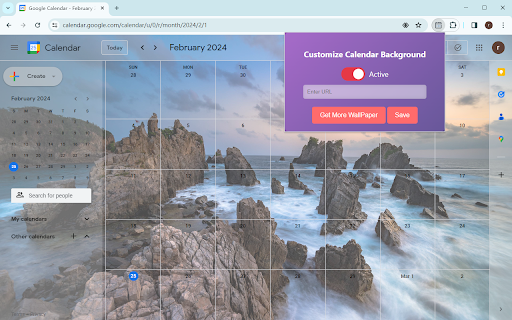

Customize The Background Of Google Calendar. The "Change Google Calendar Background" extension is a Chrome extension that allows users to customize the background of their Google Calendar. With this extension, users can personalize the appearance of their Google Calendar by setting their preferred background image. 1. **Background Image Customization**: Users can input the URL of a new background image via the extension's popup UI. 2. **Save Functionality**: After inputting the URL of the new background image, users can click the save button to apply the specified background image to their Google Calendar. 1. Click on the extension icon to open the popup UI. 2. In the popup UI, input the URL of the new background image. 3. Click the save button to save user background image. 4. Click active button to apply the changes. - Ensure that the URL provided for the background image is valid. Invalid URLs will not result in any changes. By using this extension, users can personalize their Google Calendar and tailor it to their preferences with custom background images.

Calendar 2026
Calendar 2026 is a browser extension that gives you quick access to google calendar With this extension, you will be able to: 🚀 Open the calendar with just one click on the extension icon, without leaving your current tab. 🌟 Enjoy a minimalist design that doesn't distract you from your tasks. 📆 See the current day at a glance, so you can check your schedule and plans. 🌎 Use the calendar in the language and format that is convenient for you, depending on your browser settings. Calendar 2026 is an extension for anyone who wants to have their personal calendar at hand. This extension is suitable for those who: 💻 Spend a lot of time in the browser, working, studying, entertaining, or exploring the internet. 🗓 Follow a schedule and want to be organized and productive. 🕊 Love minimalism and simplicity in everything. 🗂 Want to remember what day of the week it is or what the date is. Calendar 2026 is not just a calendar, but your personal assistant that will always remind you of what and when needs to be done. In the future, we plan to add even more features and capabilities to this extension, such as: 📝 Todo list, so you can add your tasks and reminders to the calendar and mark them as completed. 📲 Integration with Google Calendar and Apple Calendar, so you can sync your calendar with other apps and services you use. 🎂 Ability to add birthdays and reminders for them, so you never forget important events and holidays. 🌙 Night mode that automatically changes the calendar colors based on the time of day to reduce eye strain. 🌐 Calendar synchronization with other devices and services, so you always have access to your schedule no matter where you are. 📊 Statistics and analytics that show how you allocate your time, which tasks you complete or skip more often, and what goals you achieve. 🎁 Bonuses and rewards that motivate you to accomplish your plans and lift your mood. For example, you can earn points, medals, badges, or discounts for completing a certain number of tasks or goals. In addition, in the future, we want to make the calendar even more interesting and useful by adding integrations with various apps and services, such as: 📧 Gmail, so you can receive notifications about new emails, events, and tasks right in the calendar. 📚 Wikipedia, so you can learn interesting facts and events related to the selected date. 🎮 Steam, so you can see which games you and your friends played on a specific day. 🌤 Weather services, so you can see the weather forecast for the selected date and location. 🎫 Booking services, so you can plan your trips, hotels, tickets, and other services. 📰 News websites, so you can stay up to date with current events and topics that interest you. 🎨 Design services, so you can get inspiration and ideas for your creative projects. Calendar 2026 is not just a calendar, but a whole world of possibilities waiting for you. Install this extension today!

Google Calendar Weekend Highlighter
Custom Colour for Weekends in Google Calendar >>>>>>>>>>>>>>>>>>> LET'S GO DARK! >>>>>>>>>>>>>>>>> Important NOTE!!! >>>>>>>>>>>>>>>>>>>>> DONATE!

Calendar Color
Customize your Google Calendar colors with ease. Choose from Google's palette or create your own custom colors. Now with a built-in Focus Timer to boost productivity during calendar events. 🎨 Google Calendar Color Categorization: Assign categories to Google Calendar's existing color palette, making it easier to remember the purpose of each color. For example, red could represent "Critical," blue "Learning," and green "Finances." 🖌️ Custom Color Groups: Add custom color groups that appear in the color picker on calendar events. Each color in the group can be customized with a unique color and label. ⏱️ Focus Timer: Start a productivity timer directly from any calendar event. Track your focus time, get completion sounds, and build better work habits. 🔍 Eyedropper Tool: Pick any color from the screen to use in your custom palette. 🔄 Reset and Disable Options: Clear all custom colors or disable them to use only categorization with Google's default colors. 🧩 Templates for Easy Setup: Pre-made templates including Time Blocking, Priority, Energy Levels, Schedule Type, Projects, Focus Mode, Mood, and Value. 🛠️ Dependency on Google Calendar Layout: This extension relies on Google Calendar's current layout. Changes by Google may temporarily break features. If this happens, reach out via email: ali@humanquest.net or visit: https://humanquest.net 💻 Desktop-Only: Chrome extensions don't work on mobile. For mobile, use Google's core colors. 🙏 Free Extension: This is completely free. Please reach out with issues rather than leaving a negative review. 🆕 v0.2.4 - Gmail Sidebar Support • Custom colors now appear in Gmail's sidebar calendar — click the Calendar icon in Gmail and your event colors should show up v0.2.3 - Storage & Color Reliability • Fixed custom colors reverting on page refresh — The local storage fallback now correctly reads chunked data, so your colors persist even when sync storage is temporarily unavailable. • Fixed potential infinite loop in storage sync — When Chrome's sync state changes (e.g. signing in/out), the extension no longer risks getting stuck in a recursive loop. • Fixed event viewer dialog coloring — The event detail popup no longer gets incorrectly painted with the event's custom color; only the color dot indicator is updated. v0.2.2 - Storage Health Warnings • Storage Health Warnings - Get notified when storage is running low, blocked, or when using incognito mode. Helpful tooltip explains what's happening and how to fix it. • Focus History now syncs across devices - Your timer sessions are now stored in synced storage, so your focus history follows you across computers. Last 50 sessions are kept. • Expandable Focus History - Click to see all your tracked events, not just the top 5. • Clear History confirmation - Prevents accidental deletion with a two-step confirmation. v0.2.1 - Focus Timer ⏱️ NEW: Built-in productivity timer for calendar events • Start a timer from any event's right-click menu • Timer adapts to remaining event time, full duration, or custom minutes • 7 pleasant completion sounds • Preview sounds and adjust volume in settings • Track focus sessions with history and statistics • Optional break suggestions after completing sessions • Focus mode dimming to reduce distractions • Beautiful floating widget with event color theming v0.1.0 - Task Color Support ✨ Customize colors for Google Tasks • Right-click any task and choose from your custom color palette • Works with timed tasks. DOES NOT WORK for all-day tasks since Google Calendar does not have colors for these v0.0.8 - Stability & Sync • Improved stability - addresses issues with lost colors and stuck dialogs • Better handling of Chrome sync on/off/changing states • Support for larger collections of colored events (smart chunking) • Enhanced cross-device synchronization reliability

Google Calendar Dark Mode
Enhance Google Calendar with dark mode. Reduce eye strain with dark mode google calendar. Easy Google Calendar Dark Mode Transform your daily planning routine with Dark Mode, the ultimate extension for a more comfortable and visually appealing scheduling experience. The chrome extension for google calendar dark mode is very popular. Designed to reduce eye strain and improve usability, this extension is perfect for those who prefer a night theme for their online device. Many users prefer using dark mode google calendar for a comfortable viewing experience. 💠 Easy-to-Activate Theme: Activate theme effortlessly with just one click. Switch between light and night modes seamlessly. Enhanced visual comfort for prolonged use. It's easy to enable google calender dark mode with the right settings. 📆 Improved Usability: Sleek and modern interface. There is an option for dark mode for google calendar in the settings. People often ask, does google calendar have a dark mode? Yes. Customizable to fit your personal preferences. 🌐 Wide Compatibility: Works across various devices including desktops and laptops. Compatible with all major browsers. Ensures a consistent look and feel across platforms. 💡 Why Use this Extension? 🔹 Reduced Eye Strain: Themes are known to minimize eye strain, making it easier to focus on your tasks for longer periods. You can use google calendar dark mode desktop for your PC. 🔹 Better Battery Life: Especially useful for laptops, this mode can help extend battery life by reducing the amount of light emitted from your screen. 🔧 Easy Installation: 1️⃣ Visit the Chrome Web Store. Use the chrome extension for google cal dark mode. 2️⃣ Search for this mode. 3️⃣ Click on "Add to Chrome" to install the extension. 📲 User-Friendly Design: ➤ Simple and intuitive interface. ➤ Quick access to all features directly from your browser. ➤ No complicated setup required. 🚀 Enhanced Productivity: 1️⃣ Improved focus with a dark background. 2️⃣ Better contrast for viewing events and appointments. Consider switching to google calendar dark theme for a different look. 3️⃣ Customizable settings to suit your needs. If you need help on how to make google calendar dark, check the FAQs. 🌍 Global Appeal: ◆ Available for users worldwide. ◆ Supports multiple languages. ◆ Ideal for both personal and professional use. 🔒 Secure and Reliable: 🔹 Regular updates to ensure compatibility with the latest browser versions. 🔹 No data tracking or privacy concerns. 🔹 Dedicated support team to assist with any issues. 🎨 How to make google calendar dark mode: 1️⃣ Choose from various shades of themes. 2️⃣ Adjust brightness and contrast to your liking. 3️⃣ Personalize your style. 🔔 Notifications and Alerts: 🔸 Receive alerts in dark mode without switching themes. 🔸 Customize notification settings to avoid interruptions. 🔸 Stay on top of your schedule with minimal distractions. 📊 Detailed Analytics: ◆ Track your productivity with built-in analytics. ◆ Gain insights into your scheduling habits. ◆ Make informed decisions based on your data. 👥 Community and Support: 🔹 Join a growing community of users who prefer dark mode. 🔹 Access helpful tips and tricks from other users. 🔹 Receive prompt support from our dedicated team. 💼 Professional Use: 🔸 Perfect for office environments where dark mode is preferred. 🔸 Maintain a consistent look across all your professional tools. 🔸 Enhance your productivity with a more comfortable viewing experience. 📅 Get Started Today! Transform your scheduling experience with Dark Mode. Download now and enjoy a more comfortable, efficient, and aesthetically pleasing way to manage your time. 🛠️ FAQs: 🔹 How do I switch to dark mode? Simply install the extension and activate it with one click. 🔹 Will it affect my existing settings? No, it will only change the appearance to dark mode without altering your existing settings.
