
gplhcnbpmokcnjhhcbhfjgdnpdjgoadk
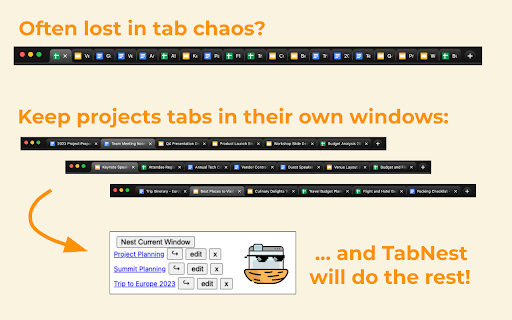
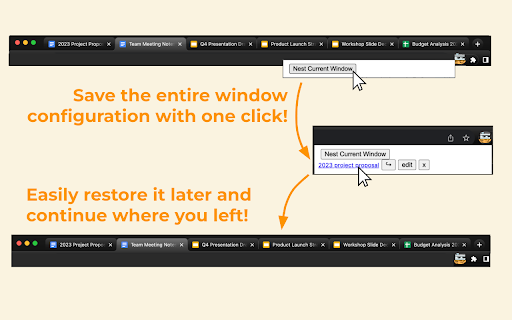
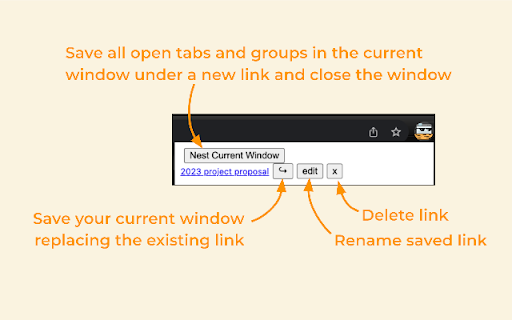
Save multiple tabs for later and reopen them with a single click. TabNest is a minimalistic, open-source, productivity-boosting Chrome extension designed to enhance multitasking. It allows you to save all the tabs in a window for later use. With just one click, TabNest saves all tabs and groups in the window, then closes it—reducing clutter and freeing up system resources. You can easily access and reopen the saved tabs, making the switch between projects or tasks seamless. - Save all open tabs in the current window for later use and close the window. - Reopen saved tabs in a new window with a single click. TabNest saves and restores the exact tab and group configurations from when they were saved, including group name, color, collapse status, and active tab. - Update, rename, and delete saved links. - Sync saved tabs across devices using Chrome account storage.

Tabmanager.io - Tab Session Manager
Manage, save and restore your windows, tabs and sessions. Tabmanager.io is an all-in-one session, window and tab manager extension for Chrome that helps you manage your open tabs, tab-groups and windows in one convenient place. ★ Windows & Tabs Our manager empowers you to swiftly navigate through open windows and tabs using either your mouse or keyboard. You can effortlessly switch between tabs and windows, search and filter tabs by title or URL keywords, and efficiently manage various aspects of your tabs such as pinning, sorting, grouping tabs by domain, suspending, identifying tabs with sound, and removing duplicates. Additionally, you have the option to export your tabs and windows as files for backup, save tabs for future use, and synchronize them across multiple devices. Our manager presents a multiple column layout that enables you to gain a comprehensive overview of all your open windows and tabs while providing the flexibility to organize your windows by renaming them. Through simple drag and drop functionality, you can easily move tabs between windows, open them in new windows, or merge entire windows. The tab manager also offers convenient features to save tabs for later restoration. You can save specific tabs within a window, save all tabs within a window, or save the entire session encompassing all open windows. ★ Tab Groups The tab manager comes with built-in support for managing your tab-groups. You can easily create a new tab group, move groups between windows, merge tab groups, rename tab groups and save your tab groups and restore them with the window at a later time. ★ Session Manager The session manager provides a comprehensive view of all your saved sessions, allowing you to effortlessly manage and swiftly restore previously saved sessions. Our intelligent restore feature ensures that opening tabs in a new or existing window does not slow down your computer, as tabs are opened in a suspended state. You can also sync your saved sessions to the cloud, ensuring data integrity and accessibility across all your devices. ★ Session History You can access a timeline overview of your browser sessions, enabling you to easily restore individual windows or tabs from earlier points in time. Save session snapshots from either the manager or the menu, providing you with the flexibility to quit your browser or temporarily use a blank browser without the risk of losing your tabs. Enabling the auto-save session feature helps you track your local browser session history in case of a browser crash. Sessions in the session history is saved on your local machine and are not saved to the cloud. ▪ Overview of active Windows and Tabs ▪ Keyboard navigation support ▪ Rename Windows ▪ Switch between Tabs and Windows ▪ Multiple Window columns for wide screens ▪ Light/Dark theme ▪ Filter Tabs with search ▪ Drag and drop Tabs and Windows ▪ Merge Windows by drag and drop ▪ Group Tabs by domain ▪ Sort Tabs ▪ Remove duplicate Tabs ▪ Suspend/Discard Tabs from memory ▪ Find Tabs playing audio ▪ Mute/Unmute Tab playing audio ▪ Create new Tab-group ▪ Drag and Drop Tab-group ▪ Merge Tab-groups ▪ Save Tab-groups for later ▪ Save Tabs for later ▪ Save Windows for later ▪ Save Session for later ▪ Quickly restore Windows and Sessions ▪ Share Windows by URL ▪ Automatic Sessions history snapshot ▪ Take Session snapshots for easy restore later ▪ Export Tabs, Window or Session as JSON/CSV ▪ Import exported Tabs, Window or Session ▪ Backup & Sync ▪ Cloud Backups ▪ And more... Send us an email at support@tabmanager.io if you need support or have suggestions about missing features.

Tab Session Manager
Group tabs and reopen sessions with a single click. Introducing Tab Session Manager: Your Ultimate Tab Management Chrome Extension Tired of losing track of your open tabs or struggling to maintain a clutter-free browsing experience? Tab Session Manager is here to revolutionize the way you manage your online activities. This powerful Chrome extension empowers you to effortlessly save and organize your browsing sessions for seamless access later on. Whether you're a research enthusiast, a multitasking wizard, or simply someone who values an organized digital life, Tab Session Manager is your go-to tool. 1. Session Saving Made Effortless: With Tab Session Manager, you can now save all your open tabs in a session with just a single click. No more worrying about accidentally closing a tab or losing a valuable webpage. Your browsing experience is preserved exactly as you left it. 2. Quick Session Reopening: Revisit your saved sessions instantly with a single click. Whether you're picking up where you left off or revisiting a research project, Tab Session Manager ensures that you're back on track in no time. 3. Customizable Session Names: Personalize your saved sessions with meaningful names. Say goodbye to vague session titles – you can now label your sessions based on projects, interests, or any other categorization that suits your workflow. 4. Efficient Tab Management: Create empty sessions to build curated collections of tabs for specific tasks or projects. Add tabs to these sessions one by one as you browse, ensuring that you stay focused and organized throughout your online endeavors. 5. Intuitive User Interface: Tab Session Manager boasts a user-friendly interface designed to enhance your browsing experience. With easy-to-understand icons and controls, managing your tabs and sessions becomes a breeze. 6. Cross-Device Session Syncing: Tab Session Manager goes beyond the confines of a single device by seamlessly syncing your saved sessions across multiple devices. Enjoy the freedom to switch between your desktop, laptop, and other devices while maintaining access to your organized sessions. Whether you're transitioning from work to home or between devices, Tab Session Manager ensures a consistent and synchronized tab management experience, providing flexibility and convenience wherever you go. Experience a new era of tab management with Tab Session Manager. Say hello to enhanced productivity, better organization, and stress-free browsing. Whether you're juggling multiple projects or just looking to keep your tabs tidy, this Chrome extension is your ultimate solution. Try Tab Session Manager today and take control of your online world like never before.

Tab Groups to Bookmarks
Manage and Save Your Tab Groups Tab Groups to Bookmarks allows you to easily organize your tabs into groups and save them as bookmark folders. It was built for multitaskers who often find themselves with many unrelated tabs open. With it you’ll be able to easily switch between tasks and tabs while staying focused and keeping your chrome session clean. - It’s recommend to pin the extension in the extensions menu but you can also open it with Ctrl+M (MacCtrl+Command+M). - Most of the features are accessed by context menus: try right clicking groups, saved groups and tabs. 📚 Some of the features: - Group all tabs on a window; - Save a group as a bookmark folder (saved under the folder “Tab Groups”); - Drag tabs in/out of tab groups; - Copy or download the tab groups URLs; - Rename a tab group by double clicking it; - Close, ungroup or delete tab groups. --- The extension is open source and does not collect any sort of data. 📦 You can check the source code here: https://github.com/FernandoLins8/Tab-Groups-to-Bookmarks ☕ You can also buy me a coffee if you want to support the extension development. Thanks in advance.

Browser Sessions
Manage, save and restore tabs with one click. Access your browsing sessions when you need it. Manage, save and restore tabs with one click. Access your browsing sessions when you need it. Features: ⭐️ enhanced UI ⭐️ Better animations ⭐️ Confirm deletion for sessions ⭐️ Universal Search: Search through every session and find tabs. ⭐️ Quick Save: Save a session without typing a name. ⭐️ Open sessions on a new browser window. ⭐️ View tabs from every session to find the right one. ⭐️ Save as many tabs as you need for later. ⭐️ Tabs remain saved even if you close your browser or restart your computer. ⭐️ Save tabs from different windows and their tabs arrangement. ⭐️ Automatic dark and light mode. ⭐️ Select if you save tabs that belong to the browser (Ex: History, Downloads) ⭐️ Rename Sessions
