
gpkabcbkpmgnhbnophinkkbgkkfknjne
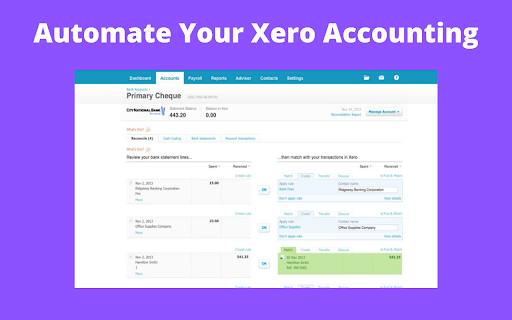

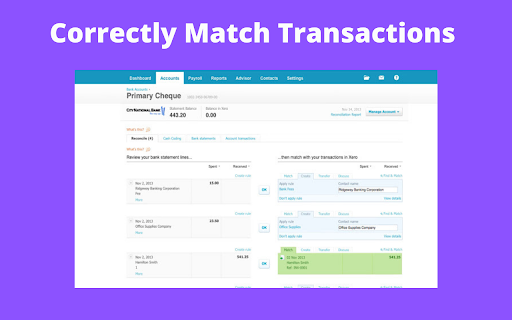

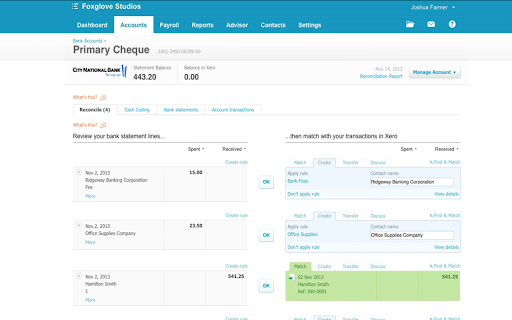
Xero Accounting Reconciliation Automation. Automate Xero Accounting with this automatic reconciliation robot tool. Automate your Xero Accounting with this easy to use auto clicker. Currently it allows for easy reconciliation for items that match the pre-set rules you have created within Xero. This means you do not have to click OK for each transaction, saving you lots of time! You can control the speed of which the tool confirms the transactions, meaning you can check them if you want, or simply blast through them! It makes Xero Accounting Automation very easy and fast. 1) Install extension 2) Head to Xero 3) Open extension and select your automation speed 4) Click start and watch the transactions confirm automatically

GG Auto Clicker 1.2
GG Auto clicker helps you automate mouse clicks on your chrome browser and has multiple options for automation. Note- ALL THE BUGS IN EXTENSION HAVE BEEN RESOLVED. IT WORKS PERFECT NOW. Hello people of the internet, we made an auto clicker for y’all that works, cherry on the top, in your chrome! ☆ GG Auto clicker chrome extension ☆ The first chrome extension with multiple clicking features to automate mouse clicks on chrome browser. NOTE - Press Ctrl and comma together to start. (Ctrl + ,). Don’t get confused! The plus symbol only means that ctrl and , should be pressed together (don’t press +) Support email - hello@autoclicker.gg (feel free to reach out for support) Allow us a moment to explain all the features to you- ✓ Click Interval: You can select the click interval between two clicks and set the unit. Example: 1 millisecond, 10 seconds or 20 minutes. ✓ Click options: You can select right or left, single or double mouse options. ✓ Click repeat: You can set the number of times it should click. Press “NEVER STOP” if you want it to run until stopped. ✓ Cursor position: You can click on current cursor location, or pick X-Y coordinates using Ctrl + / from anywhere on the screen and manually input them. ✓ Fill in your required settings. ✓ Leave the boxes that you don’t want to change, as it is. ✓ Save settings. ✓ Go back to your desired chrome window where you want to run the auto clicker online. Click on the screen once. ✓ Press Ctrl and comma buttons together to start (ctrl + ,) - please do not use the +, you only have to use two buttons simultaneously- the + is only for showing you which buttons to use together. Here are the shortcuts / commands you can use. ★ To start the auto clicker, press Ctrl + , ★ To stop, press Ctrl + . ★ To pick X-Y coordinates, press Ctrl + / THAT IS IT, SEE THE MAGIC HAPPEN. You will find two other options at the bottom in colour- ★ Reset settings: It will reset the settings to default. ★ Save settings: It will save your current settings. (It will stay like this, unless you press reset). The chrome extension is free of cost and all the features have been thoroughly tested by our developers. But if you still find any bugs or face any issue operating, feel free to email us. ★★★ EMAIL US at hello@autoclicker.gg for any kind of support. ★★★ Please don’t drop a negative review, before reaching out to us. We will make it work for you, in most cases.

Auto Clicker - AutoFill [BETA]
AutoFill input field or auto click button or link anything anywhere.You can configure and check click speed test Welcome to Auto Clicker - AutoFill Beta for Chrome! The stable version can be found here: https://chrome.google.com/extensions/detail/iapifmceeokikomajpccajhjpacjmibe Fill input field or click button or link anything anywhere. easy configure in few steps and work like PRO Auto click / Auto fill Beta is chrome extension developed with HTML, CSS, JavaScript. Quickly configure your job using XPath and work like PRO. Please note: Beta version might and sometimes most probably will contain bugs ;) Live on the bleeding edge: Try out our latest features. (They'll be rough around the edges!) You can install Auto Clicker - AutoFill Beta alongside other channels of Auto Clicker - AutoFill for Chrome. Give early feedback: Let us know what you think and help make Auto Clicker - AutoFill for Chrome a better extension.

Autoclicker
Autoclicker aims to help you automate repetitive clicks on an element in the webpage. For instance, did you ever had to deal with a page that continuously, every 20 seconds, asks you to press a confirm button, that maybe appears and disappears for a certain time? This is the extension you're looking for to be able to avoid that! #NEW IN 0.0.5 - add option to persist clicking over page reload - minor bug fixes

Auto Clicker - MT Auto Clicker [Beta Version]
Auto Clicker - MT Auto Clicker [Beta Version] is your go-to tool for automating repetitive tasks on your system. Stop wasting time on repetitive online tasks. Auto Clicker - MT Auto Clicker [Beta Version] is a completely free browser extension that automates clicking, scrolling, form-filling, and more in one powerful tool. Whether you’re endlessly scrolling through Instagram Reels, clicking through games, or filling out lengthy forms, this free auto clicker extension handles the tedious work so you can focus on what matters. Perfect For: • Social Media Users - Auto-scroll through Instagram Reels and YouTube Shorts • Gamers & Testers - Automate clicking sequences and repetitive actions • Professionals - Fill forms instantly and capture screen content • Content Creators - Record screens and take professional screenshots Core Automation Features Smart Auto Clicking • Single-point auto clicking with precise 1ms intervals • Multi-target clicking sequences for complex tasks • Touch and hold for drag-and-drop operations • Customizable timing and duration controls Content Browsing • Auto-scroll for social media feeds and videos • Auto-refresh for monitoring websites and pages • Auto-swipe for dating apps and galleries • Multi-level zoom control across platforms Productivity Tools • Smart form filling with XPath detection • Screen recording in multiple formats (MP4, WEBM, MKV) • Screenshot capture with built-in editor • Full-page and selective area capture Works Everywhere - No Download Required This Chrome extension works seamlessly with Chrome, Edge, Opera, Safari, and Brave on Windows, macOS, Android, and iOS. Perfect auto clicker for Chromebook with no download hassles - install directly from Chrome Web Store and start automating instantly. 100% Free Auto Clicker Chrome Extension Get the most advanced free auto clicker for Chrome available. No hidden costs, no premium upgrades needed - all features included at no charge. Connect With Us: Twitter: https://x.com/mtautoclicker | YouTube: https://www.youtube.com/@MTAutoClicker | Facebook: https://www.facebook.com/mtautoclicker The ultimate free auto clicker chrome extension - completely free for all users, forever.
