
inledacgphbcoihlbhmnkkbkgmjldbbi
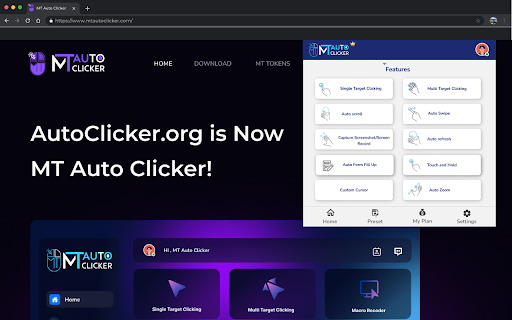


Auto Clicker - MT Auto Clicker [Beta Version] is your go-to tool for automating repetitive tasks on your system. Stop wasting time on repetitive online tasks. Auto Clicker - MT Auto Clicker [Beta Version] is a completely free browser extension that automates clicking, scrolling, form-filling, and more in one powerful tool. Whether you’re endlessly scrolling through Instagram Reels, clicking through games, or filling out lengthy forms, this free auto clicker extension handles the tedious work so you can focus on what matters. Perfect For: • Social Media Users - Auto-scroll through Instagram Reels and YouTube Shorts • Gamers & Testers - Automate clicking sequences and repetitive actions • Professionals - Fill forms instantly and capture screen content • Content Creators - Record screens and take professional screenshots Core Automation Features Smart Auto Clicking • Single-point auto clicking with precise 1ms intervals • Multi-target clicking sequences for complex tasks • Touch and hold for drag-and-drop operations • Customizable timing and duration controls Content Browsing • Auto-scroll for social media feeds and videos • Auto-refresh for monitoring websites and pages • Auto-swipe for dating apps and galleries • Multi-level zoom control across platforms Productivity Tools • Smart form filling with XPath detection • Screen recording in multiple formats (MP4, WEBM, MKV) • Screenshot capture with built-in editor • Full-page and selective area capture Works Everywhere - No Download Required This Chrome extension works seamlessly with Chrome, Edge, Opera, Safari, and Brave on Windows, macOS, Android, and iOS. Perfect auto clicker for Chromebook with no download hassles - install directly from Chrome Web Store and start automating instantly. 100% Free Auto Clicker Chrome Extension Get the most advanced free auto clicker for Chrome available. No hidden costs, no premium upgrades needed - all features included at no charge. Connect With Us: Twitter: https://x.com/mtautoclicker | YouTube: https://www.youtube.com/@MTAutoClicker | Facebook: https://www.facebook.com/mtautoclicker The ultimate free auto clicker chrome extension - completely free for all users, forever.

Auto Clicker - AutoFill [DEV]
AutoFill input field or auto click button or link anything anywhere.You can configure and check click speed test Welcome to Auto Clicker - AutoFill Dev for Chrome! The stable version can be found here: https://chrome.google.com/extensions/detail/iapifmceeokikomajpccajhjpacjmibe Fill input field or click button or link anything anywhere. easy configure in few steps and work like PRO Auto click / Auto fill Dev is chrome extension developed with HTML, CSS, JavaScript. Quickly configure your job using XPath and work like PRO. Please note: Dev version might and sometimes most probably will contain bugs ;) Live on the bleeding edge: Try out our latest features. (They'll be rough around the edges!) You can install Auto Clicker - AutoFill Dev alongside other channels of Auto Clicker - AutoFill for Chrome. Give early feedback: Let us know what you think and help make Auto Clicker - AutoFill for Chrome a better extension.

Auto Clicker
Perfect for testers, developers, avid gamers, and regular users, AutoClicker is your go-to tool for automated clicks. For the gaming community, AutoClicker is a game-changer. Eliminate the need for continuous clicking in idle, incremental, or clicker games like minecraft and roblox. Alleviate the hand stress from intensive grinding in RPG games. With AutoClicker, set your custom click speed and tap, streamline your gameplay, achieve gaming objectives faster, and level up effortlessly. It's the best auto clicker for Chrome users looking to boost their gaming performance. Gaming Advantage: Gain a significant advantage in your favorite clicker games, RPGs, and more. AutoClicker simulates super-fast clicks, providing a competitive edge. Customizable Click Speeds: From leisurely to lightning-fast, customize your click speeds with our Chrome click automation tool. Select Click Points: Guarantee precision with the ability to choose specific click points on your screen. Auto Click Sequences: Automate complex tasks using pre-set click sequences, enhancing your efficiency in games and workflows. Scheduled Clicking: Schedule your clicks for regular intervals, perfect for tasks requiring recurring actions. User-Friendly Interface: Navigate AutoClicker's features with ease, thanks to its intuitive design.

Auto Clicker
Automates repetitive clicking tasks for you. Click up to 3 locations simultaneously. ━━━━━━━━━━━━━━━━━━━━ 🖱️ How to Use ━━━━━━━━━━━━━━━━━━━━ 1. Place your mouse where you want to click 2. Press Ctrl+, to start clicking 3. Press Ctrl+. to stop clicking ━━━━━━━━━━━━━━━━━━━━ ⭐ Key Features ━━━━━━━━━━━━━━━━━━━━ • 3 Slots: Click 3 different locations at different speeds simultaneously. • Click Delay: Set the interval between clicks in milliseconds (1000 = 1 second). Can be changed while clicking. • Click Limit: Set a limit by count (e.g., 100 clicks) or time (e.g., 1 minute). • Click Indicator: Shows where clicking is happening and displays the click count. • Follow Cursor: In slot 1, you can set it to keep clicking wherever the mouse moves. • Click Mode: If regular clicking doesn't work, try Mousedown or Compatibility mode. On Mac, use Control instead of Ctrl, and Option instead of Alt. Shortcuts can be changed at chrome://extensions/shortcuts 1. Check if shortcuts are configured. → You can check at chrome://extensions/shortcuts 2. Refresh the page (F5) and try again. 3. Change the click mode in the popup. - Mousedown: Works better on some buttons. - Compatibility: Try this for games and special pages. 4. Disable and re-enable the extension, then retry from step 2. 5. Completely close and restart the browser, then retry from step 2. [Technical Limitations] The following cases won't work due to Chrome extension limitations: • Chrome internal pages (chrome://, settings, new tab, Web Store, etc.) • PDF viewer • Canvas/WebGL-based games (Unity, Construct, Phaser, etc.) • Some banking/payment sites that block auto-clicking ━━━━━━━━━━━━━━━━━━━━ 📬 Contact Us ━━━━━━━━━━━━━━━━━━━━ If the above methods don't help, please contact us through the Support tab on Chrome Web Store. Including the following information will help us resolve your issue: • URL of the website where the problem occurs • What action triggered the problem • Click mode being used (Click/Mousedown/Compatibility) • Error message, if any

OP Auto Clicker
A full-fledged autoclicker with two modes of autoclicking, at your dynamic cursor location or at a prespecified location. The maximum amounts of clicked can also be set (or left as infinite). Hotkeys work in the background for convenience.
