
beilbfghjjeoajmbmlfbocjgbocmggap
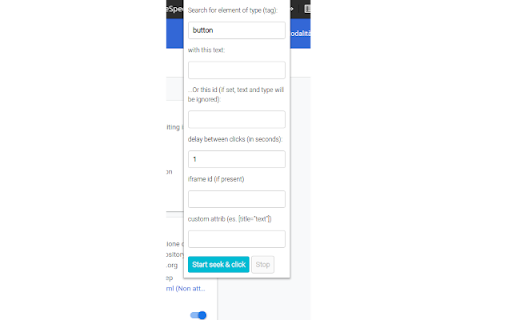
Autoclicker aims to help you automate repetitive clicks on an element in the webpage. For instance, did you ever had to deal with a page that continuously, every 20 seconds, asks you to press a confirm button, that maybe appears and disappears for a certain time? This is the extension you're looking for to be able to avoid that! #NEW IN 0.0.5 - add option to persist clicking over page reload - minor bug fixes

Auto Clicker Pro
Professional auto clicker with advanced features. Set click positions, intervals, and automate mouse clicks in your browser. Auto Clicker allows you to set the desired click interval, choose a specific location on the screen, and start automated clicking with a single button press. HOW TO USE AUTO CLICKER? Using Auto Clicker is extremely simple and requires no technical knowledge. Follow these steps to start automating your clicks: Step 1: Install the Extension Install Auto Clicker from the Chrome Web Store. Click on the extension icon in the browser toolbar to open it. Step 2: Set the Click Position Click on the “Set Position” button. Move your mouse to the location where you want the clicks to happen. Press the Q key to confirm the position. You can also add multiple click points: the auto-clicker cycles through them sequentially. Note: the extension cannot work on protected page like chromewebstore.google.com or on local file opened in the browser. Step 3: Adjust Click Settings Set the click interval (seconds). Free version limit: min 0,1 clicks per second. Choose the number of clicks. Free version limit: max 100 clic Step 4: Start the Auto Clicker Press the “Start AutoClicker” button to begin automated clicking. Or press at the same time CTRL+Q to start. The extension will repeatedly click at the selected position according to your settings. Step 5: Stop the Auto Clicker Click the "Stop" button to end the clicking process. Alternatively, press CTRL+M to stop clicking instantly. KEY FEATURES ✅ Automated Mouse Clicking Set up your clicking process and let Auto Clicker do the work for you. Just configure the interval, set the number of clicks, and watch as it clicks automatically. 🎯 Custom Click Position Record a specific point on the screen where you want the click to occur. Press the "Set Position" button, move your mouse to the desired spot, and lock it in place by pressing Q. The extension will then repeatedly click at that exact position. ⏳ Adjustable Click Interval You can set how frequently the clicks should happen, from milliseconds to seconds. Whether you need fast-paced clicking for games or a slow, steady clicking for work tasks, this feature gives you full control. 🔄 Set Number of Clicks Enter the number of clicks you want, and the extension will stop automatically after completing the set count. 🖱️ Works in the Background & Scheduler Once activated, the auto-clicker keeps running in the background, allowing you to continue working on other tasks without interruption. You can also schedule a start and stop time! ⏹️ Easily Start and Stop Control your clicking process effortlessly. Start clicking with a single button press, and stop it anytime using the dedicated stop button or by pressing the shortcut key (Q). 🖥️ Lightweight and Fast The extension is designed to be minimalistic and efficient, ensuring it doesn’t slow down your browser or interfere with other tasks. 🔐 Safe and Secure We respect your privacy. Free Auto Clicker does not collect any personal data or track your browsing activity. It is designed solely for automating clicks within your browser. NOTE: The free version allows you to do not set an interval

AutoClick Pro
Element Auto Clicker Pro (fixed) A Chrome extension that automates repetitive clicks on selected webpage elements. Key features:… Element Auto Clicker Pro (fixed) A Chrome extension that automates repetitive clicks on selected webpage elements. Key features: -Precision Element Selection: Visually pick elements with a red outline and CSS selector generation. -Background Auto-Clicking: Operates even when tabs are minimized or in the background. -Millisecond Intervals: Adjustable timing from 1ms to hours (limited by Chrome’s ~1-second minimum for reliability). -Debug Tools: Real-time logging, status indicators (green/red lights), and error alerts for missing elements. -Persistent UI: Overlay guides selection, escape-key cancellation, and cross-tab compatibility.

Auto Clicker Pro
"Auto Clicker Pro" is a Chrome extension that automates clicking on DOM elements at specified intervals, supporting different element selectors and even clicks inside iframes. Simplify repetitive tasks and streamline web interactions effortlessly with this powerful and user-friendly tool.

Auto Clicker
An auto clicker triggered by a hotkey with configurable CPS and element selector. Tired of auto clickers that just don't work? 😤 We've got you covered! As the developers behind the online CPS (Clicks Per Second) test and seasoned extension creators, we've cracked the code. Other auto clickers let you precisely target the element on the page—that's where ours stands out! 🎯 Simply set your desired CPS and select your target element right from the popup, then start clicking away instantly! 🖱️💨 We've tested it on the CPS test website: Just enter #clickarena in the popup's Element Selector, and let the auto-clicking fun begin! 😎
