
goklhcebibhgfhpajkafpblpkmanpeao
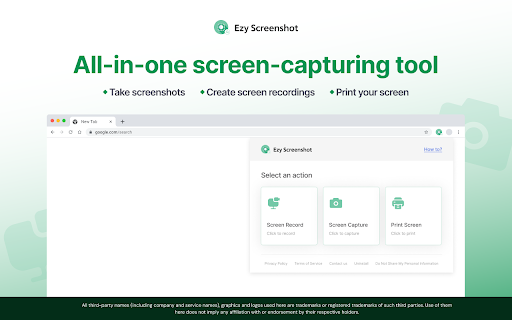
Add the Ezy Screenshot Chrome™ extension to capture, record and print your screen via a widget on your browser toolbar. Capture the visible part of your screen, and record your computer screen with this easy-to-use tool. Save or get shareable links for screen recordings (up to 50 MB) and screenshots that you can send to your family, friends, or colleagues. You can also print screenshots. How to use the screen-capturing tool: - Add the extension to your Chrome™ browser - Pin the extension to your browser toolbar for quick access to the screen-capturing widget - Open the widget and choose ‘Screen Record’ or ‘Screen Capture’ - To record, select a window or the entire screen from the dropdown, navigate to the desired window or screen, and the recording will begin in 10 seconds - To take a screenshot, select the window you want to capture. The screenshot will capture the visible part of your screen - Click ‘Print Image’ to print the screenshot We welcome your ideas and suggestions to improve this extension. Please note that you can uninstall the extension if you are dissatisfied with the product. Upon clicking the button above, you confirm that you have read & agree to the Terms of Service & Privacy Policy and consent to install this Chrome™ extension. Chrome is a trademark of Google LLC. Use of it here does not imply any affiliation with or endorsement by Google LLC.

Custom Cursor for Chrome™
Fun custom cursors for Chrome™. Use a large collection of free cursors or upload your own. Customize your Chrome browser experience with our free collection of mouse cursors at Custom Cursor. At Custom Cursor we have created a giant collection of hand-drawn cute cursors. We have over 10,000 different packs available on our website for you to enjoy. With your help, our collection has grown so big that we divided it into categories that should fit every taste, like: - Minecraft; - Cute Cursors; - Anime mouse packs; - Memes; - Spy x Family pointer packs with Anya Forger; - Among Us; - Two types of Minimal pointers for work and studies; - Games; - Roblox; - And many, many other funny elements for you to play with. Some of our mouse pointer packs are bundled with the Custom Cursor browser extension, but most of them await you on our website. Keep an eye out for new and trending additions. To simplify navigation, we've organised our collection into Editor's Picks collections, each with a unique theme. Examples include: - Green arrows for autumn; - Christmas themed arrows; - Holidays editor's picks; - Halloween; - Custom Cursor collaboration with Daieny Schuttz; - Pink pointers editor picks; - Summer mouse decorations; - Rainbow colors; and much, much more on our website. If you can't find what you're looking for, use the "UPLOAD CURSOR" button to add your own. Manage your personal arrow collection on the Upload page and adjust cursor size in the "Manage" section. Newly added collections will be uploaded to the Custom Cursor for Chrome extension and can be found at the bottom of the collection list. Your added packs will appear in “My Collection”. Create your own collection of mouse cursors from any images with Custom Cursor Creator tool on our website. It will allow you to create new packs from almost any arrow or pointer shaped image on the internet. ------------------- ! After installing the extension, refresh previously opened tabs to use it on those pages. Note that the extension may not work on Chrome Web Store pages or the home page. Open another website (e.g., google.com) to test the extension. If you like the extension you can also check our Custom Cursor for Windows app. Preview arrow appearance by clicking on it in the extension window and moving the mouse to the empty space within the window.

Screen Recorder & Screenshot App for Chrome | Scrnli
Screen recorder for Chrome, take screenshots, record screen and video, capture, edit and share instantly Scrnli is a powerful screen recorder and screenshot tool for Chrome that lets you capture your screen, record video, take screenshots, and share content instantly. Use Scrnli to record your screen, capture full pages, edit screenshots, and create video recordings for work, study, or communication. Why Choose Scrnli screen recorder and screenshot app Screenshot Tool for Chrome - Capture full page, selected area, or visible screen Screen Recorder for Chrome - Record screen, browser tab, or desktop video Edit Screenshots - Annotate, draw, add text, arrows, and highlights Instant Capture - Take screenshots and record screen with one click Easy Sharing - Share screenshots and videos instantly via link Save and Download - Save screenshots and screen recordings locally Lightweight Extension - Works smoothly without slowing down Chrome Secure and Private - Your data stays safe and under your control What You Can Do with Scrnli Take Screenshots - Capture full page screenshots or selected areas Record Screen Video - Record tutorials, meetings, and presentations Create Tutorials - Record screen and explain processes visually Improve Communication - Share screenshots and videos instead of text Save Important Content - Capture and store useful information How to Use Screen Recorder & Screenshot Tool 1. Install Scrnli from the Chrome Web Store 2. Click the extension icon 3. Choose screenshot or screen recording mode 4. Capture your screen or record video 5. Edit, save, or share instantly Capture and record your screen in seconds with this easy-to-use screen recorder for Chrome. Full Page Screenshot - Capture entire web pages Visible Screen Capture - Capture what you see Area Screenshot - Select and capture specific areas Instant Editing - Add text, arrows, and highlights Screen Recorder Features Record Screen - Capture desktop, browser tab, or window Video Recording - Record video with smooth performance Quick Sharing - Share recordings instantly Save Video - Download recordings for offline use Why Users Install Scrnli Screen Recorder • Easy screenshot and screen recording tool • Fast capture and editing features • Share screenshots and videos instantly • Lightweight and simple to use • Perfect for work, study, and daily tasks Privacy and Security Scrnli Screen Recorder does not collect or store personal data. Your screenshots and recordings remain private.

Screen Recorder for Google Chrome™
Screen Recorder is a software that allows you to capture and record your computer screen right in the browser! Use this free screen recorder software to make video recordings / screen recordings directly from the Chrome browser and share these video recordings with your friends/colleagues. To begin using the software Screen Recorder for Google Chrome™, simply click on "Start Capture" to begin recording your computer screen. Once you have finished recording your video, click on "Stop capture" to stop the video. You can save the video you made onto your computer/Google Drive. Its simple and easy to use Screen recorder to make video tutorials/software help videos etc and much more. Disclaimer: Please note this extension is NOT made by Google and is made by an independent development team. All copyrights belong to their respective owners. Google doesn’t endorse or sponsor this Chrome extension. Screen Recorder for Google Chrome™ is not owned by, is not licensed by and is not a subsidiary of Google Inc.

Screen Capture
Use Chrome Screen Capture for fast screen capture Chrome extension, full web page screen capture Chrome, scrolling screenshot tool Use chrome screen capture for fast screen capture chrome extension, full web page screen capture chrome, scrolling screenshot tool 📸 Grab, record and save everything in your browser Screen capture is a powerful and easy-to-use extension designed for anyone who needs quick screenshots and video recording directly in the browser. This screen capture tool allows you to create a screenshot on google chrome browser in seconds without installing heavy software. With chrome screen capture you can grab visible areas, create a full browser screenshot chrome, or make a scrolling screenshot of an entire page. the extension also includes a built-in screen recorder so you can record browser video while browsing. 🌐 Smart capture utility for everyday browsing Modern work often requires saving visual information from websites. articles, product pages, analytics dashboards, documentation and tutorials may need to be stored or shared quickly. this is where a lightweight tool becomes useful. The extension simplifies how to screen capture chrome pages while keeping your workflow smooth. instead of complicated software, everything works directly inside the interface you already use every day. 📌 Practical situations where the tool helps 1️⃣ saving important information from long online articles 2️⃣ collecting research materials for reports or presentations 3️⃣ sharing visual instructions with teammates 4️⃣ documenting interface changes during development 5️⃣ storing references for creative projects Many users rely on a screenshot for browser while studying, managing projects, or collaborating remotely. 💡 Flexible capture modes for different needs ➤ full page screen grabber plugin for long reading materials ➤ scrolling screen capture chrome for pages that extend beyond the area ➤ full web page screen grabber for archiving information ➤ screen recorder when working with detailed layouts ➤ full screenshot to keep entire documents intact 📊 Comfortable workflow for visual documentation • save a screenshot chrome browser when reviewing content • create a browser screenshot for tutorials or reports • produce a screenshot on google chrome browser for quick notes • keep a screenshot for browser as visual reference • generate a full browser screenshot chrome for larger materials Such flexibility is useful for teams that frequently exchange visual context instead of long explanations. The extension also includes tools for recording on-screen activity. this feature helps create demonstrations, onboarding materials, and quick walkthrough videos. screen recorder chrome extension for simple recordings area recorder suitable for tutorials area recorder extension chrome that runs directly in the interface chrome extension screen recorder for capturing workflows record screen chrome extension sessions without complex setup Many educators, developers, and support specialists prefer record browser video features when explaining processes visually. open the website or article you want to save click the extension icon in the toolbar choose the capture type including full screen capture chrome extension save or share the result depending on your task These steps make it easy for anyone searching how to screen capture chrome content efficiently. ▸ students collecting references for research ▸ designers reviewing layouts and visual elements ▸ developers documenting interface updates ▸ marketers analyzing landing pages ▸ support teams preparing visual instructions Whether you need a chrome screen capture entire page for documentation or a chrome screen capture whole page example for analysis, the extension adapts to different workflows. choose the scrolling screen capture chrome mode the tool automatically performs scroll capture screenshot processing 📌 can i save a full page yes, full page video recorder and full web page screen capture chrome options are available yes, the screen recording chrome extension allows you to record browser video recordings can be used for tutorials, presentations, or feedback ⚡ a convenient helper for daily digital work chrome screen capture works as a practical screen capture software chrome users can keep installed without slowing down their workflow. it supports quick screenshots, long-form captures, and lightweight recording. Whether you want to save information, create documentation, or explain something visually, this chrome extension screen capture solution provides a simple and reliable way to capture what you see online.
