
goaifllkmmcjkekjdlkjofoiiebmfljg
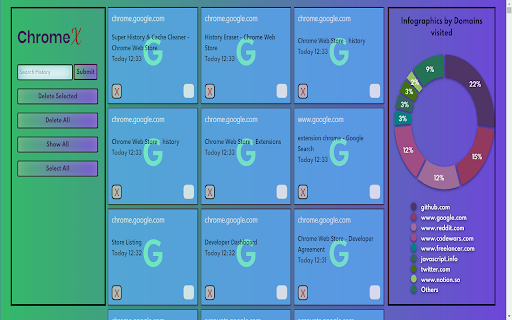
The one of the best cleaning tools for your Chromebook, Windows PC, Mac or Linux. https://github.com/anshusaurav/Chrome-Extension ChromeX is easy to use. The one of the best cleaning tools for your Chromebook, Windows PC, Mac or Linux. Open History page ⌘+Y --- Mac Users Ctrl+H --- Window/Linux Users Our features: - Instant removal with one-click - Clear Chrome history

Twitter Extension
Filter Your Twitter Feed by Custom Categories Filter your tweets by creating custom categories. You can create a custom category such as "news", "animals" etc. Then you can add usernames to it. When you click "apply", only the usernames in your selected categories will be shown on your Twitter feed. It is also fast and doesn't slow down Twitter.

Android Terminal
Access your USB-connected Android terminal without installing ADB This extension establishes an ADB-compatible connection with your Android device, eliminating the need for any native applications to be installed. It's designed to operate across various desktop environments, whether you're on Windows, Linux, macOS, or Chrome OS. Remarkably, the extension is written entirely in JavaScript, making it free from any native executables. Here are some of the key functionalities offered by this extension: 1. Multiple Terminal Windows: Easily open multiple terminal views to connect with your Android device, facilitating efficient debugging and interaction. 2. File Transfer: Streamline sending and receiving files between your desktop computer and the Android device. 3. Screenshot Capture: Capture screenshots of the current screen view on your Android device and store them on your desktop computer. 4. Application Backup: Perform comprehensive backups of your Android device, including all or select installed applications and their associated data. 5. Debugging with "logcat": Use the "logcat" command to debug your Android device directly from your desktop, enhancing your development capabilities. This extension serves as a compelling alternative to traditional native ADB (Android Debug Bridge) applications, offering a more accessible and platform-agnostic solution. If you already have the native ADB installed and want to explore this extension, ensure there are no ongoing communications with the ADB server by executing the "adb -kill-server" command. Then, refer to the instructions on the extension's homepage to get started seamlessly.

GLaunch
GLaunch is a simple tool which provides a popup panel linking to various Google services - Chrome Extension. GLaunch is a simple extension that provide a popup link panel to numerous Google services. Services can be quickly filtered by typing the name of the desired service name. GLaunch can be used as your new tab page, opened as a new tab or standalone window along side the Chrome extension panel. Features: - Improved Material based Design. - Quickly search and find Google Services (+ Quick actions to common functions). - Ability to add custom links. - Filters services as you type. - Links open in a new tab (+ Incognito window support). - Open with Key binding (CTRL + SHIFT + Y) or customise to your own preference. - Discover Google Services you did not know existed! - Right click context menu based quick searches for Google Maps and YouTube. - Select & Search; you can use GLaunch to highlight an address and right click to search Google Maps. - Select & Search; You can also highlight sentences and search Youtube for videos. Please note that the icons used to represent each service are the official icons by Google they were sourced from the service itself. Any of the trademarks, service marks, collective marks, design rights or similar rights that are shown, mentioned or cited on the extension are the property of their respective owners and not of Integrated Brands, its contributors or visitors. The word mark, "Google" and the logo, and any associated service logos are copyright. The copyright is held by Google.

Fedora free online linux server
Run the Linux Fedora, RedHat, RHEL, CentOS, Oracle Linux, Open SUSE and Mandriva from the OnWorks free servers hosting provider This extension is a file manager integration to import and export your desktop files into the Fedora linux server provided by the OnWorks free hosting provider. It also allows to import files detected as links by Google Chrome. Users should install this extension in order to import and export their files in their OnWorks Fedora linux online workstation.
