
gmppioheijlidaamfhpjkhijdnjdbkmm
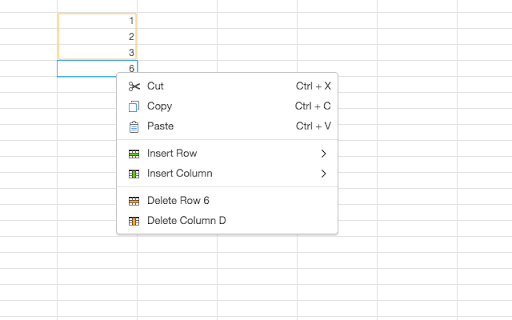
Enhances functionality of the Workiva web applications The Workiva Chrome extension empowers people to leverage the context menu to perform Cut, Copy and Paste actions in Workiva applications with ease; all without forcing the use of keyboard shortcuts. This is a common interaction people are used to in many applications. Installing it can improve workflow and remove any need to message limitations to cut/copy/paste actions.

Culture Cloud
Whether it’s celebrating personal victories or team wins, Culture Cloud allows you to send recognition at your fingertips. You can select an award value and level and add a personal message. The Extension enables you to send eCards and/or nominations and give points from the app you use every day. After receiving recognition, you get points to redeem great awards in your recognition program. Recognition sent using the Extension will look the same as recognition sent from the Culture Cloud website, and it will be recorded in Reports. Users of the Chrome Extension must have permission to send recognition from the Culture Cloud program. Only recipients who have permission to receive recognition will be visible recipients in the Chrome Extension. Recognizing great work is the key to a thriving workplace culture. Create a culture people love.

ezeep Blue
Extension to print from your Chromebook or Chrome browser with your ezeep Blue account Enjoy smart printing for Google Workspace, Chrome OS and your Chrome browser. ezeep Blue is a cloud printing solution that connects all printers to Chrome OS and Android. Printers can be centrally managed and assigned to users regardless of where they are located, even if the networks are separated. Integrated pull printing ensures that no printouts fall into the wrong hands. This makes ezeep Blue ideal for educational institutions and companies alike. ▸ Share and provision ezeep-enabled printers with employees or guests. With the optional ezeep Hub, you can connect printers to Chromebooks without needing a Windows PC or print server. ▸ Print from Chromebooks or the Chrome Browser to any printer, even if isn't compatible with Chrome OS. ▸ Print remotely to any printer, even if you aren't in the same network as the printer. ▸ Manage all printers and configure printing policies in one web portal. ▸ Supports all printing options provided by the printer manufacturer. ▸ Fully integrated into Chrome OS for great user experience. ▸ Supports Sign in with Google, as well as Microsoft and Apple logins. ▸ Complies with the strictest security standards, like GDPR and HIPAA and includes added security features like pull printing. All print data is transmitted TLS 1.2 encrypted and deleted immediately after printing. ▸ Hosted by carbon-neutral hosting providers. We also offset the CO2 emissions produced by each printed page via our cooperation with justdiggit.org Already have an ezeep Blue account? Download the Chrome Extension and login with your ezeep Blue account: https://app.ezeep.com/quickstart Not yet an ezeep Blue customer? Sign up & try for free: https://www.ezeep.com/free-trial/

Okta Browser Plugin
Work outside the perimeter Okta Browser Plugin protects your passwords and securely logs you into all your business and personal apps. The world's largest organizations and over 100 million people rely on Okta to connect to apps inside and outside of their organization knowing that their credentials are protected. With the Okta Browser Plugin you can: *Automatically sign in to your business and personal apps with just one click *Add your own apps into Okta *Quickly generate strong, random passwords on the fly for all your apps *Easily access your Okta dashboard apps and tabs *Seamlessly and securely switch between multiple Okta accounts You need an Okta account to use the Okta Browser Plugin. If you cannot access your Okta account via Okta Browser Plugin, please contact your IT admin. Use the following link to learn about the most recent version changes: https://help.okta.com/en/prod/Content/Topics/Settings/Version_Histories/Ver_History_Browser_Plugin.htm

Degreed Extension
Track all your learning. Bring learning into your everyday workflow with the Degreed button. You can track your learning from any website, share content with others, save for later, add to a Pathway, or search for content in Degreed without ever leaving the site you’re on. Track your learning: Track all your learning directly from your browser without leaving the page you’re on — and save comments about what you learned. Share with others: If you love what you learned, you can recommend it to a friend or a group. Save for later: If you find an article you want to read later, you can save it. If you forget, Degreed will recommend it in your feed. Add to Pathway or Plan: When building a Pathway or plan in Degreed, you can add to it directly from the Degreed Button. Add to catalog: If you have the “Manage Content” permission, you can add directly to the catalog. The Degreed Button will scrape the title, description, and image for the content if available, removing the need to manually add the information. You can also review and modify the title and description before the item is added to the catalog. Find more learning resources: Find new learning resources and people to follow. If you want to learn more, search to see other learning items or find people to follow and see what they’re reading. Stay in touch with notifications: Your Degreed notifications are available directly. If someone recommends an item, you get notified without leaving the page you are on.
