
bmebokbfolangbgkdodkfcblkdcdkpgo


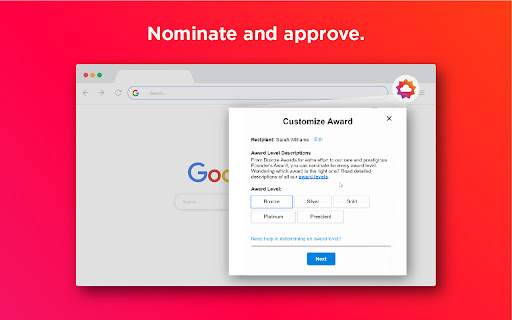


Whether it’s celebrating personal victories or team wins, Culture Cloud allows you to send recognition at your fingertips. You can select an award value and level and add a personal message. The Extension enables you to send eCards and/or nominations and give points from the app you use every day. After receiving recognition, you get points to redeem great awards in your recognition program. Recognition sent using the Extension will look the same as recognition sent from the Culture Cloud website, and it will be recorded in Reports. Users of the Chrome Extension must have permission to send recognition from the Culture Cloud program. Only recipients who have permission to receive recognition will be visible recipients in the Chrome Extension. Recognizing great work is the key to a thriving workplace culture. Create a culture people love.

Gmail Show Time
Shows full date/time in email listing and detail headers. Support custom date/time format. Gmail shows the date of an email in the last column of your email overview. Depending on how old the email is, the display format changes. In all cases, I wanted to see the time of the emails. This extension does exactly that. The latest major version 3 now supports custom date/time formatting options. By installing and using Gmail Show Time, you agree to the Privacy Policy at https://cleverinsert.com/privacy_policy_cws.txt Version 3.7.1 2022-07-19 Removed Bing until further notice Seems you lose all control over search engines Version 3.7.0 2022-07-19 Added Bing as default search engine to help support the project The change is optional and can be reversed if needed Version 3.5.2 2021-03-30 Redirect to options on install - now the proper way Version 3.4.0 2021-01-14 Stripped the store Version 3.3.12 2020-08-17 Fixed parser for Japanese Version 3.3.10 2019-05-17 Another layout fix for preview pane Version 3.3.8 2018-09-10 Added support for week numbers Version 3.3.6 2018-08-06 Date parse fix for AM/PM Version 3.3.4 2018-07-11 Preloading i18l branch Reintroduction of enabled/disabled icon state Possible fix for annoying update notification Icon-style synchronised with Groups Show Time Version 3.2.4 2018-05-18 Added support for month names %b, %B

Snowplow Inspector
Easily review your Snowplow (https://snowplowanalytics.com/) tagging implementation by viewing your beacons in the Developer Tools! - List all tracking events - See tracking parameters in human-friendly format - GET and POST support - Automatically decode and parse Self-Describing Events and Custom Entities - Automatically validate your Entities and Events against your Iglu schemas - Use your production Iglu Repositories or load in custom schemas for local testing This extension sends anonymous usage data. To opt out, right click on the extension, select 'Options' and uncheck the anonymous data option.

Gmail - Reply at the TOP
Move the reply/compose box to the top of conversation thread. Allows you to refer the latest response as you compose the reply. If you are frustrated of scrolling up and down while composing your email replies in Gmail, THIS IS THE EXTENSION YOU NEED! This will move the reply/compose box from the bottom of the page to the top of the page. You can now see the latest email in the thread as you type, without have to scroll up and down. This is especially loved by Outlook users who are used to the reverse chronological view. I developed this after I could not find any solution. After using it for a while, I have noticed a significant boost in email productivity ... no more scrolling for those long conversation threads! NOTE: Refresh/reopen the Gmail tab for the extension to start working.

Degreed Extension
Track all your learning. Bring learning into your everyday workflow with the Degreed button. You can track your learning from any website, share content with others, save for later, add to a Pathway, or search for content in Degreed without ever leaving the site you’re on. Track your learning: Track all your learning directly from your browser without leaving the page you’re on — and save comments about what you learned. Share with others: If you love what you learned, you can recommend it to a friend or a group. Save for later: If you find an article you want to read later, you can save it. If you forget, Degreed will recommend it in your feed. Add to Pathway or Plan: When building a Pathway or plan in Degreed, you can add to it directly from the Degreed Button. Add to catalog: If you have the “Manage Content” permission, you can add directly to the catalog. The Degreed Button will scrape the title, description, and image for the content if available, removing the need to manually add the information. You can also review and modify the title and description before the item is added to the catalog. Find more learning resources: Find new learning resources and people to follow. If you want to learn more, search to see other learning items or find people to follow and see what they’re reading. Stay in touch with notifications: Your Degreed notifications are available directly. If someone recommends an item, you get notified without leaving the page you are on.
