
inehghpkjjjdgpnagcbogckbonilnidc
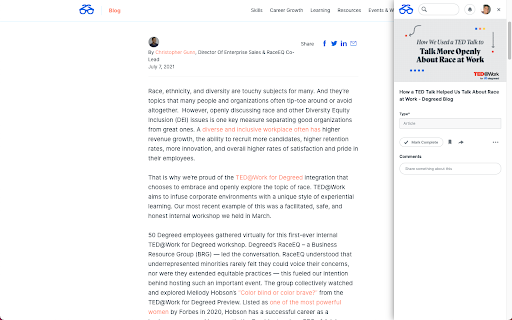
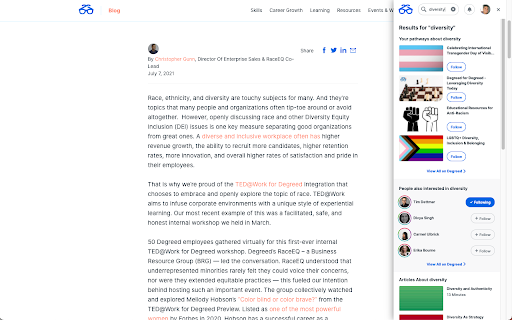


Track all your learning. Bring learning into your everyday workflow with the Degreed button. You can track your learning from any website, share content with others, save for later, add to a Pathway, or search for content in Degreed without ever leaving the site you’re on. Track your learning: Track all your learning directly from your browser without leaving the page you’re on — and save comments about what you learned. Share with others: If you love what you learned, you can recommend it to a friend or a group. Save for later: If you find an article you want to read later, you can save it. If you forget, Degreed will recommend it in your feed. Add to Pathway or Plan: When building a Pathway or plan in Degreed, you can add to it directly from the Degreed Button. Add to catalog: If you have the “Manage Content” permission, you can add directly to the catalog. The Degreed Button will scrape the title, description, and image for the content if available, removing the need to manually add the information. You can also review and modify the title and description before the item is added to the catalog. Find more learning resources: Find new learning resources and people to follow. If you want to learn more, search to see other learning items or find people to follow and see what they’re reading. Stay in touch with notifications: Your Degreed notifications are available directly. If someone recommends an item, you get notified without leaving the page you are on.

Virtru for Drive
Virtru for Drive Virtru Data Encryption, Protection, and Privacy for Google Drive. ***This extension requires a valid license with Virtru to Activate and be able to use. The primary functionality of this extension is a paid feature and users need a license to use it. For more details please visit our website at https://www.virtru.com/google-workspace-encryption. Additionally, if you already paid for Virtru for Drive please reach out to your domain admin for assistance with licensing.*** Easily protect files in Google Drive, and maintain control wherever they’re shared. At Virtru, we understand that data is an organization’s most valuable asset and sharing it is critical for business success. But sharing data creates significant risk. We believe no one should have to choose between protecting data and sharing it. We help more than 20,000 organizations, large and small, across almost every industry, protect data wherever it’s created or shared so they can collaborate with confidence. Virtru is a certified partner for Google CSE encryption key management to support heightened privacy and compliance for Google Docs, Sheets, and Slides within Google Cloud. Encrypt files ranging from PDF to Word, PowerPoint, Excel, PNG, and CAD files uploaded to Google Drive to prevent unauthorized access. Privacy Ensure files uploaded to and shared from Google Drive stay private, so you don’t have to trust Google with your data. Compliance Maintain compliance with data privacy regulations such as HIPAA, GDPR, CJIS, ITAR, CCPA, FERPA, CMMC, NIST, and more. Secure Sharing Protect files stored in Drive and maintain control wherever they’re shared—both internally and externally, beyond Google. End-to-End Encryption Object-level, client-side encryption for files uploaded to Google Drive. Persistent Access Controls Access revocation, expiration, disable sharing, and watermarking give you persistent control, wherever Drive files are shared. Watermarking Watermark files uploaded to Drive with recipients’ names, helping prevent file-based data leaks as they’re shared externally. Contact us to learn more or try Virtru at your organization: https://www.virtru.com/contact-us/ By clicking the “Install” button above, or by otherwise downloading or installing the Virtru software referenced above, you consent to be bound by the Virtru Terms of Service (https://www.virtru.com/terms-of-service), which governs your access to and use of the Virtru software. If you are downloading or installing the Virtru Software, or otherwise accepting the Virtru Terms of Services, on behalf of an entity (such as your employer), you represent to Virtru that you have the legal authority to accept that Virtru Terms of Service on behalf of that entity.

SAML-tracer
A debugger for viewing SAML messages A tool for viewing SAML and WS-Federation messages sent through the browser during single sign-on and single logout.

Glean
Unlocks your company's knowledge and enables powerful work AI for everyone. The Glean browser extension unlocks your company’s knowledge and enables powerful work AI for everyone. Just hit Command + J or Alt + J on Windows to instantly access Glean from anywhere: 💡 Know what your company knows, instantly with the Glean sidebar * Discover: Glean delivers personalized content recommendations tailored to your current work context, surfacing relevant insights without you having to search. * Chat: Ask questions and get instant answers from an AI Assistant that understand both your current content and your entire company knowledge base. * Search: Find exactly what you need with intelligent search that understands context, connects related information, and identifies relevant experts. * With a simple Command + J on Mac or Alt + J on Windows - instantly summarize information from any work application ⚡️ Get quick access to the work resources you need. * Glean’s new tab page puts all of your company’s knowledge at your fingertips * See recommended documents, notifications from across applications, access calendar events, and more. * Use Glean’s Go Links feature to instantly access even the most complex URLs Glean connects with dozens of popular workplace apps like Google Drive, Jira, Confluence, Slack, and more. Use this extension if you have an account created by your company admin. Learn more about the permissions we ask for: https://help.glean.com/en/articles/3643260-why-does-the-chrome-extension-ask-for-those-permissions

Gmail - Reply at the TOP
Move the reply/compose box to the top of conversation thread. Allows you to refer the latest response as you compose the reply. If you are frustrated of scrolling up and down while composing your email replies in Gmail, THIS IS THE EXTENSION YOU NEED! This will move the reply/compose box from the bottom of the page to the top of the page. You can now see the latest email in the thread as you type, without have to scroll up and down. This is especially loved by Outlook users who are used to the reverse chronological view. I developed this after I could not find any solution. After using it for a while, I have noticed a significant boost in email productivity ... no more scrolling for those long conversation threads! NOTE: Refresh/reopen the Gmail tab for the extension to start working.
