
gmginoamabjegaokkopplmenagbgdojn


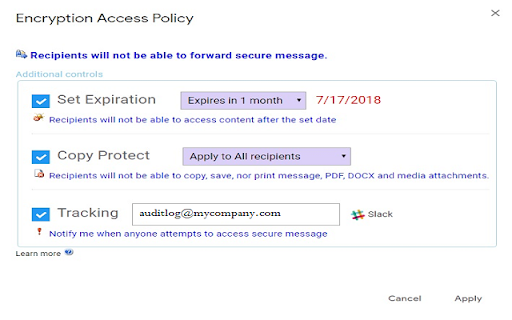
Send secure, end to end encrypted email messages to anyone in the world while maintaining control of your shared content ★🔓 Seamless End-to-End Encryption - Patented identity-based client-side email encryption. - Simple to use, quick and secure. ★ Effortless Email Encryption - Users don't have to change the way they work. - Fully integrated inside GMail UI for best user experience. - Recipients internal or external don't have to install any software. ★ Enables compliance and data privacy regulations - FERPA, CCPA, HIPAA, and more - Doctors, Teachers, Accountants, Lawyers, and others are using LockMagic to protect sensitive information to meet regulatory compliance. ★ Data Privacy - Data stays private in your local device at all times. - You don't have to trust Gmail or any messaging system with your sensitive emails. ★ 🔏 Seamless Secure Sharing - Send encrypted messages and attachments while maintaining control to anyone in the world - Seamless secure forwarding enables collaboration with others without impacting business workflows and people productivity ★ Stay in control of your data - Set message expiration, revoke messages anytime, copy protect message and attachments, disable forwarding and more. ★ One-Click Encryption - With a single click the entire message is encrypted before it is sent. - Attach large files of any size. ★ 🌐 Always-On Protection - Email messages are sent and stored encrypted at all times. - Blocks recipients from forwarding secure messages to unintended people. - Automatic encryption of reply messages. - Download and store encrypted messages anywhere. ★ 📳 Stay Informed - Learn who, when and where your email messages are viewed in a world map. - Receive read receipt and email notifications whenever your messages are viewed. - Receive instant notifications on your mobile phone. ★ ⛔ Recall, unsend and revoke access to secure messages at any time. By clicking the “Install” button above, or by otherwise downloading or installing the Lockmagic Gmail Encryption Extension referenced above, you consent to be bound by the Lockmagic Terms of Usage (https://www.lockmagic.com/doc/terms.pdf). If you are installing the Lockmagic Gmail Encryption Extension, or otherwise accepting the Lockmagic Terms of Usage, on behalf of an entity, you represent to Lockmagic that you have the legal authority to do so.

Gmail Privacy & Screen Lock - Better Security and Privacy
Protect your Gmail privacy with screen lock, and content blur to prevent unauthorized access and shoulder surfing Secure your Gmail workspace comprehensively with our advanced Gmail Privacy Extension, featuring customizable PIN and password protection that works in perfect harmony with essential security tools like VPNs and antivirus software. While your VPN provides encrypted tunneling for secure data transmission and your antivirus software vigilantly guards against malware, ransomware, and other digital threats, our extension adds a crucial physical security layer by automatically locking your screen with a secure PIN or password of your choice, shielding sensitive information within your Gmail tab. Busy Professionals: Modern work requires multiple layers of security. Your VPN encrypts internet traffic, your antivirus software monitors for threats, and our solution ensures your confidential emails remain private by automatically securing your Gmail screen with a customizable PIN or complex password during periods of inactivity. Set up your preferred PIN length or create a strong password that matches your organization's security requirements. This multi-layered approach combines network security through VPN protection, system security via antivirus monitoring, and physical privacy through our screen protection technology with flexible authentication options. Remote Workers and Shared Spaces: Today's flexible work environments demand comprehensive security solutions. While your VPN creates a secure tunnel for sensitive data and your antivirus software maintains system integrity, our Gmail Privacy Extension adds crucial physical security protection through customizable PIN and password locks. Whether you're connected through a corporate VPN at a coffee shop or relying on endpoint antivirus protection in a co-working space, our tool prevents visual data exposure with quick PIN access or secure password protection, creating an unbreakable chain of security that adapts to your preferences. Open Office Environments: Contemporary workplaces need security at every level. Your VPN secures network communications, antivirus software protects against malicious code, and our extension prevents accidental exposure of confidential information through intelligent screen locking with PIN or password authentication. Choose between rapid PIN entry for quick access or comprehensive password protection for enhanced security. This security trinity - VPN for network protection, antivirus for system defense, and our solution for customizable visual privacy - ensures comprehensive protection in high-visibility environments. Privacy-Conscious Individuals: Building a complete security strategy requires multiple components working in concert. Start with a reliable VPN service to encrypt your connection, add robust antivirus software for real-time threat protection, and complete your security suite with our Gmail Privacy Extension featuring flexible authentication options. Set up a memorable PIN for convenient access or implement a strong password that aligns with your security preferences. These complementary layers - VPN encryption, antivirus monitoring, and screen privacy with customizable access controls - create an impenetrable defense for your sensitive communications. Mobile Professionals: Mobility demands dynamic security solutions. Your VPN provides secure connections across networks, your antivirus software ensures endpoint protection, and our extension adds essential screen privacy protection with fast PIN access or comprehensive password security. Configure your preferred authentication method based on your working environment - quick PIN entry for frequent access or robust password protection for shared devices. Whether you're using public Wi-Fi protected by your VPN, keeping your device secure with antivirus software, or protecting sensitive emails with our customizable solution, you'll have security covered from every angle. Security-First Organizations: Enterprise security requires a comprehensive approach. Begin with VPN infrastructure for secure remote access, deploy antivirus solutions across all endpoints, and integrate our Gmail Privacy Extension with configurable PIN and password policies for complete protection. Implement organization-wide PIN complexity requirements or enforce strong password policies that align with your security standards. This security framework combines the encryption power of VPNs, the threat detection capabilities of antivirus software, and the physical security of our screen protection technology with flexible authentication options. Digital Nomads: Global work requires global security solutions. Your VPN masks your location and encrypts your traffic, your antivirus software protects against regional threats, and our extension ensures physical privacy worldwide with adaptable PIN and password protection. Choose between quick PIN access for convenient security on the go or comprehensive password protection for shared workspaces. This international security approach leverages VPN technology for secure connections, antivirus protection for local threats, and our solution for universal screen privacy with customizable authentication. Compliance-Focused Teams: Meeting regulatory requirements demands multiple security layers. Implement VPN protocols for secure data transmission, maintain updated antivirus protection for threat prevention, and deploy our Gmail Privacy Extension with configurable PIN and password requirements for visual privacy. Enforce minimum PIN lengths or password complexity standards to meet compliance requirements. This comprehensive strategy satisfies regulatory demands through VPN security, antivirus protection, and screen privacy controls with flexible authentication options. IT Security Teams: Build a complete security stack by combining essential technologies. Deploy VPN solutions for network security, implement antivirus software for system protection, and add our extension with customizable PIN and password policies for physical privacy. Configure authentication requirements that align with your organization's security policies, from simple PIN access to complex password protection. This multi-layered approach integrates VPN capabilities, antivirus defenses, and screen protection features with flexible access controls into a unified security solution. System Administrators: Building robust security architecture requires multiple complementary layers. While VPN infrastructure secures network communications and enterprise antivirus solutions protect against evolving threats, our Gmail Privacy Extension fills a critical gap in physical security through configurable PIN and password protection. Implement organization-wide authentication policies, including PIN complexity requirements and password standards that match your security framework. This combination of VPN tunneling for data transmission, antivirus monitoring for malware prevention, and automated screen privacy with flexible access controls creates a comprehensive security environment that addresses both digital and physical vulnerabilities in the modern workplace. Security Consultants: When designing security protocols for clients, every potential vulnerability must be addressed. Traditional solutions like VPN services protect network traffic and antivirus platforms guard against malicious code, but physical screen privacy often remains a blind spot. Our Gmail Privacy Extension bridges this gap with customizable PIN and password authentication, working alongside VPN encryption and antivirus protection to create a truly comprehensive security strategy that addresses visual data exposure in increasingly open work environments. Implement tailored authentication policies that balance security requirements with user convenience, from rapid PIN access to robust password protection. Cloud Security Specialists: As organizations migrate to cloud-based workflows, security must evolve accordingly. While VPN connections secure remote access and cloud-enabled antivirus solutions provide real-time threat protection, visual privacy remains crucial. Our Gmail Privacy Extension complements your existing security stack with flexible PIN and password options, adding automated screen protection to your VPN and antivirus defenses. Configure authentication methods that align with your cloud security policies, whether through quick PIN access for improved productivity or comprehensive password protection for enhanced security. This creates a security framework that protects sensitive data not only during transmission through VPN tunnels and from digital threats through antivirus scanning but also from unauthorized visual access in physical spaces through customizable authentication controls.

Pointofmail.com Email Tracking & Recall
Know who opens your emails, links and attachments, where and for how long. Recall and send self-destructed emails. Know who opens your emails, links and attachments, where and for how long. Recall and send self-destructed messages. Pointofmail.com for Gmail and other providers allows you to track and recall email, get read receipts, send self-destructed messages, fix mistakes at sent messages and more. Features: ========= ✔✔ Know when, where and for how long have been read ✔✔ Get instant read receipts ✔✔ Schedule tracked messages with New Gmail UI ✔✔ Track when your message gets forwarded or disallow forwarding ✔✔ Know who exactly opened your email, even when sending to multiple recipients (Per-Recipient Tracking) ✔✔ Get notified when links and attachments gets opened ✔✔ Get read notifications on your mobile or SMS notifications about every event ✔✔ Recall, modify or delete sent messages ✔✔ Send self-destructed messages ✔✔ Follow-up reminder notifications for unread messages ✔✔ Send Personal Group Email at one click (Mail Merge) How To Use: =========== - Gmail: Click on Send&Track button inside Gmail Compose window. - Other: Add .pointofmail.com suffix to recipients' addresses in other web services such Yahoo! Mail, Hotmail and AOL. For more information visit http://www.pointofmail.com Pointofmail offers free, 7 days trial.

Secure Exchanges for Gmail
Protect your Gmail email exchanges with a strong encryption. Protéger vos échanges courriel Gmail avec un cryptage puissant Turn your Gmail into a digital fortress. Our Chrome extension is built on the backbone of advanced, robust technology that ensures the safety of every message and every conversation. Here's why you should make the switch: Cutting-edge Encryption: With our military-grade encryption algorithm, even the most sophisticated cyber threats can't intercept your communications. PDF Document Signing: Included in the price of our packages is the feature to sign PDF documents, encrypted end-to-end. Recipient Convenience: The recipient doesn't need to create an account. Messages can be protected with a password and/or a SMS code for added security. Strong Authentication: Ensure only the intended recipients can read your messages. No impostors allowed! Seamless Integration: The extension works silently in the background, without disrupting your usual Gmail experience. Privacy Respect: Unlike other solutions, we never store or access your emails. Your privacy is paramount. Continuous Updates: Our dedicated team works tirelessly to ensure the extension is updated with the latest security threats and technologies. Don't leave your communication's security at the mercy of hackers. Choose peace of mind. Protect yourself with our Chrome extension for Gmail today!" ---------------------------------------------------------------------------------- Français: Transformez votre Gmail en une véritable forteresse numérique. Notre extension Chrome est conçue sur les fondements d'une technologie avancée et robuste qui assure la sécurité de chaque message et de chaque conversation. Voici pourquoi vous devriez l'adopter : Intégration transparente : L'extension fonctionne silencieusement en arrière-plan, sans perturber votre expérience Gmail habituelle. Mises à jour continues : Notre équipe dédiée travaille sans relâche pour s'assurer que l'extension est à jour avec les dernières menaces et technologies de sécurité. Ne laissez pas la sécurité de votre communication à la merci des hackers. Choisissez la tranquillité d'esprit. Protégez-vous avec notre extension Chrome pour Gmail dès aujourd'hui!

689Cloud SecureMail
Secure, Track, and Take Control of Your E-mail Attachments. Send Large Files Too! SecureMail by 689Cloud allows business users to secure and track their E-mail attachments as well as send files up to 1GB. Free users can send up to 100 files a month, while the Pro version allows up to 200 files and also has advanced DRM protection and tracking for downloaded files. E-mail attachments are by far the most popular way to share files. Its benefits are ease of use as well as ubiquity. However, when a file is sent by E-mail, there is a risk that confidential or valuable data can be leaked or stolen. Once you click on “Send”, you have no way of revoking access, limiting re-sharing, or tracking who has downloaded your file. SecureMail fixes the E-mail attachment security problem. • Files sent with SecureMail are converted into a link that can only be accessed by the recipients specified in the E-mail. Recipients are verified with 2-factor authentication before they can view or download files. • PDF, Word, Excel, and PowerPoint files can be sent as view-only links. Since the files cannot be downloaded, this dramatically reduces the risks of data leaks. The documents can also be watermarked for additional protection. • For downloadable files, SecureMail can encrypt them in a password-protected ZIP file. The password is unique to each recipient and is automatically generated and sent to the recipient so that you do not need to worry about managing passwords. • In the Pro version, downloadable PDF, Word, Excel, and PowerPoint files can be copy-protected using our proprietary digital rights management (DRM) technology. DRM protection prevents files that are downloaded and saved from being copied and re-shared. Access is tracked, and on some platforms, screen- captures and copy/paste are blocked. Files can even be revoked after they have been downloaded. Track and control the files you send. • Using the SecureMail console, you can track who has viewed or downloaded your files. You can stop access to files at any time, and with the Pro version, you can even revoke files that have been downloaded and saved. Send videos, archives, and other large files • SecureMail allows you to send files as large as 1GB, making it ideal for videos and other large files. With SecureMail, you get the convenience and ease of E-mail attachments while increasing security, traceability, and control.
