
mbeplfnjilafaeiebahdkiklicllohhf

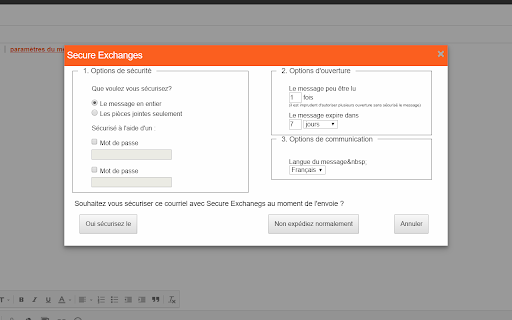
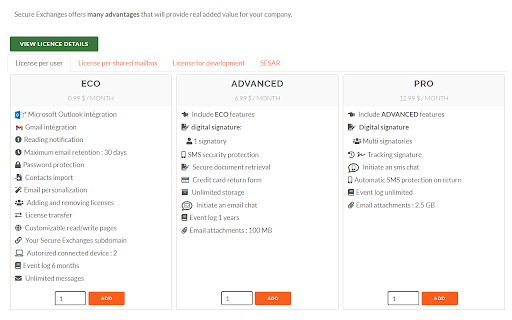
Protect your Gmail email exchanges with a strong encryption. Protéger vos échanges courriel Gmail avec un cryptage puissant Turn your Gmail into a digital fortress. Our Chrome extension is built on the backbone of advanced, robust technology that ensures the safety of every message and every conversation. Here's why you should make the switch: Cutting-edge Encryption: With our military-grade encryption algorithm, even the most sophisticated cyber threats can't intercept your communications. PDF Document Signing: Included in the price of our packages is the feature to sign PDF documents, encrypted end-to-end. Recipient Convenience: The recipient doesn't need to create an account. Messages can be protected with a password and/or a SMS code for added security. Strong Authentication: Ensure only the intended recipients can read your messages. No impostors allowed! Seamless Integration: The extension works silently in the background, without disrupting your usual Gmail experience. Privacy Respect: Unlike other solutions, we never store or access your emails. Your privacy is paramount. Continuous Updates: Our dedicated team works tirelessly to ensure the extension is updated with the latest security threats and technologies. Don't leave your communication's security at the mercy of hackers. Choose peace of mind. Protect yourself with our Chrome extension for Gmail today!" ---------------------------------------------------------------------------------- Français: Transformez votre Gmail en une véritable forteresse numérique. Notre extension Chrome est conçue sur les fondements d'une technologie avancée et robuste qui assure la sécurité de chaque message et de chaque conversation. Voici pourquoi vous devriez l'adopter : Intégration transparente : L'extension fonctionne silencieusement en arrière-plan, sans perturber votre expérience Gmail habituelle. Mises à jour continues : Notre équipe dédiée travaille sans relâche pour s'assurer que l'extension est à jour avec les dernières menaces et technologies de sécurité. Ne laissez pas la sécurité de votre communication à la merci des hackers. Choisissez la tranquillité d'esprit. Protégez-vous avec notre extension Chrome pour Gmail dès aujourd'hui!

GMass: Powerful mail merge for Gmail
A powerful mass email and mail merge system for Gmail. The easiest way to transform Gmail into a cold outreach, email marketing, and mail merge platform. ** Join the 400,000+ others who’ve given us an average of 4.8 out of 5 stars ** No credit card required + try all features during your free trial! ----------------------------------------- Key features ----------------------------------------- * Send cold email, email marketing messages, and mail merges to thousands of addresses without ever leaving Gmail * Unlimited contacts, campaigns, AND emails * Also: Unlimited email verification and unlimited spam solving (find out and fix issues before you send) * Mail merge personalization with data from Google Sheets * Personalize each mass email (even send personalized images and attachments) * Break Gmail's limits (and we'll help you do it with our in-house sending servers for both opt-in and cold outreach campaigns) * With GMass MultiSend's inbox rotation feature, you can distribute your campaign across multiple accounts * Hit the inbox, not the spam folder. 99% of GMass users report the best deliverability they’ve ever had * Spam Solver - test messages before you send to find spam rates, then use suggested tweaks to improve * Send auto follow-ups based on opens, clicks, and replies. * ChatGPT campaign creation generates an entire email campaign, creates a follow-up sequence, and handles your GMass settings * Automatically skip sending emails and automations on holidays, and choose custom days of the week to send/not send a campaign * Send triggered emails that go out automatically when a recipient opens or clicks — reach your prospects when you know they're in their inbox * Automate your outreach by automatically sending to new contacts in your Sheet * Connect your CRM or other apps using the GMass API or Zapier * Track opens, clicks, and replies. With instant reply and bounce detection and some of the most accurate open rates you'll find anywhere * Free email verification verify email addresses before you send your campaigns * Help with the Google/Yahoo bulk sender requirements is here. We've also created a one-of-a-kind system to help users with free Gmail addresses sending campaigns via a SMTP server pass DMARC - https://www.gmass.co/blog/gmail-smtp-dmarc/ * Emails can be sent as replies to the last conversation you had with each recipient * Unsubscribe and bounce management to automatically process unsubs/bounces, suppress future messages to those addresses, and more. * Hundreds of other features: Schedule emails, throttle sending speed, custom tracking links with SSL, A/B testing, spintax for varying up your copy (and AI's SpinMax to vary up every message), quick email polls with custom landing pages, add a countdown timer to emails, drip campaigns, HTML editing, 1-click replies, reusable templates, template sharing for teams, and so much more * And yet, even with all these features... sending an email campaign with GMass is just like using regular Gmail ----------------------------------------- Keep up with GMass ----------------------------------------- Website: https://www.gmass.co ----------------------------------------- How does GMass compare to other Gmail extensions? ----------------------------------------- Mixmax: cool extension, but you have to use its external web portal to send campaigns. (Also, Mixmax is much more of a sales team management platform than an email sending platform.) With GMass, the magic happens inside Gmail, using just the red GMass button. Yesware: similar to Mixmax, you can't send campaigns inside Gmail. You have to use their web interface. Plus, both Mixmax and Yesware are more expensive than GMass. Mailtrack and Snov.io: Lets you track individual emails, but with GMass, you can eliminate Mailtrack and Snov.io because GMass can track both individual emails and campaign emails. (Use the GMass button on both one-on-one emails and campaigns.) Copper: Good CRM system, but not meant for sending email campaigns. Same for Gmelius and Streak CRM. Lastly, GMass works seamlessly with Grammarly to ensure your campaigns contain perfect prose and are error-free.

SendSafely Encryption for Chrome and Gmail
Chrome extension that provides end-to-end encryption for Gmail. Encrypt private emails and securely share files up to 10GB. With the SendSafely Chrome Extension, you can send encrypted files and messages directly from Gmail or using our Chrome pop-out menu. It's never been easier for Chrome or Google Mail users to use SendSafely. SendSafely is an end-to-end encryption platform that eliminates the need for pre-shared encryption keys and passwords. With SendSafely, nobody other than you and the people you send items to can view them...not even us. - Built on OpenPGP: OpenPGP is the most widely used email encryption standard in the world. It's been in development and use for years, and proves to be the best encryption available today. - Multi Factor Authentication: We offer an extra layer of security to keep your information secure. When users access items sent using SendSafely, they are prompted for a username and password, along with a unique SMS code. - No Software for Recipients: With SendSafely, the people you share items with don't need to download or install on anything on their computer. If they have a web browser, they can receive your files.

Lockmagic Gmail Encryption
Send secure, end to end encrypted email messages to anyone in the world while maintaining control of your shared content ★🔓 Seamless End-to-End Encryption - Patented identity-based client-side email encryption. - Simple to use, quick and secure. ★ Effortless Email Encryption - Users don't have to change the way they work. - Fully integrated inside GMail UI for best user experience. - Recipients internal or external don't have to install any software. ★ Enables compliance and data privacy regulations - FERPA, CCPA, HIPAA, and more - Doctors, Teachers, Accountants, Lawyers, and others are using LockMagic to protect sensitive information to meet regulatory compliance. ★ Data Privacy - Data stays private in your local device at all times. - You don't have to trust Gmail or any messaging system with your sensitive emails. ★ 🔏 Seamless Secure Sharing - Send encrypted messages and attachments while maintaining control to anyone in the world - Seamless secure forwarding enables collaboration with others without impacting business workflows and people productivity ★ Stay in control of your data - Set message expiration, revoke messages anytime, copy protect message and attachments, disable forwarding and more. ★ One-Click Encryption - With a single click the entire message is encrypted before it is sent. - Attach large files of any size. ★ 🌐 Always-On Protection - Email messages are sent and stored encrypted at all times. - Blocks recipients from forwarding secure messages to unintended people. - Automatic encryption of reply messages. - Download and store encrypted messages anywhere. ★ 📳 Stay Informed - Learn who, when and where your email messages are viewed in a world map. - Receive read receipt and email notifications whenever your messages are viewed. - Receive instant notifications on your mobile phone. ★ ⛔ Recall, unsend and revoke access to secure messages at any time. By clicking the “Install” button above, or by otherwise downloading or installing the Lockmagic Gmail Encryption Extension referenced above, you consent to be bound by the Lockmagic Terms of Usage (https://www.lockmagic.com/doc/terms.pdf). If you are installing the Lockmagic Gmail Encryption Extension, or otherwise accepting the Lockmagic Terms of Usage, on behalf of an entity, you represent to Lockmagic that you have the legal authority to do so.

MailProtect: Protect your Gmail privacy for free.
The ultimate Gmail privacy guardian — 100% free Protect Your Privacy in Gmail: Block Email Tracking with Ease Stop hidden tracking and safeguard your privacy with MailProtect for Gmail, the ultimate Chrome extension for Gmail users. Prevent senders from accessing your private information, such as your IP address, location, and email reading habits. ★ Advanced Privacy Protection for Gmail MailProtect for Gmail is a cutting-edge Chrome extension that blocks tracking pixels in your Gmail inbox. These hidden trackers reveal personal details like your IP address and location. With MailProtect for Gmail, you can read emails privately without revealing sensitive information. ★ Seamless Integration with Gmail • Automatic Protection: Works in the background for all incoming emails. • Discreet Interface: A minimal design that integrates directly into your Gmail experience. ★ Why MailProtect for Gmail? • We don’t read your emails. • We don’t know the identity of your senders. • We don’t store IP addresses. • We don’t share your data with third parties. • We don’t manage or delete your emails. Your privacy is our priority. MailProtect for Gmail operates locally within your browser, ensuring complete confidentiality. ★ Free Plan for Basic Protection MailProtect for Gmail is free to use, forever. Enjoy essential tracking protection at no cost. For users seeking unlimited coverage, Premium plans are available. MailProtect for Gmail identifies and blocks invisible tracking pixels embedded in emails. These pixels are typically used to inform senders when and how often emails are opened. By blocking them, MailProtect for Gmail ensures your reading habits remain private. ★ Built for Privacy Enthusiasts Our team is passionate about online privacy and committed to empowering users to take control of their personal data. With MailProtect for Gmail, you can enjoy a safer and more private email experience. Protect your Gmail inbox today. Download MailProtect for Gmail for free and reclaim your privacy!
