
gllpomlmiljchdbigeahkpflkonfjiob

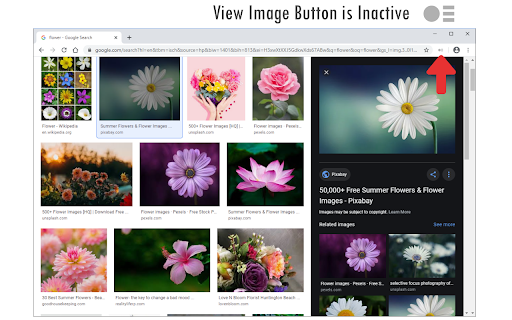
Bring back the view image button for Google image search results. View Image Button (for Google™ Search) is an extension that lets you add a button to the Google image search page to view images directly. The toolbar button serves as an ON|OFF switch to quickly add or remove the button. Please note that clicking the view image button will open the image in a new tab. Moreover, this extension tries to find and open the image in the maximum available resolution (please wait for the image to completely load and render before pressing the view image button). To report bugs, please fill out the bug report form on the add-on's homepage (https://mybrowseraddon.com/view-image-button.html).

But really open image in new tab
You know when you right click an image there is the option to "Open image in new tab"? You know how it doesn't work if the image is covered by another hidden element? Wouldn't it be nice if you could just tell it to ignore those elements and just open the damn image hidden underneath. Well good news, that's what this extension does! Bonus features! * If there are lots of images stacked on top of each other, it will open all of the images. * It will even check for images using the CSS background-image property. * Not only that but it will work on SVGs too! Note: It doesn't work on the Chrome Web Store pages because they restrict extensions on here.

Google Image Search Sizer
This is an extension that adds a "Size" button that controls the image search size your your google content. 2MP -70MP Allowing the user, creatives, and designers to navigate high quality image assets quickly.

Old Images Redirect: Disable Google Lens
Revert Google Images to classic view & disable Lens for a simpler, nostalgic search experience. Old Images Redirect: Disable Google Lens is a cutting-edge browser extension designed to transform your image searching experience. By reverting Google Images to its classic, beloved layout, this extension bypasses the modern Google Lens feature, offering users a straightforward, uncomplicated search interface. It’s crafted for those who appreciate the simplicity and directness of the old Google Images, ensuring a hassle-free and nostalgic browsing journey. Classic Google Images Interface: Instantly access the traditional Google Images layout. Disable Google Lens: Removes Google Lens integration for a pure, uncluttered search experience. User-Friendly: Simple to install and use, with no complicated settings. Fast and Efficient: Enjoy quicker load times and a more responsive search experience. Perfect for researchers, photographers, and anyone nostalgic for the simplicity of past web experiences, “Old Images Redirect: Disable Google Lens” brings back the efficient and straightforward image search functionality. Whether you’re seeking historical photos, vintage artworks, or simply prefer the old interface, this extension ensures your image searches are effective and to the point.

Search by Image
A powerful reverse image search tool, with support for various search engines, such as Google, Bing, Yandex, Baidu and TinEye. Search by Image is a browser extension that makes effortless reverse image searches possible, and comes with support for more than 30 search engines. Search by Image is an open source project made possible thanks to a community of awesome supporters. If you'd like to support the continued development of the extension, please check out https://armin.dev/go/patreon. The extension helps journalists and researchers verify the authenticity of images, and assists in the identification of false information on social media. Search by Image is also popular among photographers, helping artists explore how their work is shared on the web, while shoppers find it valuable for discovering similar products at discounted prices. The extension enables you to search for images from the context menu and the browser toolbar with the help of a diverse set of reverse image search engines, which can be toggled and reordered from the extension's options. Visit the wiki for the full list of supported search engines. Images positioned at the selected area are detected regardless of how they were embedded in the page. The extension also supports searching with images from your device, images from private sites, and captured areas of the page. A handful of search modes are offered that serve different use cases. The search mode can be set independently for the context menu and the browser toolbar from the extension's options. Search modes: • Select URL: select an image on the page and search with the image URL. This is the default search mode. • Select image: select an image on the page and search with the image file. This search mode is preferred for sites which do not allow the direct linking of images, such as private sites. • Capture: search with a captured area of the page. • Browse: search with an image from your device. Pasting images from the clipboard is also supported. • URL: search with an image URL. The "Allow access to file URLs" option must be enabled to search with local images opened in a tab. Visit the chrome://extensions page and open the extension's details to find the option. The extension is also available for Edge and Safari: https://github.com/dessant/search-by-image#readme The image you select during a search is sent to the requested service, visit the extension's privacy policy for more information. Reviews are not monitored for bug reports, please use GitHub for issues and feature requests.
