
glehbmcdknkgdibnilmbinohdnmjggoo
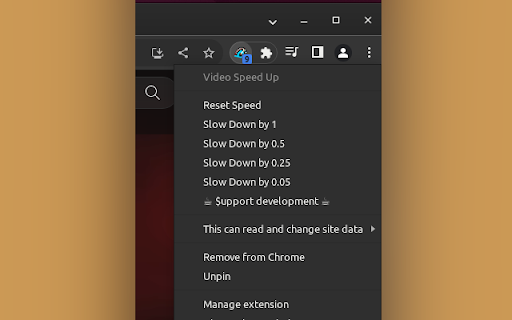
Accelerates video playback with a single click on the extension button. Works with HTML5 videos and audio elements. The extension's function is to accelerate video playback and slow it down below normal speed. It works with video and audio elements on websites that support it. To activate the extension, simply left-click on its icon. Right-clicking on the extension's icon reveals a menu with additional options that may be useful in certain situations. - On some webpages, it is not possible to adjust the speed of the played elements. This is due to how the specific page is designed. If you find this extension useful, you may consider supporting the author with a donation of any amount.

HTML5 Video Speed Control
Control the speed of your HTML5 videos. You have the following options, speed boost, slow down, advance and rewind using the keyboard while you watch your video. Watch videos at the pace you want, using our video speed control software. This software works well for the Chrome browser, and is a video speed controller chrome. Handle the playback speed while watching videos so you can save time by boosting the play speed. This extension allows you to speed up or slow down any video. No standards or limits. Just increase and decrease the playback speed, advance and rewind video as many times as you need. Have you ever wanted to skip through the boring moments of a movie or just rewind the favourite moment more and more? You can do so today using our video speed controller. Control youtube speed control and also adjust html5 video speed control as well.

Video Speed Control
When speed is not enough! Control the speed of your favorite videos: Slower or faster. You are "the only one who decides"! Do you need more speed? Video Speed Control is an extension for all Chromium based web browsers, that allows you to control the playback speed of online videos. Whether you need to skip that boring part of your series or advertisements, or want to enjoy that action scene, with Video Speed Control you can make it, since it allows with a high level of precision to increase or decrease the playback speed. It works on most of websites, and yes: It is 100% tested on Youtube. Now you are "the only one who decides"! ======================================================= NEW FEATURES in version 2.0.1 (sunshines) ======================================================= * Global and site-specific speed settings. * Speed management enhancements: Maintains set speed settings even when showing ads or switching videos. * Compatibility with most websites. * Addition of 1.25x preset speed. * Performance improvements and bug fixes. * Credits & donations

Youtube Speed Control Hotkeys
Allows you to customize your own speed control hotkeys in Youtube You can customize your own hotkeys to speed up and speed down the playing video on youtube. This extension only works on youtube. ======================================================== Version 1.0.22 - Bug fixes and performance improvements Version 1.0.21 - Add support for Youtube Shorts Version 1.0.18 - Bug fixes and performance improvements Version 1.0.9 - Remove "Seek backward & forward" feature from extension, as Youtube had include this feature in the latest update. Version 1.0.7 - Seek backward & forward works even the focus element is not on video player Version 1.0.6 - New configuration effect immediate change without the needs of refreshing page Version 1.0 - Basic customization that allows you to customize your own hotkeys of changing youtube playback speed rate.

Super Video Speed Controller
Adjust playback speed for any video. Video speed controller for your videos Super Video Speed Controller allows to increase or decrease playback sped on any web site. Features: 🎥 Work almost anywhere 🎥 You can adjust with presets or set a custom speed in percents 🎥 Use shortcuts Quick start: find "Super Video Speed Controller" icon by opened a menu under the "puzzle" icon in the toolbar.
