
nkldafgkfkngellahbdcigfpacpgongm


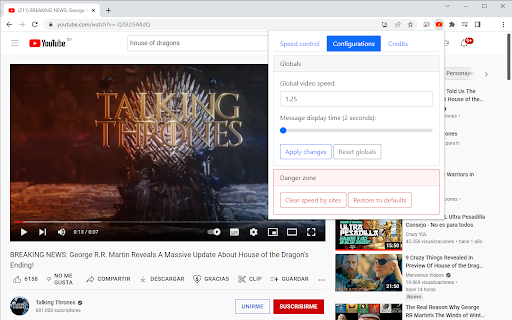
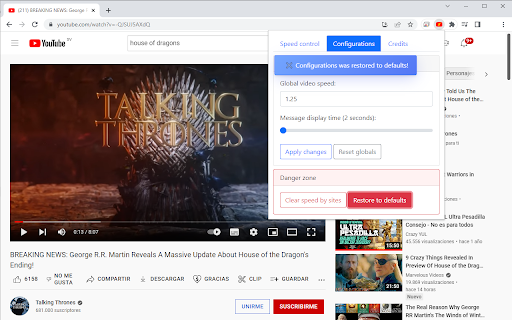

When speed is not enough! Control the speed of your favorite videos: Slower or faster. You are "the only one who decides"! Do you need more speed? Video Speed Control is an extension for all Chromium based web browsers, that allows you to control the playback speed of online videos. Whether you need to skip that boring part of your series or advertisements, or want to enjoy that action scene, with Video Speed Control you can make it, since it allows with a high level of precision to increase or decrease the playback speed. It works on most of websites, and yes: It is 100% tested on Youtube. Now you are "the only one who decides"! ======================================================= NEW FEATURES in version 2.0.1 (sunshines) ======================================================= * Global and site-specific speed settings. * Speed management enhancements: Maintains set speed settings even when showing ads or switching videos. * Compatibility with most websites. * Addition of 1.25x preset speed. * Performance improvements and bug fixes. * Credits & donations

HTML5 Video Speed Control for Google Chrome™
The fastest and easiest way to speed up or slow down videos. Adjust the speed of any video you're watching so you can skip the boring parts/slow down and understand the video better by playing the video at a slower speed. Increase the video speed if you are trying to skip past the boring parts and want to skip to the action scenes/critical parts of the video. Save time today when you are watching videos by slowing them down or speeding the videos up. Disclaimer: Please note this extension is NOT made by Google and is made by an independent development team. All copyrights belong to their respective owners. Google doesn’t endorse or sponsor this Chrome extension. HTML5 Video Speed Control for Google Chrome™ is not owned by, is not licensed by and is not a subsidiary of Google Inc.

Youtube Custom Speed
Change the speed of Youtube videos to whatever you like, with customizable presets and keyboard shortcuts! Youtube Custom Speed lets you play any Youtube video at any speed you like, from 0.0125x to 16x! Use the options menu to set your preferred playback rate values. Then, change the speed using buttons at the bottom of the video. It also cooperates with the default Youtube keyboard shortcuts - Shift + , and Shift + . If you experience any issues, please feel free to email me with a bug report. 1.10 – 2025-10-17 • Support for new YouTube player UI 1.9 – 2024-05-26 • Support for non-English keyboards – thanks @MartinNiederl! • Fixed changing speed while typing in search box – thanks @MartinNiederl! • Added "Do nothing" options • Set constant width of the speed value in player UI

Custom Video Speed for YouTube™
change the current & default speed of YouTube™ videos by steps of 0.1 from 0.1 up to 8.0 using sliders, buttons, and/or the keyboard 10.0.0 UPDATE! Version 9.0.0 is rolled back. There is NO LONGER the music check feature. In the development and deployment of 9.0.0, a serious bug was introduced. Until this bug can be solved, the extension features are being rolled back to the 8.0.0 version. A new version number is necessary when publishing to the web store, but version 10.0.0 has the exact same features and functionality as 8.0.0 did. 9.0.0 UPDATE! This is a major update that introduces a new feature: the detection of music videos! The extension now has an option to detect music videos and reset speed to 1 if it does. This only works for music from official YouTube™ Music channels (the ones with the little music note by the artist name). By default this is disabled so as not to disrupt the typical experience but it can be turned on in the options page! 8.0.0 UPDATE! There are no major User-facing changes in this update, however the extension now uses Manifest v3. This is necessary because Google will soon remove support for Manifest v2 from Chrome. No features or options should change and this update should be entirely transparent. 7.0.0 UPDATE! Text fields no longer mess with the extension's functionality. By default, when typing text on a webpage, the extension will ignore your hot keys so the speed doesn't change, and you can write comments in peace! You can still turn this option back on if, for some reason, you like changing speed while typing in the options page. 6.1.2 UPDATE! Replaced Icon and text due to guidelines 6.1.0 UPDATE! Contributions from @jclaveau on GitHub to enable features in embedded YouTube™s and iframes from YouTube. This is a breaking change. In an effort to make the extension work as closely as possible to how it was in 5.1.0 provided no options are changed, the following things were done 1. 'keypress' was changed to 'keydown' this due to how macOS reports codes in keypress. This should be transparent to the users 2. The options page no longer uses `keyCode` it now uses `key`. `keyCode` is deprecated and inconsistent between platforms and more opaque to use. 3. `event.preventDefault()` is now an option and no longer forced on. Not calling preventDefault() is the old behavior of 5.1.0 so this decision is so that the extension more closely works like 5.1.0 if no key bindings are changed This will make the extension act more like it did before 5.2.0. It does however break the keyboard shortcuts that people might have set until now NEW FEATURE: Change the keyboard shortcuts for the app! You can now change the keys that control the extension. Below (in the description) you can see the default keys used to control the extension. You can use the new options page to change which keys do what. There is also (though there has been for a while) the option to disable keyboard controls entirely if you prefer. --- 5.1.0 UPDATE! This update has all of your favorite features of the last update PLUS now you can change the values of the buttons in the extension to whatever value you want so you have easy access to your favorite speed settings. --- 5.0.0 RECENTLY UPDATED!!! BUGS FIXED!! I noticed that when ads play it resets the speed the video. I have added a mechanism that ensures the speed is always moving at the current setting when the video is playing even after an ad interrupts it!! 5.0.2 Fixed issue with the grave key and added number formatting so there are no long decimal points --- This extension lets you change the speed of YouTube™ videos in a more granular way than the default options in the player. The player on YouTube™ let's you change the speed to 0.25x, 0.5x, 0.75x, 1x, 1.25x, 1.5x, 1.75x, and 2.0x the normal speed. This extension lets you change the speed of playback to between 0.1x to 8.0x normal speed by steps of 1.0, 0.5, 0.1, or 0.05. Once you find a speed you like, you can also save it as the default speed which all YouTube™ videos will play at when opening. You can also program up to 7 "preset speeds" that allow you to simply click a button and set the speed of the YouTube video to your stored preset. By default this extension adds a the ability to control the speed of a YouTube™ video and some playback with keyboard shortcuts. The '+' and '-' keys to change the speed by 0.1 and to the '*' and '/' keys change the speed in increments of 1.0. If you hold shift while pressing these, '+' and '-' move in steps of 0.05 and '*' and '/' move in steps of 0.5. It also assigns '`' to reset the speed to 1.0x normal speed. Finally, it uses '[' and ']' to move through the video in time steps proportional to the speed of the video, rather than in increments of 5 or 10 seconds. These shortcuts *can* be disabled on demand if you prefer not to have them and can be re-enabled at any time I made this extension for fun and because it really made my YouTube™ experience better. I published it because I thought it might be useful for other people as well. I cannot promise every single YouTube page and video will work perfectly with this extension. YouTube has a lot of places like gaming, educational playlists, livestreams, etc. This extension is open source on GitHub (see website) link, and I am open to suggestions, issues, and fixes but I cannot make any promises about what I will do with those things if i receive them.

HTML5 Video Speed Control
Control the speed of your HTML5 videos. You have the following options, speed boost, slow down, advance and rewind using the keyboard while you watch your video. Watch videos at the pace you want, using our video speed control software. This software works well for the Chrome browser, and is a video speed controller chrome. Handle the playback speed while watching videos so you can save time by boosting the play speed. This extension allows you to speed up or slow down any video. No standards or limits. Just increase and decrease the playback speed, advance and rewind video as many times as you need. Have you ever wanted to skip through the boring moments of a movie or just rewind the favourite moment more and more? You can do so today using our video speed controller. Control youtube speed control and also adjust html5 video speed control as well.
