
glbgmggaeahlgmicchincpidpoeabeac


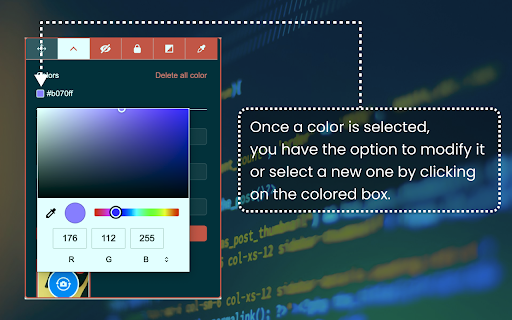
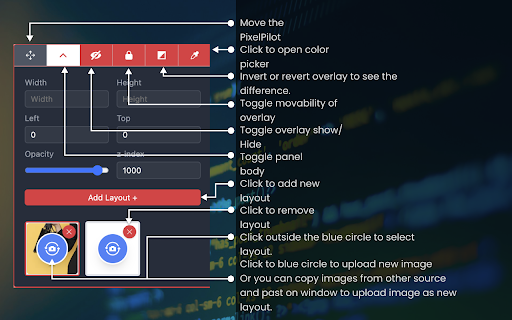
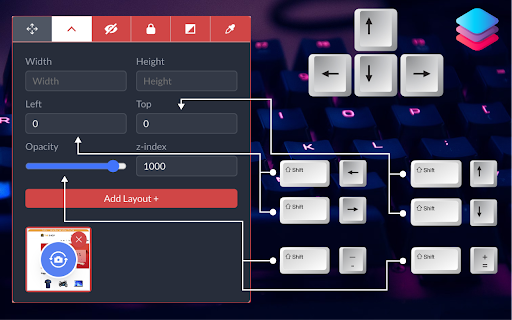
Welcome to PixelPilot, Your Ultimate Design Precision Tool! Tired of pixel imperfections and alignment issues in your web projects? Discover PixelPilot, the Chrome extension that revolutionizes your design process, ensuring pixel-perfect precision in every element of your web designs. Why PixelPilot? PixelPilot is meticulously crafted to enhance your workflow, allowing you to overlay UI images with pinpoint accuracy. It’s designed for both novice developers and seasoned designers seeking flawless execution in their web projects. 1. Pixel-Perfect Alignment: Overlay UI images seamlessly for exact alignment. 2. Effortless Integration: Integrates directly into your Chrome browser for quick access. 3. Intuitive Controls: Keyboard shortcuts enable simple adjustments of design elements. 4. Customizable Settings: Tailor overlay transparency, positioning, and more to your specific needs. 5. Advanced Color Tools: Generate and manage color palettes directly from your designs. 1. Adjust Opacity: Shift + Plus/Minus 2. Move Overlay: Shift + Arrow Keys 3. Toggle Visibility: Shift + T, Shift + E 4. Lock/Unlock Overlay Movement: Shift + L 5. Invert Overlay Colors: Shift + I for enhanced contrast 6. Color Picker: Shift + C for easy color adjustments Empower Your Design Process: With PixelPilot, every click brings you closer to design perfection. Manage layouts, adjust z-index, and handle panel movements effortlessly. Customize your workspace to suit your design style and requirements. Join the Revolution in Web Design: Don’t let layout discrepancies hold back your creativity. Join thousands of designers who have elevated their design prowess with PixelPilot. Download now and transform the way you approach web design! Download PixelPilot Today: Experience the difference precision can make. Say goodbye to design limitations and hello to limitless creativity with PixelPilot. Your journey towards design perfection starts here!

PerfectPixel by WellDoneCode (pixel perfect)
Drop your mockup on the live page for pixel-perfect comparison with your code. PerfectPixel adds a semi-transparent image overlay on top of any web page, letting you compare your frontend implementation against the original design mockup directly in the browser. Upload a design comp, adjust opacity, and immediately see where your code diverges from the spec — with pixel-perfect accuracy. No more switching between tabs or squinting at two screens side by side. How it works: install the extension, open any page, and drop in an image — drag and drop, paste a URL, paste from clipboard, or use the file picker. Position and scale the overlay, then adjust opacity to compare. - Overlay any PNG, JPG, or SVG on any web page - Adjustable opacity for real-time visual comparison - 4 blend modes (Difference, Invert, Multiply, Overlay) plus Normal — each useful for catching different types of mismatches - Lock the overlay to click through it and interact with page elements underneath - Per-domain persistence: your layers stay saved per site and restore automatically across browser sessions - Multiple layers per domain - Scaling, repositioning, and centering controls - Keyboard shortcuts for common actions - Unlimited simultaneous layers (free tier supports 2) - Folders to group layers - Layer rotation - Dark theme - Custom icon, accent color, and custom CSS Built for frontend developers, QA engineers, agencies, and development teams who need to verify that what they shipped matches what was designed. 350,000+ developers. 10+ years on the Chrome Web Store.

Pixel Perfect Pro
The Pixel Perfect Pro Extension for Browsers is an invaluable tool for web designers and developers. With this extension, users can easily and accurately overlay their web designs on the existing web page, making sure that all the planned design elements and styling match up perfectly. The extension is compatible with all major browsers, so no matter what browser a user is using, they can be sure that their designs will look perfect. Using this extension is easy and straightforward. First, open the page you want to work with and then open the Pixel Perfect Pro Extension. You can then choose the design you want to overlay and the extension will automatically display it over the web page. You can position the design elements, adjust the size and check that all the planned elements are in place. It offers a wide range of features: 1. unlimited layers, 2. inversion and scaling, 3. horizontal and vertical alignments, 4. splitting images for each website, 5. support for large images up to 50 MB, 6. drag and drop file uploads, 7. keyboard arrow and mouse wheel support when focused on an input, 8. minimal space needed for development panels, 9. a ruler for accurate measurements. With Pixel Perfect Pro, you can save time and energy creating flawless websites with perfect pixel-level accuracy. Overall, the Pixel Perfect Extension for Browsers is an incredibly useful tool for web designers and developers who want to quickly and accurately check that their designs match up with the existing web page.

Reddit Pixel Helper
The Reddit Pixel Helper is a tool to QA your pixel implementation. While browsing any site, the extension badge will show the number of Reddit Pixel events firing on a page. Open the extension on any page with the pixel implemented to see which events are actively firing, identify any errors in their configuration, and get recommendations for fixing errors. Check out our Help Center for more info: https://advertising.reddithelp.com/en/categories/measurement/reddit-pixel-helper By using the Reddit Pixel Helper you agree to the Reddit Advertising Platform Terms: https://advertising.reddithelp.com/en/categories/policy-guidelines/advertising-terms-ads-platform

PixelParallel by htmlBurger
PixelParallel by htmlBurger - Pixel perfect HTML vs Design tool for developers PixelParallel is a completely free, super handy and light HTML vs Design comparison tool for front-end developers that will help you code pixel perfect websites with ease. Built from developers to developers, PixelParallel is a tool working in favor of the ultimate precision in front-end coding. How it works: 1. Simply upload your image and compare the semi-transparent overlay with the web page below. 2. Customize the opacity, scale and position of the image as you wish. You can also hide it or lock it. 3. Perform color difference for a strong pixel perfect precision. 4. Use the vertical and horizontal grids to achieve a pixel perfect web design. - Bootstrap grid with customizable width, number of columns, gutter and opacity - Horizontal lines with customizable space between - Draggable rulers (Photoshop-like) + Reset option - Inversion (Color difference) - Separate overlays for each web page - Overlay scaling - Customizable overlay opacity - Saving overlays between sessions - All image sizes supported - Draggable overlay - Quick hide / show image - Shortcuts + customizable keyboard hotkeys - Works with local files - Intuitive UI: clean and simple; draggable; minimizable PixelParallel does not collect any personal data. Uploaded images are saved locally in the browser storage.
