
gkohiokkalnklkeagfgamdnnhajjnfaf


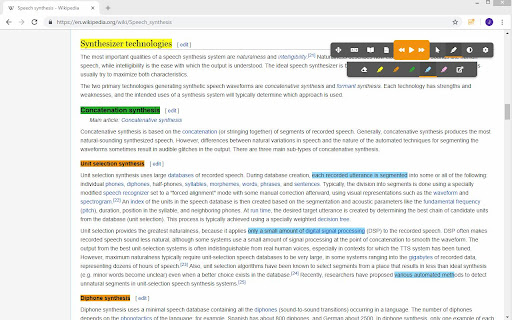
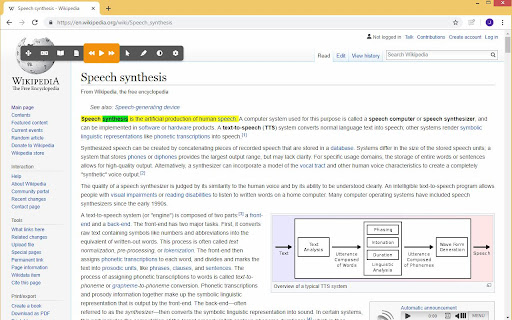
Have web pages, Gmail and Google Docs read to you with learning and study opportunities. Ideal for people with reading difficulties such as dyslexia or foreign speakers. Log in with your Alinea or Kurzweil 3000 license. This extension reads your web pages aloud in 10 different languages (NL, FR, EN, DE, AR, ES, IT, PL, PT, TR) and applies a double marking to the texts. This way, the reader can easily follow the text and read more comprehensively. You can personalize the settings to your preference: large or small toolbar, contrasts, reading speeds, colors of the markings, languages and voices. You can have text translated, look something up in (image) dictionaries, check conjugations or homophones, create audio files and mark and summarize. The study tools marking and summarizing are really useful and they work across different websites. You can always have the summary read to you. New additional features: With the screenshot reader you can have text in a self-drawn frame easily recognized and read aloud (e.g. text in an image). In addition, you can now dictate text in search fields and forms instead of typing. And three reading modes have been added: Read selection, Read text in rectangle, Click to read.

Text to Speech for Google Chrome™
Want to listen to text being read out to you? Simply Install our software today and just highlight the text you want to listen to, right click and choose "Text to Speech for Google Chrome™" Our text to speech extension will begin reading out the text to you. There are over 10+ accents you can choose from as well. Choose the type of voice you wish to listen to. This software also supports many languages, it is FREE of charge and easy to use. You can configure the voice and speed options by changing the settings on our options page. Want to rest your tired eyes and just use your ears instead? You can do so now by simply installing our software Text to Speech for Google Chrome™ Fixed a bug where text to speech does not work if page is not reloaded. Disclaimer: Please note this extension is NOT made by Google and is made by an independent development team. All copyrights belong to their respective owners. Google doesn’t endorse or sponsor this Chrome extension. Text to Speech for Google Chrome™ is not owned by, is not licensed by and is not a subsidiary of Google Inc.

ClaroRead Chrome
Free extension with a few Premium features, see below. Speak any text on a website by selecting it, point with the mouse to hear text and links and captions, or click Play to hear sentences read out with highlighting to let you keep track of where you are. Read Google Docs documents back to you so you can proof your work and fix any errors. Speak accessible PDFs opened in Google Chrome with highlighting by clicking the Play button. Hear letters, words or sentences spoken back as you type. Simply type in to web pages and hear what you type as you type it. For letters, hear the letter names or sounds spoken back to you, whichever helps you understand better. Turn on a coloured overlay so pages are tinted to the colour you find easiest to read - no more glaring black on white text. Change the speed of the spoken voice, slower for comprehension, faster for efficiency. Activate word prediction to help you with writing and composition - find that elusive word you want. Now includes subject-specific prediction dictionaries and larger base dictionaries! Read the contents of Google Docs extensions aloud so your support tools speak. Upgrade to a Premium subscription and also gain: ● Scan from Screen, so you can select inaccessible images like Google Books and hear them read aloud. ● Speech Recognition. Enter text in to documents and text areas of web pages through dictation. ● Prediction in Google Docs, Microsoft Office 365 Word Online and other editable text areas. ● Spelling and Homophone checking in Google Docs, Microsoft Office 365 Word Online and other editable text areas. ● Capture. Highlight and capture text on webpages. ● Save to audio. Select text and click the save to audio button to generate a sound file for the selected text. From the developers of ClaroRead for Mac and Windows and the ClaroSpeak and ClaroPDF Apps.

Troubadour - web reader
Instantly read aloud web content with text-to-speech. Watch and listen. Listen to the current web-page article with one click, using text to speech (TTS). Troubadour is intended for anyone who prefers to listen rather than to read. It works on a variety of websites, including news sites, blogs, fan fiction, and many more. By installing the extension, you agree to Troubadour's Terms and Conditions (https://troubadour.ai/legal/) and acknowledge that you have read Troubadour's Privacy Policy (https://troubadour.ai/privacy/)

eID Chrome Extension
Chrome extension for the Belgium eID card The eID Chrome Extension gives access to the eID card within the Chrome web browser. The eID Chrome solution has been integrated within our eID Identity Provider and Digital Signature Service.
