
gkibdicghcpcikhjpgjoijpobdipklnp
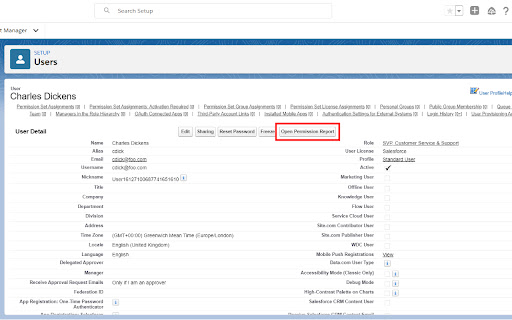


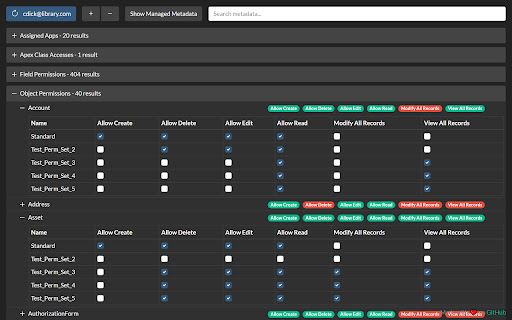
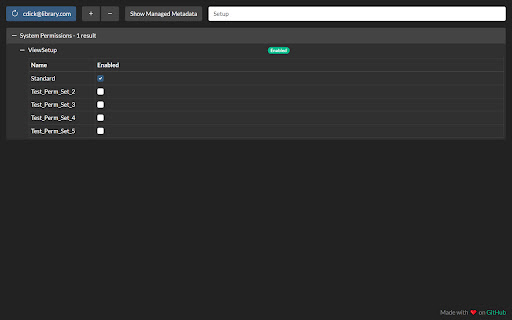
Salesforce User Permission Report allows you to see a report of all the permissions a user has and where they are set. DESCRIPTION This tool reads all of the user's Profile and Permission Set metadata, merges it, and presents it in a single view allowing busy admins and developers to quickly troubleshoot security and permission issues! FEATURES - Search - Dark mode - Intuitive tree view - Toggle managed metadata - Permission Set Group support - Consolidated view of user permissions - Compatible with Classic and Lightning Experience SECURITY/PRIVACY No data is stored by the extension in the browser (apart from in-memory during use) and no data is transferred to third-party (i.e. non-Salesforce) servers. All communication is secured using HTTPS/TLS, so in theory the unencrypted (plain text) data is only visible in your Salesforce org and in the extension when it is used. A network request is made to the SOAP API's getUserInfo resource which may contain the running user's PII as described here: https://developer.salesforce.com/docs/atlas.en-us.api.meta/api/sforce_api_calls_getuserinfo.htm The only other piece of PII is the target user's username which is queried and displayed on the refresh button.

Salesforce Show Api Name
Salesforce Show API Name The easiest way to view and copy API names in Salesforce 1. Shows API names for all fields and objects 2. Works in both Classic and Lightning 3. Copy single or multiple fields with one click On any Salesforce record page: 1. Click the extension icon to show/hide API names INSTALLATION Get it from the Chrome Web Store or install manually from: https://github.com/ChenZaichuang/salesforce_show_api_name

Salesforce Permission Comparator
Helps to compare the permission between any user, profile, permission set or permission set group. Salesforce Permission Comparator Chrome Extension is designed to streamline to compare the salesforce permissions.This extension offers a comprehensive suite to compare the permissions among the users, profiles, permission sets and permission set groups. With intuitive functionalities and seamless integration into your Salesforce workflow, this extension empowers developers to compare the Object level Permissions, User permissions, Setup entity permissions such as Apex class, Apps, Connected Apps, Visualforce Page etc. In this document, we'll provide a concise overview of the extension's key features. Here you can select any user, profile, permission set and permission set group of at most 3. For example you can also selected 1-user, 1-profile, 1-permission set. Means that any combination as per your use case. 1. Search:- Here you can search any user, profile, permission set and permission set group. 2. User Tab:- It contains the list of user with classified active and inactive users. 3. Profile Tab:- It contains the list of all standard and custom profiles. 4. PermissionSet Tab:- It contains the list of permission sets. 5. PermissionSetGroup Tab:- It contains the list of Permission Set Groups. Here you can see the permissions for selected user, profile, permission set and permission set group. The checked checkbox denoted as access and its vice-versa for unchecked checkbox. This section basically classified into below three sections. 1. Object Permission:- It shows you all standard and custom object permissions showing as Read, Edit, Created, Delete, ViewAllRecords and ModifyAllRecords. 2. User Permissions: Basically It shows all the user-level permission such as general user permission etc. 3. Setup Entity Permissions:- It shows you setup entity user permission. Basically we show you below four permissions which are- 1. Apex Class 2. Apps 3. Connected App 4. Visualforce Page. Note: To perform all the activity mentioned above, tool will be used to access the active session id from browser for respective salesforce org.

Salesforce DevTools
Salesforce DevTools is a powerful Salesforce developer chrome extension for doing the below things : ・Quickly generate Apex code / SOQL, exporting query results to Excel file. ・Quickly access to new record page, list page and object setting page of any object. ・Quickly search object fields and check its usage. ・Display fields API name on Salesforce object detail page. ・Exporting Objects Definition to Excel file. ・Exporting Objects Fields Definition to Excel file. ・Exporting Objects Page Layout Definition to Excel file. ・Exporting Objects List View Definition to Excel file. ・Exporting Flow Definition to Excel file. ・Salesforce data modal (ERDs) generator. ・All Check / Select on profile edit page and field permissions edit page. ・Mass edit, mass delete, mass clone custom fields (Only Classic). ++++++++++++++++++++++++++++ Release notes ++++++++++++++++++++++++++++ 2026/01/1 ・Added features of "Export Flow Definition". -------------------------------------- 2023/04/10 ・Added features of mass edit, mass delete, mass clone custom fields on Lightning. -------------------------------------- 2022/01/30 ・Added feature of searching object fields and show its usage. -------------------------------------- 2021/04/05 ・Added feature of exporting Object definition (FULL) and fixed bugs. -------------------------------------- 2020/09/07 ・Added feature of exporting List View definition and fixed bugs. -------------------------------------- 2020/06/07 ・Fixed Lighting active bug and Japanese language document exporting bug. -------------------------------------- 2020/04/12 ・Improved feature of Query Editor. -------------------------------------- 2020/01/06 ・Added feature of exporting object page layout. -------------------------------------- 2019/08/18 ・Added feature of Multi Check on field permission edit page. -------------------------------------- 2019/05/13 ・Added features of mass edit, mass delete, mass clone custom fields -------------------------------------- 2019/03/24 ・Fixed issues. -------------------------------------- 2018/12/17 ・Reactivated feature of Debug Log Viewer. ・Added feature of searching Debug Log. ・Fixed issues. -------------------------------------- 2018/11/12 ・Improved UX of feature exporting object API reference to Excel file. ・Added Query Editor feature to all Objects. ・Added feature of exporting query result to Excel file -------------------------------------- 2018/09/25 ・Added support for cloudforce orgs. -------------------------------------- 2018/09/03 Major Release ・ Added support for Lightning! ・ Improved UX of feature Object Reference Doc generating. ・ Improved UX of feature All Check. -------------------------------------- 2018/04/17 ・Improved ERDs UX, fixed bugs. -------------------------------------- 2017/10/11 ・Improved Debug Log Viewer UX. -------------------------------------- 2017/05/29 ・Added feature of query editor and csv data exporting. -------------------------------------- 2017/04/23 ・Added feature of ERDs generator. -------------------------------------- 2017/02/06 ・Fix bugs. -------------------------------------- 2017/01/30 ・Added features of SOQL generator and Apex debug log viewer. -------------------------------------- 2016/12/20 ・Fixed export excel bugs. -------------------------------------- 2016/12/06 ・Improved UI, fixed bugs. -------------------------------------- 2016/11/25 ・Added features that allows you to enable it on custom domain. -------------------------------------- 2016/08/21 Major Release ・Added features of exporting objects definition to excel file. -------------------------------------- 2016/05/18 ・ Added support for Visualforce Page. -------------------------------------- 2016/04/04 ・ Added the features of object searching and object quick access. -------------------------------------- 2016/03/31 ・ Added support for generating Apex Code include blank fields -------------------------------------- 2016/03/28 ・ Added support for RecordType ・ Added hint for Quick Access Menu Turned Off

EasyCrud(Salesforce)
Assign your CRUD and FLS for Salesforce in Bulk from Single Screen This Extension allows Salesforce Admins/Developers to assign CRUD and FLS Permissions from Single Screen. There are also features that provides ability to export permissions in CSV and also generate dashboard for the permissions.
