
gkeidfcddhciheedahgociippopggfdo

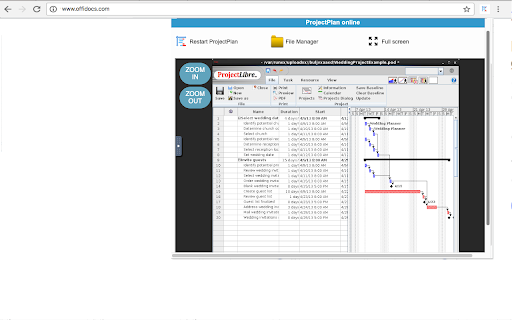

Create and edit project plans with ProjectLibre online Project Plans editor allows to create and edit project plans. It is a project management tool compatible with any other project management software, included Microsoft Project. It is an app for task management, work breakdown structure generation, resource allocation and tracki Its main features are: - Free Project Management software. - Compatibility with Microsoft Project 2010 (Imports MS Project files

Breeze Project Management
Quickly add tasks in Breeze from any web page. Increase productivity with Breeze project management tool. Breeze is a simple to use project management tool that your whole team will love using. Install the handy Breeze Google Chrome plugin and manage your tasks directly from your toolbar. It’s a great way to keep track of to-dos and tasks. You can also add articles, blog posts, or websites as tasks to read later — simply add the URLs as tasks. The Chrome plugin also lists your latest tasks so that you can see what you're working on. For more information check out https://www.breeze.pm .

Good Gantt
Gantt Chart for Trello ALL BOARDS IN ONE PLACE In the Gantt Chart view, you can see all the boards of your Trello account and the tasks for them. You can disable what you want also. AUTOMATIC CARDS MOVEMENT Customize the necessary columns in which your cards will be added or moved - In progress column (SOON) If the time tracker starts tracking the time by task, it automatically moves to that column. - Completed column (SOON) Tasks that are marked as completed in the Gantt Chart View will automaticly move in this column. GROUPING Group tasks and build any hierarchy. Keep track of the progress of the exercise throughout the group. EXPORT Export a Gantt chart in the following ways: - PDF - PNG - Excel - MS Project - iCal/Google Calendar/Outlook RENAMING Change the name of the task/Trello card directly right on the Gantt View. HOTKEYS Quick work with hotkeys. WORKLOAD PANEL Watch for the load of your team members and evenly distribute the load between them using the access panel. Choose between the number of tasks and the number of working hours per day. CONNECT YOUR TIME TRACKERS (SOON) Connect your favorite time trackers and track your employees' performance right on the gantt chart. Tracked time is displayed as a green bar on the task line. STATS (SOON) Brief statistics of the time spent by the performer in each card. INDICATORS (SOON) Indication of changes in the cards on the Gantt View. PROGRESS (SOON) Make subjective progress on the task in order to understand at what stage the readiness is.

Calligra online - office, graphics & email
Suite applications for word processing, spreadsheets, presentation and graphics with email client This extension allows to create and edit any office file using the Calligra online app integrated, which is a suite of applications for word processing, spreadsheets, presentation and graphics. This extension allows to handle the OpenDocument formats and it can also import other formats, including Microsoft Office formats. This Calligra suite office includes the following office components: * Words, which is a word processor application with desktop publishing features. It makes it easy to create rich documents with images, tables, and more. Open and save ODF, and open Microsoft Office Word files .doc and .docx files. * Sheets, which is a fully-featured spreadsheet application. It is a calculation and spreadsheet tool with a comprehensive formula list, default templates, and use shapes for notes or create flowcharts and mindmaps. Open and save ODS, and open Microsoft Office Excel files .xls and .xlsx files. * Stage, which is a powerful and easy to use presentation application. It provides tools to make creating slides using images, videos, animation and other special effects easy. It is extensible through a plugin system. Open and save ODP, and open Microsoft Office Powerpoint files .ppt and .pptx files. * Krita, which is a creative sketching and painting application based on Calligra technology. It is valid for creating concept art, comics, textures for rendering and matte paintings. Krita supports many colourspaces like RGB and CMYK at 8 and 16 bits integer channels, as well as 16 and 32 bits floating point channels. Please refer to the video in order to know how to use the extension. IMPORTANT: This extension scans the URLs browsed in order to detect Calligra compliant files. The Calligra compliant files detected appear in a list located in the extension popup that are retrieved from our servers. The scanning is performed from our servers so your URL are reported to our system. No personal data is collected. This scan can be disabled with a checkbox that appears in the extension popup. If you disable this scanning, this functionality is not available so then the extension functionality is very limited.

Yanado - Task Management inside Gmail
Yanado turns your Gmail into powerful collaboration tool. Create tasks and turn emails into tasks within seconds. Yanado lets you create and manage your tasks and projects without leaving your Gmail. CREATE TASKS FROM EMAILS - Create tasks from emails with a single click, add them to projects and set reminders. - Easily find email related to the tasks just by clicking on the task in the list. TASK MANAGEMENT - Create tasks and TO-DO lists in seconds within your Gmail. - Use tags to improve search and organization of your tasks. - Create custom statuses to support your own processes. SHARE TASKS - Delegate tasks and discuss details with your team members. PROJECT MANAGEMENT - Manage project progress and track who is doing what in your team. DUE DATES & REMINDERS - Never miss a deadline again by setting due date and reminders on your tasks (synced with Google Calendar). REAL TIME NOTIFICATIONS - Receive project updates right inside your Gmail and reduce the number of emails you are getting. VISUALISE YOUR WORK -Choose between a simple list or a kanban-view with cards to easily visualize your work. GREAT FOR - If you spend majority of your time within your Gmail and you have lots of tasks to manage, Yanado is perfect tool for you to help you get organized better without leaving your Gmail. For details about pricing, check the pricing page on our website.
